
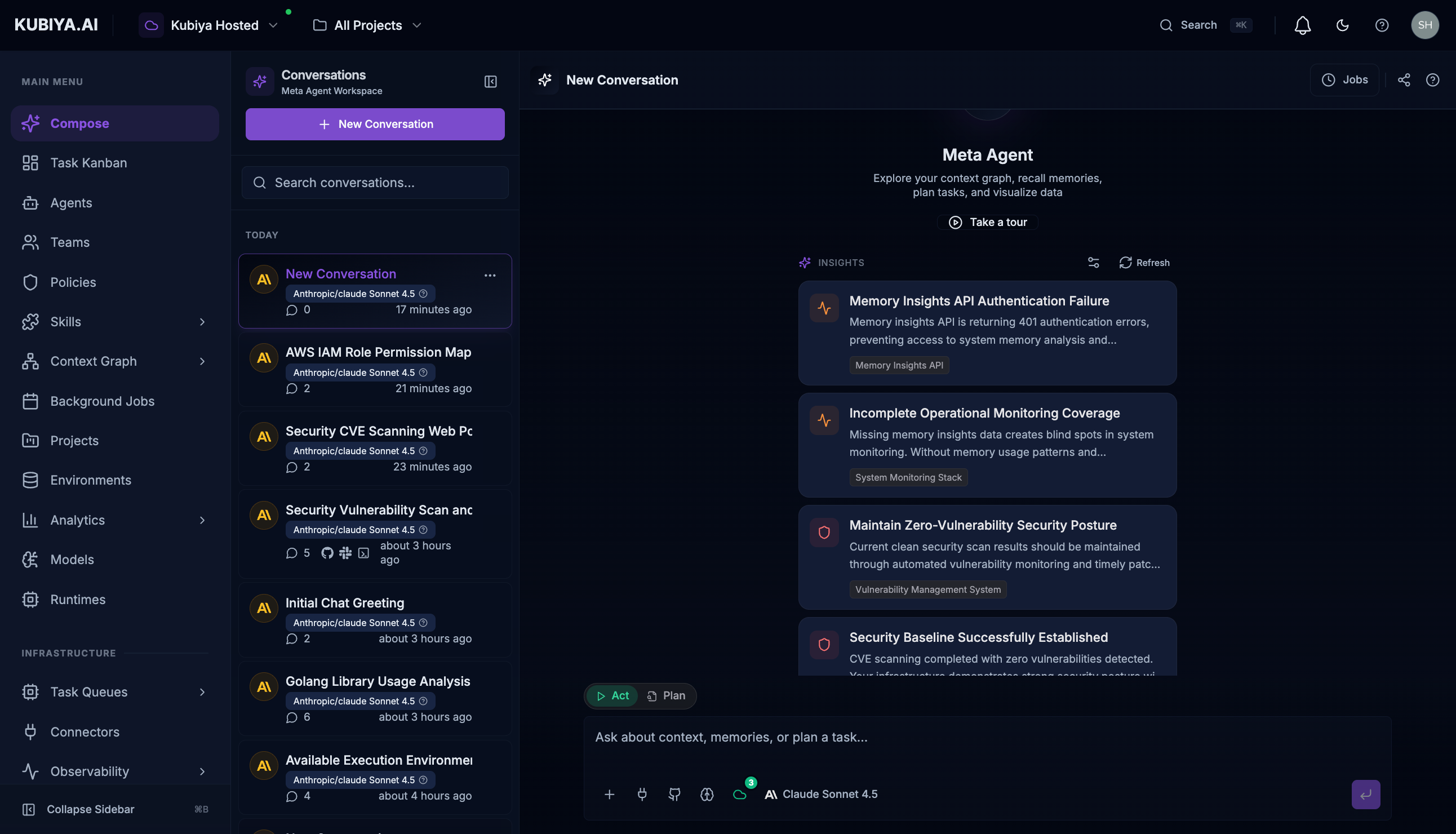
Meta Agent - Unified Orchestration Interface The Meta Agent is Kubiya’s unified orchestration interface—a coordination layer that connects any user to the full Kubiya platform through natural language. Unlike individual agents that specialize in specific domains, the Meta Agent acts as an intelligent router and coordinator that understands your intent and orchestrates the appropriate resources, agents, teams, and workflows to accomplish your goals. Built on the Model Context Protocol (MCP), the Meta Agent has direct access to all Kubiya Platform APIs, enabling it to manage agents, teams, environments, projects, executions, cognitive memory, and the context graph—all from a single conversational interface.

Why Meta Agent?

Kubiya provides powerful primitives: agents, teams, environments, skills, policies, and cognitive memory. But navigating these resources typically requires understanding the platform deeply. The Meta Agent eliminates this barrier:
User TypeWithout Meta AgentWith Meta Agent
Business UsersNeed to learn platform UI, create agents, configure environmentsAsk questions in natural language, get results
DevelopersWrite API calls, configure MCP servers, manage agent lifecyclesDescribe what they need, Meta Agent orchestrates
Data EngineersNavigate context graph queries, manage datasets manuallyQuery infrastructure relationships conversationally
Platform EngineersManually coordinate agents, teams, and executionsLet Meta Agent route tasks to the right resources

Architecture: MCP-Powered Orchestration

The Meta Agent connects to the Kubiya Control Plane through MCP, giving it access to all platform capabilities: Meta Agent Architecture - MCP-Powered Orchestration

MCP Tools Available

The Meta Agent has access to all Kubiya MCP tools:
CategoryCapabilities
AgentsList, create, update, delete, execute agents
TeamsManage teams, assign agents, execute team workflows
EnvironmentsCreate and configure execution environments
ProjectsOrganize work by objective or domain
ExecutionsMonitor, stream, and control running tasks
Context GraphQuery infrastructure relationships and dependencies
Cognitive MemoryStore and recall organizational knowledge
Background JobsSchedule and manage recurring automation
PoliciesView and understand OPA guardrails
Worker QueuesMonitor execution capacity

Key Capabilities

1. Intelligent Task Routing

The Meta Agent understands your intent and routes requests to the appropriate resources:
"Deploy the authentication service to staging"
Meta Agent:
  1. Identifies the DevOps team/agent best suited for deployments
  2. Checks environment availability and worker capacity
  3. Creates and executes the task with proper context
  4. Streams results back to you

2. Context Graph Exploration

Query your infrastructure without writing Cypher:
"What services depend on the user-auth database?"
Meta Agent Exploring Context Graph The Meta Agent:
  • Scans graph nodes for relevant entities
  • Traces relationships and dependencies
  • Returns structured, actionable results

3. Cognitive Memory Access

Tap into organizational knowledge across all agents and teams:
"What did we learn from the last production outage?"
Meta Agent Searching Cognitive Memory The Meta Agent queries the cognitive memory system, which aggregates learnings from all agents operating in your environments.

4. Cross-Resource Coordination

Orchestrate complex operations spanning multiple platform resources:
"Create a new project for Q1 cost optimization, assign the FinOps team,
and schedule weekly cloud spend analysis"
This single request triggers:
  • Project creation with defined goals
  • Team assignment with proper permissions
  • Background job scheduling with recurring execution

Getting Started

Opening Meta Agent

Access the Meta Agent through:
  • Keyboard shortcut: Press Cmd+J (Mac) or Ctrl+J (Windows/Linux)
  • FAB button: Click the floating action button in the bottom-right corner
Meta Agent Introduction

Personalizing Your Experience

On first use, select the categories most relevant to your role:
  • Security - CVEs, vulnerabilities, compliance monitoring
  • Infrastructure - Kubernetes, databases, service health
  • Cost Optimization - Cloud spend analysis, unused resources
  • CI/CD - Pipelines, deployments, releases
  • Memory & Insights - Historical patterns, organizational knowledge
  • Tasks & Jobs - Execution planning, scheduled automation
The Meta Agent uses these preferences to surface AI-powered suggestions tailored to your needs.

Usage Patterns by Role

For Business Users

Ask questions without technical knowledge:
"How many deployments happened this week?"
"What's the status of our cloud cost reduction project?"
"Show me any security issues that need attention"

For Developers

Interact with platform resources naturally:
"List all agents that have shell access"
"Execute the DevOps agent to check our Kubernetes cluster health"
"Create an agent for database migrations with PostgreSQL skills"

For Data Engineers

Explore infrastructure relationships:
"Map all data pipelines connected to the analytics warehouse"
"What resources are in our AWS us-east-1 region?"
"Show me the dependency tree for our ETL jobs"

For Platform Engineers

Coordinate and manage platform resources:
"What workers are connected to the production queue?"
"Show me all failed executions from the last 24 hours"
"Which teams have access to the production environment?"

Real Examples

Listing Platform Agents

Ask the Meta Agent to show all available agents and their capabilities:
"List all agents available in the platform and show their capabilities"
Meta Agent Listing All Agents The response includes agent names, AI models they use, descriptions of their capabilities, and available teams.

Checking Worker Queue Capacity

Query environment status and worker availability:
"Show me all available environments and their connected worker queues with capacity status"
Meta Agent Showing Worker Queues The Meta Agent shows queue IDs, worker availability, and suggests next actions like creating tasks or monitoring queues.

Understanding Responses

Meta Agent Complete Response Meta Agent responses include:
  1. Reasoning Process - Transparent display of how the request was interpreted
  2. Tool Calls - Visual indicators showing which MCP tools were invoked
  3. Visual/JSON Toggle - Switch between formatted and raw data views
  4. Structured Results - Organized output with clear sections
  5. Recommendations - Actionable next steps based on findings
  6. Follow-up Options - Suggested queries to explore further

AI-Powered Suggestions

Meta Agent AI Suggestions The Meta Agent proactively analyzes your infrastructure and surfaces intelligent suggestions:
  • Security Alerts - Detected vulnerabilities requiring attention
  • Health Issues - Unhealthy resources or degraded services
  • Optimization Opportunities - Cost savings or performance improvements
  • Stale Data Warnings - Datasets needing refresh
  • Pattern Insights - Trends from cognitive memory analysis
Suggestions are generated by analyzing:
  • Context Graph for resource state and relationships
  • Cognitive Memory for historical patterns and learnings
  • Dataset status for data freshness

Session Controls

  • Stop Button - Halt streaming responses or cancel long-running operations
  • Clear Chat - Reset the conversation for a fresh start
  • Expand/Collapse - Toggle panel size for focused work
  • History - Access previous conversations and continue from where you left off

Best Practices

  1. Be Specific - Include context about what you’re looking for
  2. Leverage Natural Language - Write as you would explain to a colleague
  3. Follow Up - Ask clarifying questions based on responses
  4. Use Suggestions - Act on AI-powered insights for proactive management
  5. Review Tool Calls - Check which platform resources were accessed
  6. Trust the Orchestration - Let Meta Agent route to the right agents and teams

Relationship to Other Concepts

ConceptRelationship to Meta Agent
AgentsMeta Agent can list, create, execute, and manage individual agents
TeamsMeta Agent coordinates team-based workflows and assignments
Context GraphMeta Agent queries graph relationships through natural language
Cognitive MemoryMeta Agent stores/recalls organizational knowledge
Task KanbanMeta Agent can create tasks that appear on the Kanban
Background JobsMeta Agent can schedule and manage recurring automation
MCP ServerMeta Agent is powered by the same MCP protocol and tools

Keyboard Shortcuts

ShortcutAction
Cmd/Ctrl + JOpen/close Meta Agent
EnterSend message
Shift + EnterNew line in message
EscapeClose Meta Agent panel

Next Steps

  • Agents - Learn about individual AI agents the Meta Agent orchestrates
  • Teams - Understand team coordination and shared context
  • Context Graph - Explore the knowledge layer Meta Agent queries
  • Cognitive Memory - Understand organizational knowledge storage
  • MCP Server - Learn about the protocol powering Meta Agent