

- Distributed compute workloads with workers that scale execution
- Self-hosted capability for security and compliance requirements
- Framework agnosticism through multiple runtimes—no vendor lock-in
- MicroVM technology that lets agents function like real engineers—they run terminal commands and use unified tooling without hard MCP wiring or protocol adjustments
- Task Kanban abstraction so you can track agent value like JIRA tasks—no more wondering if agents delivered real value
The Challenge
The AI landscape moves fast—new models launch monthly, new frameworks emerge constantly, and organizations rebuild everything when requirements change. Teams spend more time managing AI infrastructure than delivering business value. What’s needed: A stable abstraction layer that handles model providers, frameworks, and orchestration—so your team focuses on outcomes, not plumbing.How Kubiya Solves This
Kubiya provides a unified layer that abstracts complexity across four key areas:Multi-Model Orchestration
- Works with 100+ LLM providers (OpenAI, Anthropic, Google, Azure) through LiteLLM
- Switch models by changing configuration, not code
- Automatic failover and cost optimization
Framework-Agnostic Execution
- Supports multiple runtimes (Agno, Claude Code, custom)
- MCP protocol for standardized tool integration
- Provider-agnostic storage (AWS, GCP, Azure)
Organizational Coordination
- Cognitive memory enables agents to learn from each other
- Teams work together with shared knowledge and context
- Complete audit trails of all decisions and actions
Enterprise Governance
- Policy-driven safety with OPA-based guardrails
- SOC 2 Type II, GDPR, CCPA, HIPAA-ready
- Multi-tenant isolation and zero-trust enforcement
Who Benefits
For Engineering Leadership
- One platform replaces point solutions for orchestration and governance
- Ship AI features in days, not quarters
- Track cost, productivity gains, and cycle time reductions
- Swap models and frameworks without rewriting applications
For Security & Compliance
- Zero-trust enforcement with pre-approved tool access
- Complete audit trails and policy evaluation logs
- SOC 2 Type II, GDPR, CCPA certifications
- Multi-tenant isolation at the database level
For Platform & DevOps
- Works with AWS, GCP, Azure, or on-premises infrastructure
- Flexible deployment: SaaS, self-hosted, or air-gapped
- REST API, Terraform provider, CLI, and SDK
- Unified observability across all AI workloads
For Developers
- Use any LLM provider without vendor lock-in
- MCP protocol for integrating external services
- Agents learn automatically—no vector DB setup
- Replay executions step-by-step for debugging
The Platform at a Glance
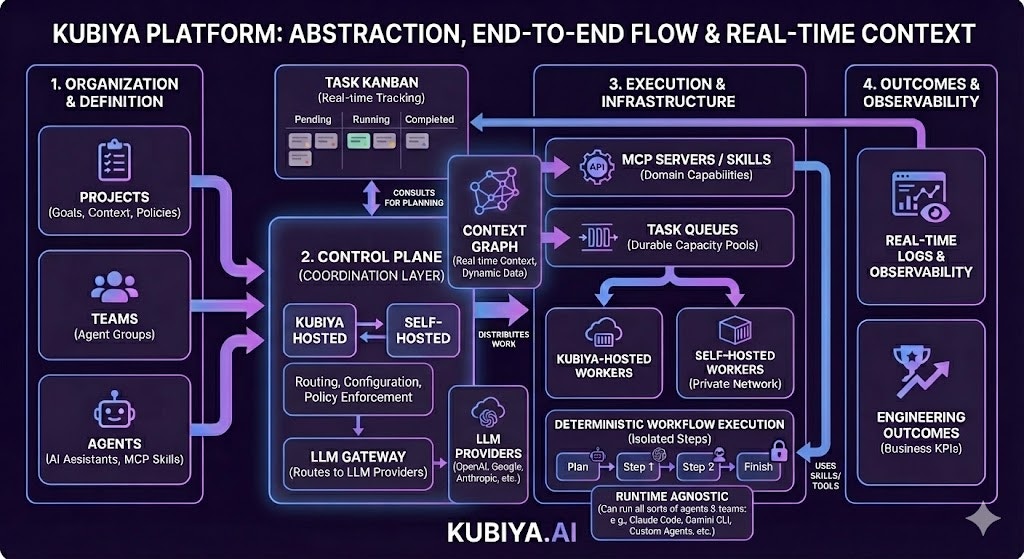
Kubiya’s UI mirrors how your work is organized. You can begin with our default setup and add and adjust as you grow.- Control Plane The control plane is the coordination layer for everything that runs in Kubiya. It owns routing, shared configuration, and policy enforcement. Start on Kubiya Hosted to get running immediately; add a Self-Hosted control plane later when you need private networking or custom policies.
- Agents Configurable AI assistants that plan and run tasks. Most users interact through the Meta Agent for general orchestration. Create custom agents only when you need specialized, reusable capabilities for specific domains.
- Teams Group multiple agents to work together on complex or ongoing operations. Teams are an advanced feature for users who need multi-agent coordination beyond what the Meta Agent provides.
- Projects Projects provide a shared scope for ongoing goals, such as reducing cloud costs or improving deployment reliability. Within a project, you define the goal, assign the agents and teams that will work toward it, and configure shared knowledge, resources, and policies.
- Environments Manage environments for routing workloads across different deployment contexts. An environment specifies where Kubiya will execute work and the configuration inherited by the agents and teams that run there.
- Task Queues Manage durable task queues for distributed agent execution. A task queue distributes work to connected workers for execution. Queues are attached to a Control Plane and can be backed by hosted capacity or by self-hosted workers that you run in your own network.
- Task Kanban The Task Kanban is a real-time board where you can create new tasks, track their progress, and view live updates as they move through different stages of execution. Each task progresses through states: Pending, Running, Waiting for Input, Completed, and Failed.
How Kubiya Works
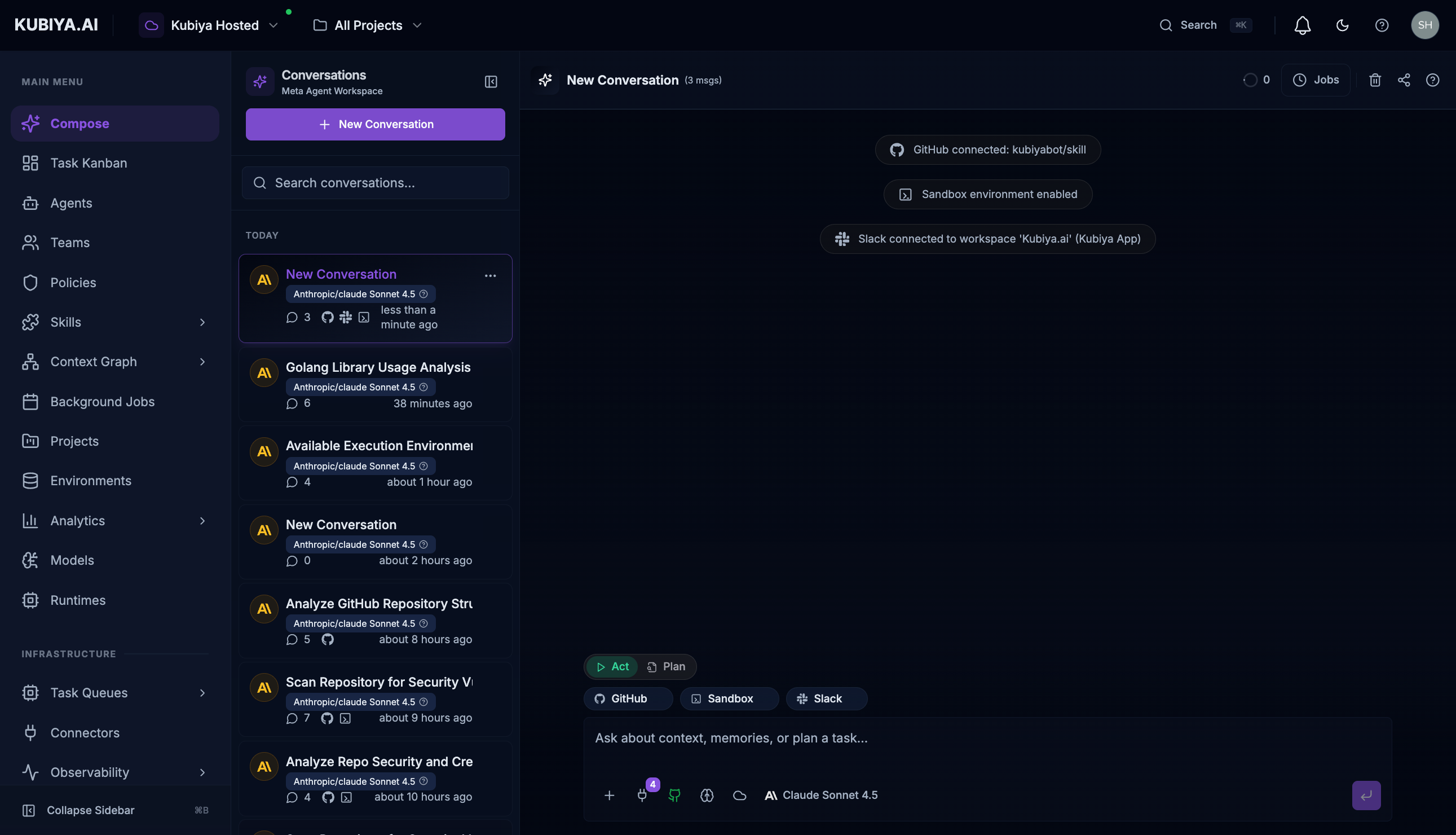
1. Sign In and Open Meta Agent
Sign into Kubiya at compose.kubiya.ai. PressCmd+J to open the Meta Agent—your primary interface for exploration and orchestration. The Meta Agent connects you to all Kubiya capabilities through natural language.
2. Set Up Connectors (Enable Actions)
Connect external services (AWS, GitHub, Jira, Slack, Kubernetes) so agents can act on your infrastructure. Connectors provide the credentials needed for authenticated execution.3. Configure Ingestion Sources (Populate Data)
Add data sources to populate the Context Graph. Ingest resources from cloud providers, identity systems, DevOps tools, or upload custom CSV/JSON files. This enables intelligent exploration and querying.4. Explore and Query via Meta Agent
Ask the Meta Agent about your infrastructure in natural language:- “What services depend on the auth database?”
- “Show me all EC2 instances in production”
- “Who has access to the customer-data S3 bucket?”
5. Execute Tasks
Use the Meta Agent or Task Kanban to execute tasks. Work is routed to Task Queues where workers execute in isolated containers with streaming logs and full audit trails. Select specific queues to route work to remote workers in your infrastructure.6. Advanced: Create Specialized Agents & Teams (Optional)
When you need domain-specific automation beyond the Meta Agent, create custom agents with specialized capabilities. Group agents into teams for coordinated operations across multiple domains.Security and Governance
- Isolation: Every task runs in a secure, isolated execution environment
- Least privilege: Credentials and access are scoped per task within the assigned environment
- Policy controls: Apply guardrails at the project or environment level
- Auditability: Inputs, outputs, and logs are captured for full traceability
- Compliance: SOC 2 Type II, GDPR, CCPA, with HIPAA support for self-hosted deployments