

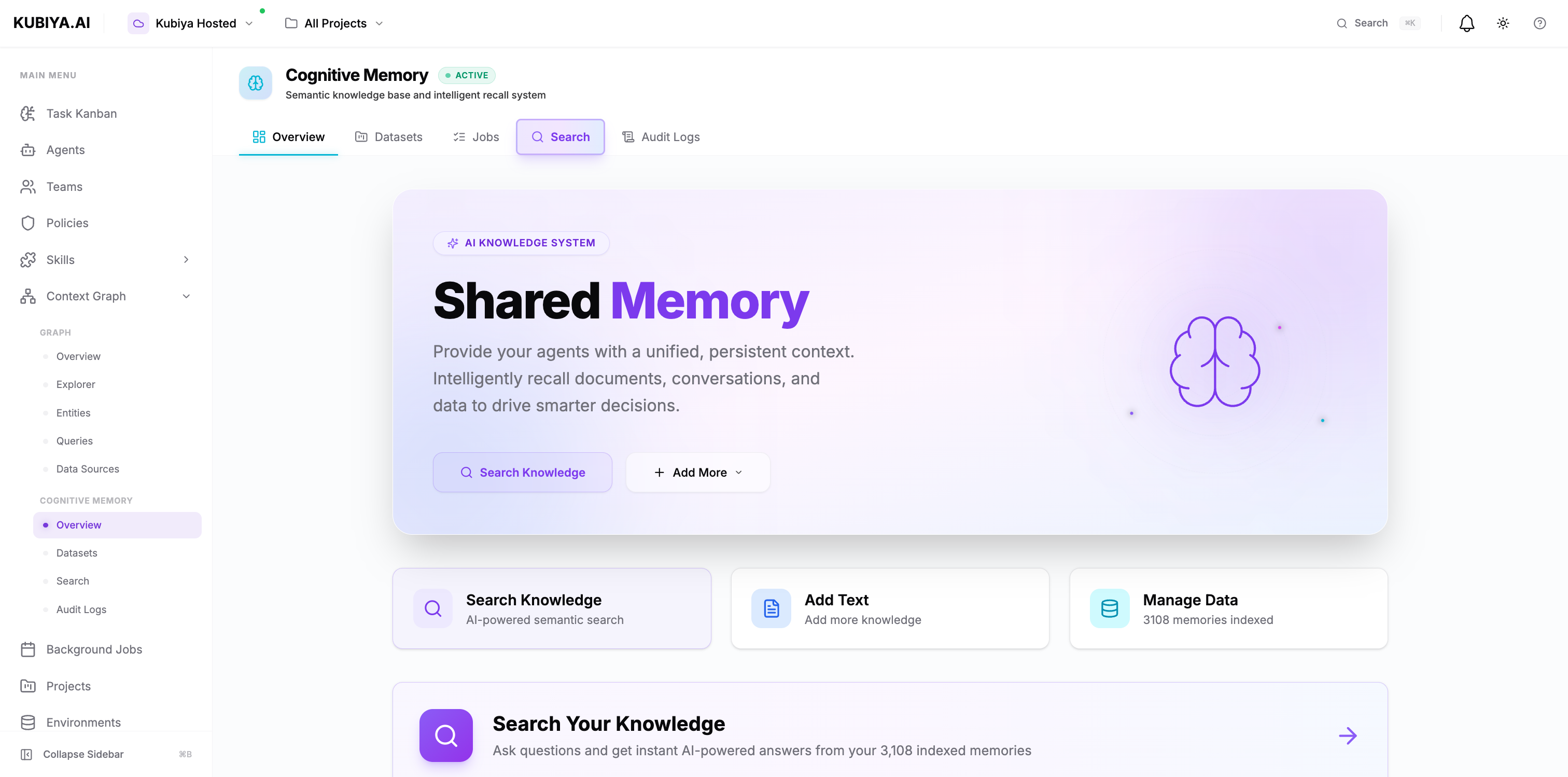
What is Cognitive Memory?
Cognitive Memory is a semantic knowledge base that stores and retrieves information using AI-powered embeddings. Unlike traditional databases that rely on exact keyword matches, Cognitive Memory understands the meaning and context of your data, enabling natural language search and intelligent recall. Key Capabilities:- Semantic Search - Find information using natural language queries, not just keywords
- Temporal Memory - Track and recall information across time and sessions
- Knowledge Extraction - Automatically identify entities and relationships from unstructured data
- Cognitive Insights - Generate patterns, connections, and insights from stored knowledge
Why Cognitive Memory Matters
Traditional AI agents are stateless—they forget everything after each conversation. Cognitive Memory transforms your agents into learning systems that:- Remember across sessions - Agents recall past interactions, decisions, and solutions
- Share team knowledge - What one agent learns, all agents in the same environment can access
- Make context-aware decisions - Agents use historical context to provide more accurate, relevant responses
- Reduce redundant work - Agents don’t re-solve problems they’ve already handled
- Build organizational knowledge - Every agent interaction adds to your team’s collective intelligence
How It Works
Cognitive Memory uses a multi-layered architecture to store and retrieve knowledge. The diagram below illustrates the complete workflow from data ingestion through the knowledge graph to AI-powered retrieval: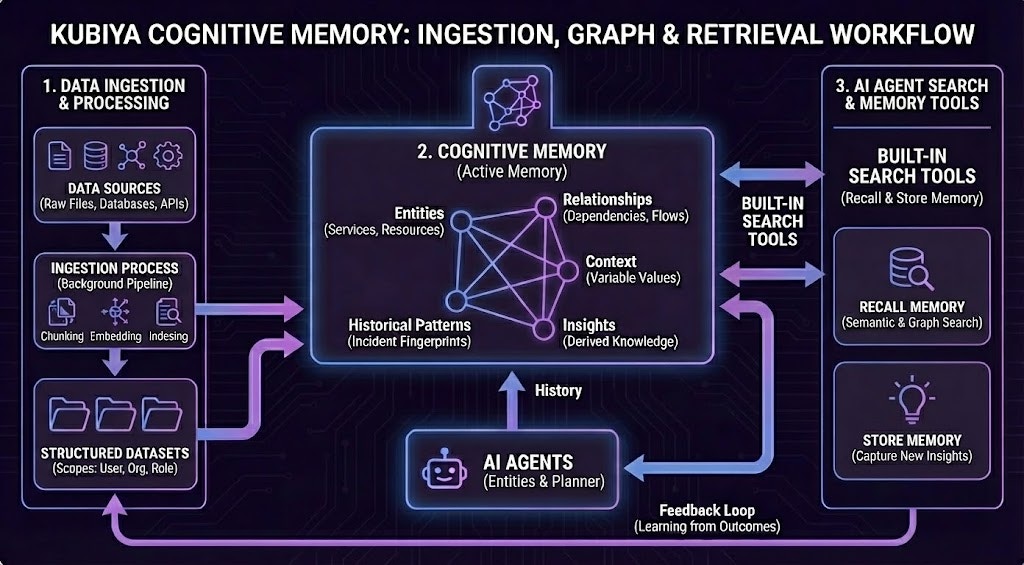
- Data Ingestion & Processing: Raw data from files, databases, and APIs is processed through chunking, embedding, and indexing pipelines, then organized into structured datasets.
-
Cognitive Memory (Knowledge Graph): The active memory system stores:
- Entities (Services, Resources)
- Relationships (Dependencies, Flows)
- Context (Variable Values)
- Historical Patterns (Incident Fingerprints)
- Insights (Derived Knowledge)
- AI Agent Search & Memory Tools: Agents use built-in search tools for recall and semantic search, along with a store memory function to capture new insights, creating a continuous feedback loop for learning.
Technical Stack:
- Storage Layer: PostgreSQL + pgvector for embeddings, Neo4j for knowledge graph
- Embedding Engine: LiteLLM converts text into semantic vectors
- Knowledge Graph: Background processing engine extracts entities and relationships
- Search Layer: Vector similarity search + graph traversal for intelligent recall
Built-in Agent Capabilities
Every AI entity (agents, teams) automatically inherits cognitive memory capabilities. No configuration required.Available Operations
All agents can:store_memory(content, metadata)- Store context with custom metadatarecall_memory(query, limit)- Semantic search across stored memorieslist_memories()- List all stored memories for the current contextget_dataset_info()- Get information about the current dataset
Environment-Based Datasets
By default, agents automatically use a dataset named after their execution environment:- Automatic isolation - Production agents can’t access staging memories
- Shared team context - All agents in the same environment share knowledge
- Zero configuration - Works out of the box, no setup needed
- Environment-specific learning - Each environment builds its own knowledge base
Agent Integration
Agents automatically inherit cognitive memory capabilities, enabling them to store context, recall information, and coordinate with other agents. The memory operations happen at three key stages:- Pre-Execution - Agents recall relevant context before executing tasks
- During Execution - Agents coordinate in real-time by checking shared memory
- Post-Execution - Agents store learnings for future use
Learn more about how agents use cognitive memory in the Agent Integration guide.
Dataset Organization
Cognitive Memory organizes knowledge into datasets—collections of related memories with shared access controls.Dataset Scopes
Datasets support three levels of access control:
Default for agents: Organization-level scope, enabling team-wide knowledge sharing.
Learn more about dataset organization and management in Datasets.
Multi-Tenant Security
Cognitive Memory is built with enterprise-grade multi-tenancy:- Organization isolation - Each organization’s data is completely separate
- User-level filtering - Individual user memories can be kept private
- RBAC support - Role-based access control for dataset permissions
- Audit trails - Complete logging of all memory operations with agent attribution
- Data encryption - At rest and in transit
Integration with Context Graph
Cognitive Memory is tightly integrated with Kubiya’s Context Graph:- Unified knowledge layer - Memories appear as nodes in the graph
- Relationship tracking - Connections between memories, entities, and resources
- Cross-system queries - Query across cognitive memories and integration data
- Visual exploration - See memory relationships in the Context Graph explorer
Getting Started
For End Users
Access cognitive memory through the Compose UI:- Search - Use natural language to find information across all memories
- Add Knowledge - Store important context, decisions, and procedures
- Manage Datasets - Organize knowledge into logical collections
- View Audit Logs - Track who stored what and when
For Developers
Use the CLI to manage cognitive memory:Agent Integration
How agents use cognitive memory to learn and coordinate
Datasets
Learn about dataset organization and scoping
Semantic Search
Understand how semantic search works
CLI Reference
Complete CLI command reference
Production-Ready
Cognitive Memory is battle-tested and production-ready:- 93% test coverage - Comprehensive automated testing
- High availability - Distributed architecture with failover
- Performance at scale - Handles millions of memories with low latency
- Monitoring & observability - Built-in metrics and health checks
- Backup & recovery - Automated backups and point-in-time recovery
Next Steps
Now that you understand what Cognitive Memory is, explore how to use it:- Agent Integration - How agents use cognitive memory to learn and coordinate
- Datasets - Organize and manage your knowledge
- Semantic Search - Find information using natural language
- CLI Commands - Command-line integration