

Shared Memory in Action: Incident Response
The following diagram illustrates how multiple agents collaborate through shared cognitive memory during an incident response scenario: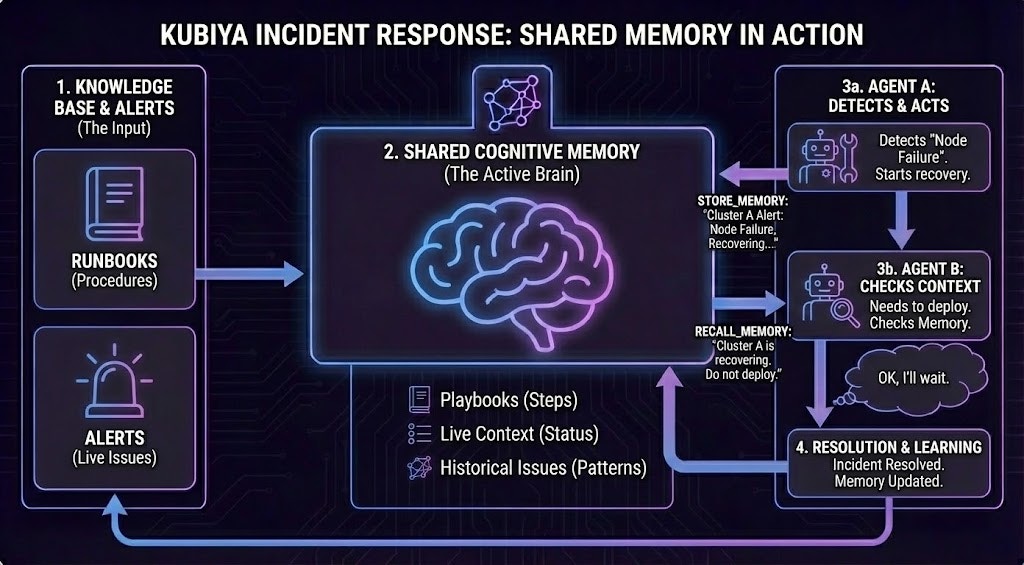
- Knowledge Base & Alerts (Input): Runbooks (procedures) and alerts (live issues) are ingested into the shared cognitive memory.
-
Shared Cognitive Memory (Active Brain): The central memory stores:
- Playbooks - Step-by-step procedures
- Live Context - Current status of systems
- Historical Issues - Patterns from past incidents
-
Multi-Agent Collaboration:
- Agent A detects a “Node Failure” and starts recovery, storing the incident context: “Cluster A Alert: Node Failure, Recovering…”
- Agent B needs to deploy but first recalls memory, discovering: “Cluster A is recovering. Do not deploy.” Agent B intelligently waits based on shared context.
- Resolution & Learning: Once resolved, the memory is updated with the resolution, creating a feedback loop for future incidents.
Automatic Memory Integration
Every agent in Kubiya automatically has cognitive memory capabilities built-in. No configuration or setup is required. When an agent is created, it inherits:- Store capabilities - Ability to save context, learnings, and decisions
- Recall capabilities - Semantic search across all accessible memories
- Shared access - Automatic connection to environment-scoped datasets
- Memory awareness - Contextual understanding of when to store vs. recall
Agents automatically use datasets scoped to their execution environment (e.g., production agents use the “production” dataset), ensuring proper isolation and relevance.
Memory Operations in Agent Workflows
Agents use cognitive memory throughout their execution lifecycle in three distinct phases:1. Pre-Execution: Context Gathering
Before executing a task, agents recall relevant memories to gather context and make informed decisions. Use cases:- Retrieving runbooks before executing procedures
- Checking for known issues before deployments
- Finding previous solutions to similar problems
- Loading environment-specific configurations
2. During Execution: Real-time Coordination
Agents store and check memory during execution to coordinate with other agents and avoid conflicts. Use cases:- Preventing conflicting operations (deployments during maintenance)
- Sharing live status updates between agents
- Coordinating distributed workflows
- Avoiding race conditions
3. Post-Execution: Learning & Knowledge Capture
After completing tasks, agents store learnings and outcomes for future reference. Use cases:- Documenting incident resolutions
- Capturing troubleshooting steps that worked
- Recording configuration changes
- Building institutional knowledge
Environment-Based Knowledge Isolation
Agents automatically use environment-scoped datasets:- Production agents → Production dataset
- Staging agents → Staging dataset
- Dev agents → Dev dataset
- Safety - Production agents can’t accidentally use dev/staging context
- Relevance - Agents only access environment-appropriate knowledge
- Team collaboration - All agents in the same environment share learnings
- Clear boundaries - Each environment builds its own knowledge base
Cross-Agent Knowledge Sharing
Multiple agents in the same environment automatically share knowledge through cognitive memory:Example Scenario: Your organization has three specialized agents:
- Deployment Agent - Handles application deployments
- Monitoring Agent - Watches for issues and alerts
- Remediation Agent - Fixes incidents automatically
Memory-Enhanced Agent Capabilities
Cognitive memory enables advanced agent behaviors:Pattern Recognition
Agents learn from historical data to identify patterns:- Recurring incidents with similar signatures
- Common configuration errors
- Seasonal usage patterns
- Deployment failure correlations
Contextual Decision Making
Agents make better decisions by recalling relevant context:- “Should I scale up?” → Recalls past scaling events and outcomes
- “Is this normal?” → Compares against historical baselines
- “What worked last time?” → Retrieves successful resolution patterns
Continuous Learning
Every agent interaction improves the collective knowledge:- Agent encounters new scenario
- Agent stores context and solution
- Knowledge becomes available in memory
- Other agents recall and learn from it
- Organization knowledge grows continuously
Memory Access Patterns
Agents use different search strategies based on their needs:Agent Memory Best Practices
To maximize the value of cognitive memory for your agents:1. Store Rich Context
Good: Detailed, searchable context with metrics and outcomes2. Use Consistent Metadata
Establish organization-wide metadata schemas for better organization and recall:3. Tag for Discoverability
Use descriptive, consistent tags that agents can easily search:- Technology:
kubernetes,postgresql,redis - Issue type:
pod-restart,memory-leak,connection-timeout - Environment:
production,staging,dev - Team:
devops,backend,platform
4. Clean Up Stale Memories
Periodically remove outdated or no-longer-relevant memories to maintain quality. Use the CLI or SDK to purge datasets or delete specific memories that are no longer applicable.Real-World Examples
Intelligent Deployment
Scenario: Deploy version 2.0 to production The deployment agent checks memory before acting:- Recalls ongoing incidents → finds database maintenance in progress → waits
- Recalls v2.0 deployment history → finds previous migration issues → adds extra validation
- Executes deployment with safeguards
- Stores successful deployment pattern for future use
Self-Healing Infrastructure
Scenario: Pod memory alert triggered Cross-agent collaboration through shared memory:- Monitoring agent detects high memory on pod-xyz → stores alert in memory
- Remediation agent recalls similar past incidents → finds previous solution (restart + increase limits)
- Agent applies fix (2GB → 4GB) and stores the resolution
- Future incidents automatically use this learned pattern
Knowledge Propagation
Scenario: Cross-team learning- Day 1: DevOps engineer works with Agent A to fix API latency → Agent A stores: “Fixed with Redis cache”
- Day 5: Backend engineer asks Agent B about API performance → Agent B recalls Agent A’s solution → suggests Redis caching
- Result: One team’s learning becomes organizational knowledge accessible to all agents
Available Agent Memory Operations
All agents automatically have access to these memory operations:For detailed usage and code examples, see the CLI Reference and SDK Documentation.
Next Steps
Overview
Learn about cognitive memory architecture
Datasets
Organize and manage datasets
Semantic Search
Understand semantic search capabilities
CLI Reference
Complete CLI command reference