Kubiya Workers are Temporal-based execution engines that process AI agent workflows with enterprise-grade reliability and scalability.
Run on Any Compute Environment : Workers can run on nearly any infrastructure - your local machine (Mac, Linux, Windows), Kubernetes clusters, Docker containers, VMs (EC2, GCE, Azure), or bare metal servers. This flexibility makes them incredibly powerful and easy to deploy wherever your infrastructure lives!
This guide covers worker deployment, configuration, and management.
What is a Worker?
Workers are distributed execution engines that:
Poll Task Queues : Listen for workflow and activity tasks from Temporal
Execute Agent Workflows : Run AI agents with tools and integrations
Report Health : Send heartbeats to the Control Plane
Stream Events : Provide real-time execution updates
Handle Failures : Automatically retry failed tasks with exponential backoff
Quick Start
Start Your First Worker
# 1. Configure API Key
export KUBIYA_API_KEY = "your-api-key"
# 2. Start a local worker
kubiya worker start --queue-id=my-queue --type=local
# 3. Monitor logs (in another terminal)
tail -f ~/.kubiya/workers/my-queue/logs/worker.log
Deployment Modes
Local Mode Development and testing with Python virtual environment
Daemon Mode Production deployment running as background process
Docker Mode Containerized deployment with isolation
Kubernetes Mode Scalable multi-replica deployment with auto-scaling
Ephemeral vs Persistent Workers
Kubiya supports two worker lifecycle models to match different use cases:
Ephemeral Workers
Perfect for CI/CD pipelines and single-task automation
Ephemeral workers are automatically provisioned to execute a single task and then terminate. They’re ideal for:
CI/CD Pipelines Automatically execute deployment tasks in GitHub Actions, GitLab CI, Jenkins without managing infrastructure
Automation Scripts Run one-off automation tasks triggered by webhooks, cron jobs, or API calls
Development & Testing Test agent workflows locally without setting up persistent infrastructure
Cost Optimization Pay only for actual execution time - no idle workers consuming resources
How Ephemeral Workers Work:
# Option 1: On-Demand Workers (Kubiya Cloud)
kubiya exec "Deploy my app to production"
# Control Plane provisions worker → Executes task → Auto-cleanup
# Option 2: Local Ephemeral Workers
kubiya exec --local "Run integration tests" --yes
# CLI creates temp queue → Starts local worker → Executes → Cleanup
Key Benefits:
✅ Zero Infrastructure Management : No need to pre-provision or maintain workers
✅ Automatic Cleanup : Workers and queues are automatically removed after execution
✅ Perfect for CI/CD : Integrate directly into pipelines without worker setup
✅ Cost-Effective : Only runs when needed, no idle resource costs
✅ Isolated Execution : Each task gets a fresh, clean worker environment
Use Ephemeral Workers When:
Running tasks in CI/CD pipelines
Executing occasional automation workflows
Testing and development
One-off operations that don’t require persistent infrastructure
Persistent Workers
Best for high-frequency tasks and production workloads
Persistent workers run continuously, polling for tasks 24/7. They’re ideal for:
High-Frequency Operations : Responding to frequent execution requests with low latency
Real-Time Monitoring : Continuously processing alerts and monitoring tasks
Custom Infrastructure : Running on your specific infrastructure with custom network access
Stateful Workflows : Maintaining connection pools, caches, and long-running processes
Deployment Options:
# Local development
kubiya worker start --queue my-queue --type local
# Production daemon
kubiya worker start --queue prod-queue --mode daemon
# Docker container
kubiya worker start --queue prod-queue --type docker
# Kubernetes deployment (scalable)
kubiya worker install --queue prod-queue --replicas 3
Key Benefits:
✅ Low Latency : Workers are always ready to process tasks immediately
✅ Run Anywhere : Deploy on your own infrastructure (local, cloud, on-prem)
✅ Custom Configuration : Full control over resources, network, and dependencies
✅ Connection Pooling : Maintain persistent connections to databases and services
Persistent Workers Require:
Infrastructure to run the worker process
Ongoing resource costs (compute, memory, network)
Monitoring and maintenance
Network connectivity to Control Plane and Temporal
Comparison
Feature Ephemeral Workers Persistent Workers Infrastructure Zero setup required Requires deployment Lifecycle Single-task execution Continuous operation Best For CI/CD, automation, testing High-frequency, production Startup Time On-demand provision Always ready Cost Model Pay per execution Ongoing infrastructure costs Use Cases Pipelines, webhooks, cron Monitoring, chatbots, APIs Deployment Automatic Manual configuration Cleanup Automatic Manual Network Access Kubiya Cloud or Local Your infrastructure
Starting Point : Use ephemeral workers for CI/CD and automation. Add persistent workers when you need lower latency, custom infrastructure, or high-frequency execution.
Worker Architecture
Core Components
Communication Flow
Registration : Worker registers with Control Plane and receives configuration
Temporal Connection : Connects to Temporal Cloud using provided credentials
Task Polling : Continuously polls assigned queue for new tasks
Task Execution : Executes agent workflows and activities
Event Streaming : Sends real-time events to Control Plane
Health Reporting : Periodic heartbeats with metrics and status
Deployment Modes
Local Mode
Best for development and testing.
# Start local worker
kubiya worker start --queue-id=dev-queue --type=local
# With custom environment
export LOG_LEVEL = DEBUG
export HEARTBEAT_INTERVAL = 15
kubiya worker start --queue-id=dev-queue --type=local
Features:
Automatic Python virtual environment setup
Foreground process with live logging
Quick iteration and debugging
Dependencies auto-installed
Directory Structure:
~/.kubiya/workers/dev-queue/
├── venv/ # Python virtual environment
├── logs/
│ └── worker.log # Execution logs
├── worker.py # Worker implementation
└── requirements.txt # Python dependencies
Daemon Mode
Production deployment as a background process.
# Start daemon
kubiya worker start --queue-id=prod-queue --type=local --daemon
# Or use shorthand
kubiya worker start --queue-id=prod-queue --type=local -d
# Check status
cat ~/.kubiya/workers/prod-queue/daemon_info.txt
# View logs
tail -f ~/.kubiya/workers/prod-queue/logs/worker.log
# Stop daemon
pkill -f "worker.py.*prod-queue"
Features:
Runs in background
Automatic restart on crash
Log rotation (configurable)
PID and status tracking
Configuration:
# Start with custom log settings
kubiya worker start \
--queue-id=prod-queue \
--type=local \
--daemon \
--max-log-size=104857600 \ # 100MB
--max-log-backups = 10
Docker Mode
Isolated containerized deployment.
# Start Docker worker via CLI
kubiya worker start --queue-id=docker-queue --type=docker
# Or run container directly
docker run -d \
--name kubiya-worker \
--restart unless-stopped \
-e KUBIYA_API_KEY="your-api-key" \
-e CONTROL_PLANE_URL="https://control-plane.kubiya.ai" \
-e QUEUE_ID="docker-queue" \
-e LOG_LEVEL="INFO" \
ghcr.io/kubiyabot/agent-worker:latest
# View logs
docker logs -f kubiya-worker
# Stop worker
docker stop kubiya-worker
docker rm kubiya-worker
Docker Compose:
# docker-compose.yml
version : '3.8'
services :
kubiya-worker :
image : ghcr.io/kubiyabot/agent-worker:latest
container_name : kubiya-worker
restart : unless-stopped
environment :
- KUBIYA_API_KEY=${KUBIYA_API_KEY}
- CONTROL_PLANE_URL=https://control-plane.kubiya.ai
- QUEUE_ID=docker-queue
- LOG_LEVEL=INFO
- HEARTBEAT_INTERVAL=30
volumes :
- ./logs:/root/.kubiya/workers/logs
logging :
driver : "json-file"
options :
max-size : "100m"
max-file : "10"
Start with:
docker-compose up -d
docker-compose logs -f
Kubernetes Mode
Scalable production deployment with high availability.
Basic Deployment
With Autoscaling
With Monitoring
apiVersion : apps/v1
kind : Deployment
metadata :
name : kubiya-worker
namespace : kubiya
spec :
replicas : 3
selector :
matchLabels :
app : kubiya-worker
template :
metadata :
labels :
app : kubiya-worker
spec :
containers :
- name : worker
image : ghcr.io/kubiyabot/agent-worker:latest
command : [ "kubiya" , "worker" , "start" ]
args :
- "--queue-id=$(QUEUE_ID)"
- "--type=local"
env :
- name : KUBIYA_API_KEY
valueFrom :
secretKeyRef :
name : kubiya-secrets
key : api-key
- name : CONTROL_PLANE_URL
value : "https://control-plane.kubiya.ai"
- name : QUEUE_ID
value : "production-queue"
- name : LOG_LEVEL
value : "INFO"
- name : WORKER_HOSTNAME
valueFrom :
fieldRef :
fieldPath : metadata.name
resources :
requests :
memory : "512Mi"
cpu : "250m"
limits :
memory : "2Gi"
cpu : "1000m"
livenessProbe :
exec :
command : [ "pgrep" , "-f" , "worker.py" ]
initialDelaySeconds : 30
periodSeconds : 10
readinessProbe :
exec :
command : [ "pgrep" , "-f" , "worker.py" ]
initialDelaySeconds : 10
periodSeconds : 5
---
apiVersion : v1
kind : Secret
metadata :
name : kubiya-secrets
namespace : kubiya
type : Opaque
stringData :
api-key : "your-api-key-here"
apiVersion : autoscaling/v2
kind : HorizontalPodAutoscaler
metadata :
name : kubiya-worker-hpa
namespace : kubiya
spec :
scaleTargetRef :
apiVersion : apps/v1
kind : Deployment
name : kubiya-worker
minReplicas : 2
maxReplicas : 10
metrics :
- type : Resource
resource :
name : cpu
target :
type : Utilization
averageUtilization : 70
- type : Resource
resource :
name : memory
target :
type : Utilization
averageUtilization : 80
behavior :
scaleDown :
stabilizationWindowSeconds : 300
policies :
- type : Percent
value : 50
periodSeconds : 60
scaleUp :
stabilizationWindowSeconds : 60
policies :
- type : Percent
value : 100
periodSeconds : 30
- type : Pods
value : 2
periodSeconds : 30
selectPolicy : Max
apiVersion : v1
kind : ConfigMap
metadata :
name : kubiya-worker-config
namespace : kubiya
data :
LOG_LEVEL : "INFO"
HEARTBEAT_INTERVAL : "30"
METRICS_ENABLED : "true"
METRICS_PORT : "9090"
---
apiVersion : v1
kind : Service
metadata :
name : kubiya-worker-metrics
namespace : kubiya
labels :
app : kubiya-worker
spec :
ports :
- name : metrics
port : 9090
targetPort : 9090
selector :
app : kubiya-worker
---
apiVersion : monitoring.coreos.com/v1
kind : ServiceMonitor
metadata :
name : kubiya-worker
namespace : kubiya
spec :
selector :
matchLabels :
app : kubiya-worker
endpoints :
- port : metrics
interval : 30s
Deploy:
# Create namespace
kubectl create namespace kubiya
# Apply manifests
kubectl apply -f kubiya-worker.yaml
# Scale deployment
kubectl scale deployment kubiya-worker -n kubiya --replicas=5
# View logs
kubectl logs -f deployment/kubiya-worker -n kubiya
# Check status
kubectl get pods -n kubiya
kubectl describe deployment kubiya-worker -n kubiya
Configuration
Environment Variables
API authentication key for Control Plane
CONTROL_PLANE_URL
string
default: "https://control-plane.kubiya.ai"
Control Plane base URL
CONTROL_PLANE_GATEWAY_URL
Override Control Plane URL (takes precedence)
Worker queue identifier (must match queue in Control Plane)
Environment name for the worker
WORKER_HOSTNAME
string
default: "auto-detected"
Custom worker hostname for identification
Heartbeat interval in seconds (15-300)
Logging level: DEBUG, INFO, WARN, ERROR
MAX_CONCURRENT_ACTIVITIES
Maximum concurrent activity executions
Maximum concurrent workflow executions
Explicit model ID to override agent/team configuration. All LLM requests will use this model regardless of agent settings.
Advanced Configuration
# Performance tuning
export MAX_CONCURRENT_ACTIVITIES = 20
export MAX_CONCURRENT_WORKFLOWS = 10
export ACTIVITY_TIMEOUT = 600
# Custom control plane
export CONTROL_PLANE_GATEWAY_URL = "https://cp.company.internal"
# Debug mode
export LOG_LEVEL = DEBUG
export KUBIYA_DEBUG = true
# Resource limits (Docker/K8s)
export MEMORY_LIMIT = "2Gi"
export CPU_LIMIT = "1000m"
# Start worker with configuration
kubiya worker start --queue-id=tuned-queue --type=local
Monitoring
Log Management
# View real-time logs
tail -f ~/.kubiya/workers/ < queue-i d > /logs/worker.log
# Search logs for errors
grep ERROR ~/.kubiya/workers/ < queue-i d > /logs/worker.log
# View last 100 lines
tail -n 100 ~/.kubiya/workers/ < queue-i d > /logs/worker.log
# Follow logs with filtering
tail -f ~/.kubiya/workers/ < queue-i d > /logs/worker.log | grep "Task completed"
Health Checks
# Check if worker is running
ps aux | grep "worker.py.*<queue-id>"
# Check daemon status
cat ~/.kubiya/workers/ < queue-i d > /daemon_info.txt
# Test connectivity to Control Plane
curl https://control-plane.kubiya.ai/health
# Verify Temporal connection (in worker logs)
grep "Connected to Temporal" ~/.kubiya/workers/ < queue-i d > /logs/worker.log
Metrics
Workers report the following metrics:
Task Execution : Success/failure counts, execution time
Resource Usage : CPU, memory, network
Queue Status : Pending tasks, poll rate
Health Status : Heartbeat success, connectivity
# View metrics in logs
tail -f ~/.kubiya/workers/ < queue-i d > /logs/worker.log | grep "metrics"
# Example output:
# [INFO] Metrics: tasks_completed=42, avg_duration=3.2s, memory_mb=512
Troubleshooting
Worker Won’t Start
# Check Python version (requires 3.8+)
python3 --version
# Clear virtual environment
rm -rf ~/.kubiya/workers/ < queue-i d > /venv
# Start with debug logging
export LOG_LEVEL = DEBUG
kubiya worker start --queue-id= < queue-id > --type=local
# Check for port conflicts
lsof -i :7233 # Temporal port
Connection Issues
# Test Control Plane connectivity
curl -v https://control-plane.kubiya.ai/health
# Check API key
echo $KUBIYA_API_KEY
# Verify DNS resolution
nslookup control-plane.kubiya.ai
# Check firewall/proxy settings
echo $HTTP_PROXY
echo $HTTPS_PROXY
Worker Crashes
# Check crash logs
tail -n 500 ~/.kubiya/workers/ < queue-i d > /logs/worker.log | grep ERROR
# Increase memory limits (Docker/K8s)
# Edit deployment and set higher resource limits
# Enable auto-restart (daemon mode)
kubiya worker start --queue-id= < queue-id > --type=local --daemon
# Check for dependency issues
~ /.kubiya/workers/ < queue-id > /venv/bin/pip list
Task Execution Failures
# Check activity timeouts
export ACTIVITY_TIMEOUT = 1200 # Increase to 20 minutes
# Verify skill availability
kubiya skill list
# Check agent configuration
kubiya agent get < agent-i d >
# Review execution logs
tail -f ~/.kubiya/workers/ < queue-i d > /logs/worker.log | grep "Activity failed"
Best Practices
Production Deployment
Use Daemon or Kubernetes Mode : Never run production workers in foreground
Monitor Health : Set up alerting for heartbeat failures
Resource Limits : Configure appropriate CPU/memory limits
Log Rotation : Enable log rotation to prevent disk fill
Multiple Replicas : Run at least 2-3 workers for high availability
Security
✅ Store API keys in secrets (Kubernetes Secrets, AWS Secrets Manager)
✅ Rotate keys regularly (at least quarterly)
✅ Use network policies to restrict traffic
✅ Enable TLS for all communications
✅ Monitor access logs for suspicious activity
# Tune concurrency based on workload
export MAX_CONCURRENT_ACTIVITIES = 50 # For high-throughput
export MAX_CONCURRENT_WORKFLOWS = 20
# Adjust heartbeat interval
export HEARTBEAT_INTERVAL = 15 # More frequent for critical workers
# Optimize Python environment
# Use pypy for better performance
~ /.kubiya/workers/ < queue-id > /venv/bin/pip install pypy
Scaling Strategy
Vertical Scaling
Horizontal Scaling
Multi-Queue
# Increase resources per worker
resources :
requests :
memory : "2Gi"
cpu : "1000m"
limits :
memory : "4Gi"
cpu : "2000m"
# Increase replica count
kubectl scale deployment kubiya-worker -n kubiya --replicas=10
# Or use HPA for auto-scaling
kubectl apply -f hpa.yaml
# Separate workers for different workloads
kubiya worker start --queue-id=high-priority-queue --type=local &
kubiya worker start --queue-id=low-priority-queue --type=local &
kubiya worker start --queue-id=batch-queue --type=local &
Custom LLM Gateway
Workers normally use the Control Plane’s LLM gateway. You can override this to route requests through your own providers (AWS Bedrock, Azure OpenAI, Ollama, etc.) for cost control, observability, or network isolation.
Quick example:
kubiya worker start \
--queue-id=my-queue \
--type=local \
--enable-local-proxy \
--proxy-config-file=./litellm_config.yaml
Example config for AWS Bedrock:
model_list :
- model_name : claude-3-5-sonnet
litellm_params :
model : bedrock/anthropic.claude-3-5-sonnet-20240620-v1:0
aws_access_key_id : os.environ/AWS_ACCESS_KEY_ID
aws_secret_access_key : os.environ/AWS_SECRET_ACCESS_KEY
aws_region_name : us-east-1
See Custom LLM Gateway for complete documentation with all providers, configuration methods, and troubleshooting.
Worker Pool Web Interface
When you start a worker, it automatically launches a built-in web interface for monitoring, debugging, and testing executions in real-time.
Accessing the WebUI
The WebUI is available at http://127.0.0.1:8088 by default when starting a worker:
kubiya worker start --queue-id=my-queue --type=local
To use a custom port:
kubiya worker start --queue-id=my-queue --type=local --webui-port=9000
The WebUI provides real-time Server-Sent Events (SSE) streaming for live updates on worker status, executions, and logs.
Overview Dashboard
The Overview page displays real-time worker metrics, control plane connection status, and recent activity.
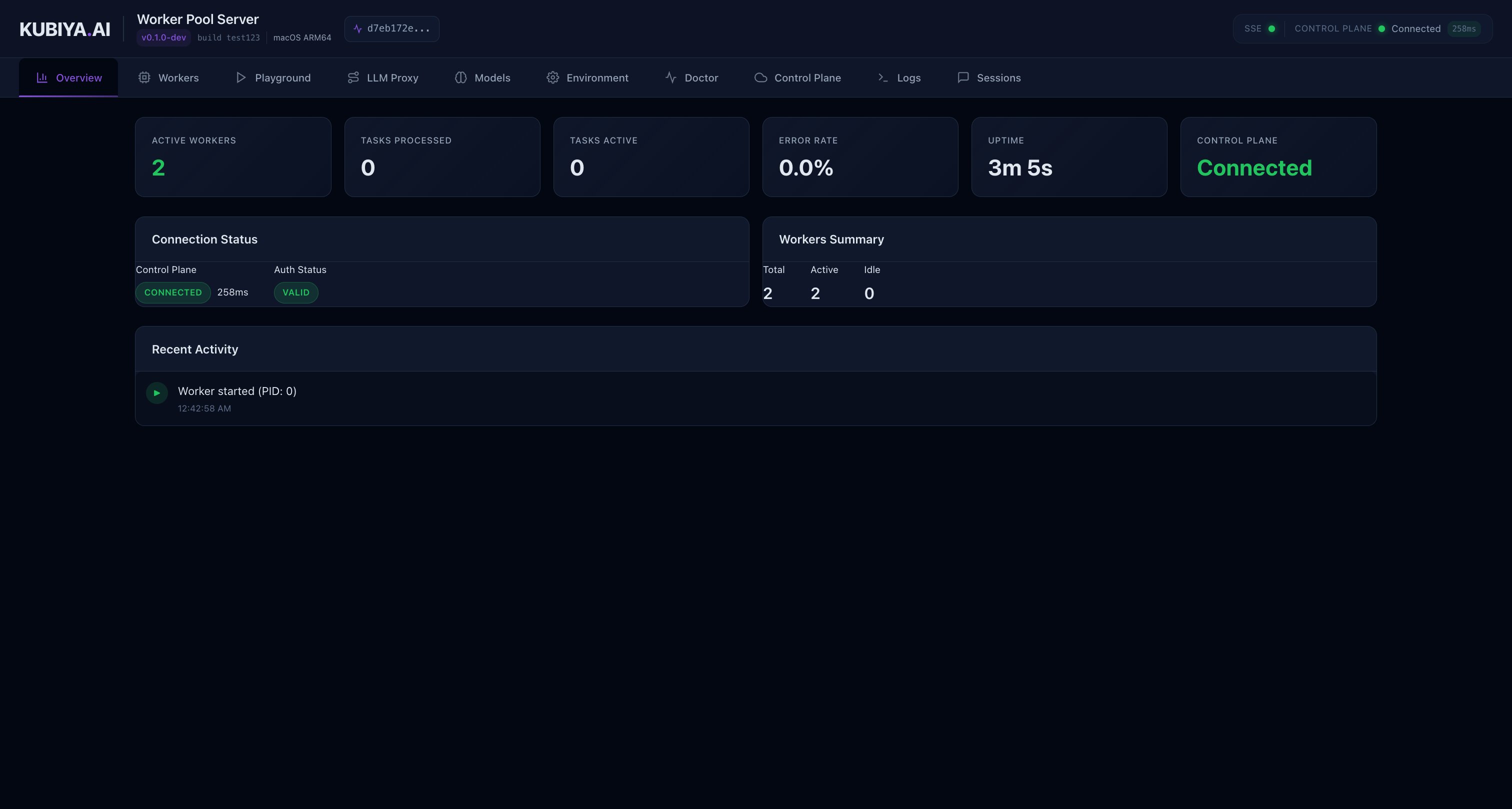
Key features:
Worker Status : Active workers, their PIDs, and uptime
Control Plane Connection : Real-time connection status with latency
Recent Activity : Latest executions and events
System Information : Version, build, and OS details
Workers List
Monitor all active workers in your pool with detailed status information.
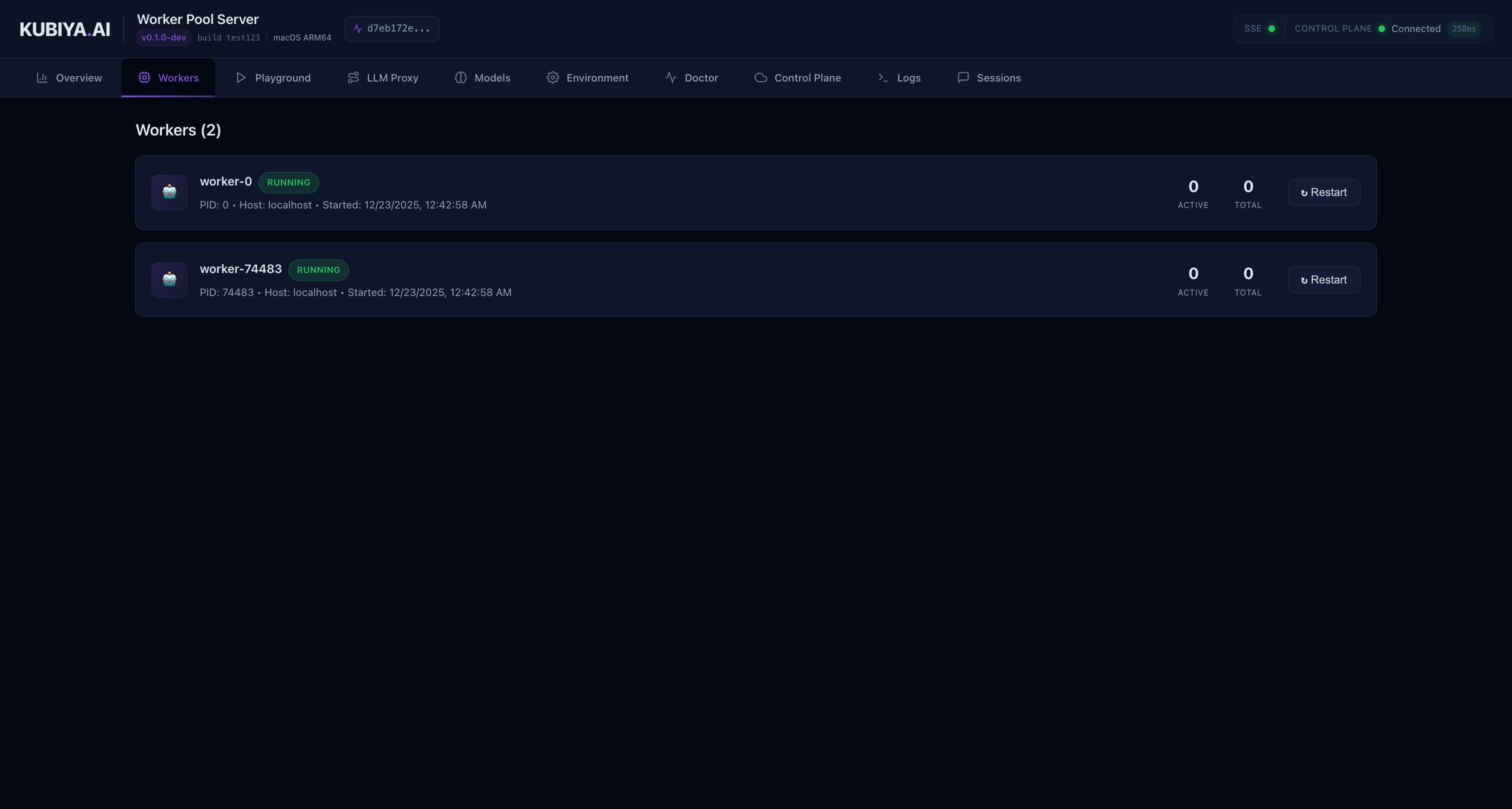
The workers view shows:
Worker ID and hostname
Process ID (PID)
Current status and uptime
Task queue assignment
Execution Playground
The Playground provides an interactive interface to test agent executions with real-time streaming output.
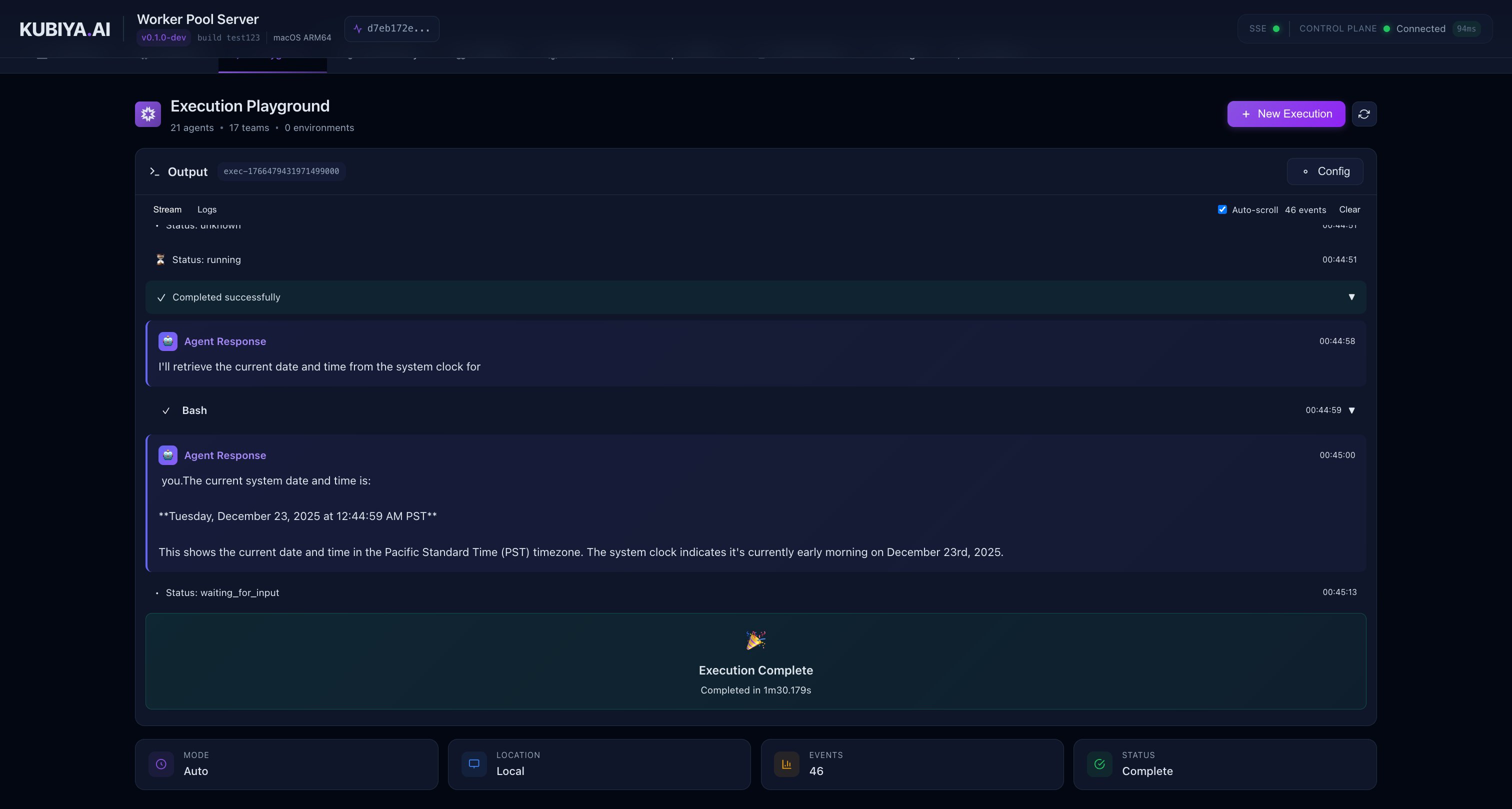
Features:
Agent Selection : Choose from available agents
Working Directory : Set the execution context
Real-time Streaming : Watch agent reasoning, tool calls, and outputs live
Tool Call Visualization : Collapsible cards showing tool inputs and outputs
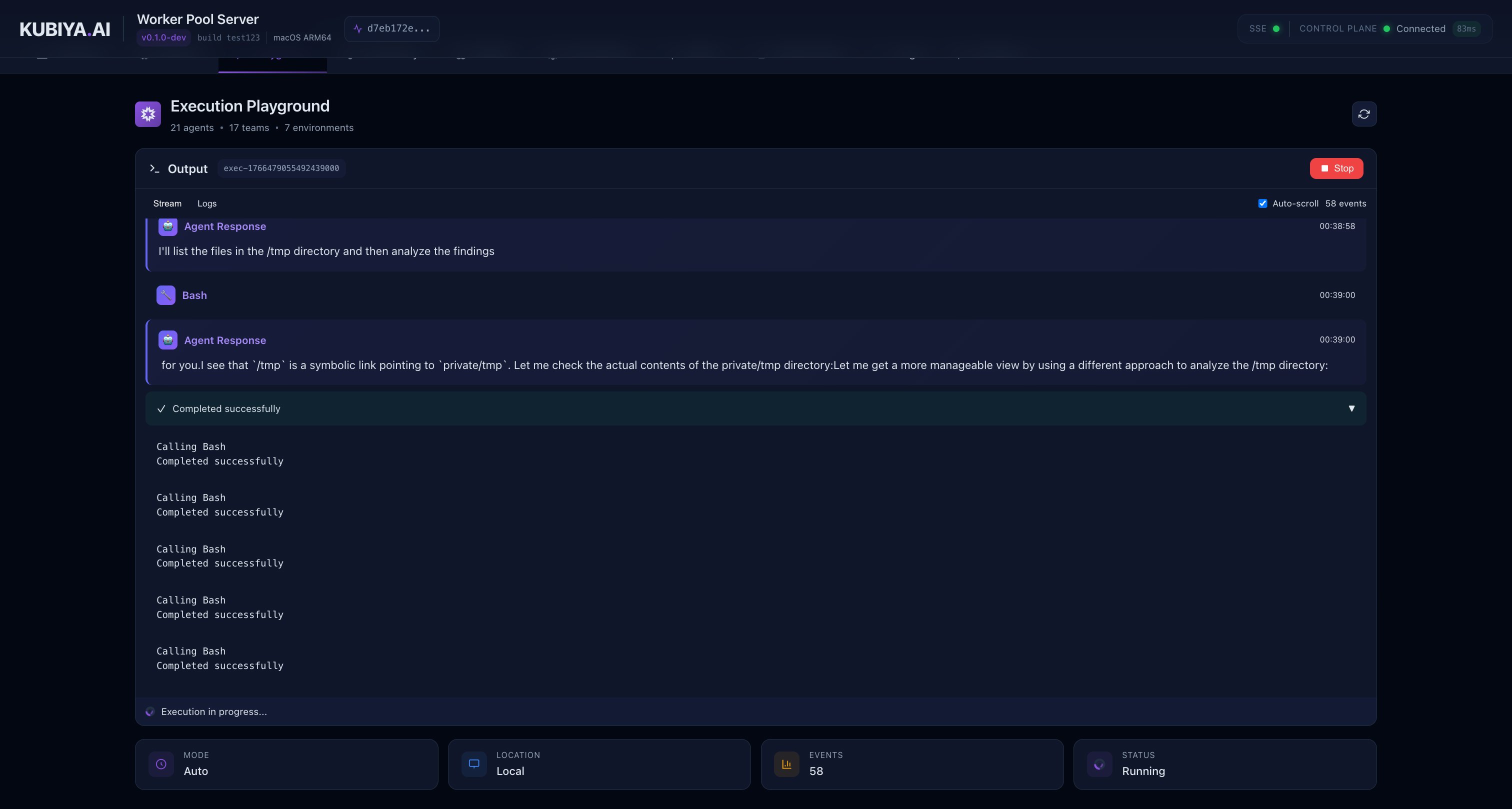
During execution, you can see:
Agent’s reasoning process
Tool calls with expandable input/output details
Real-time output as the agent works
Execution status and duration
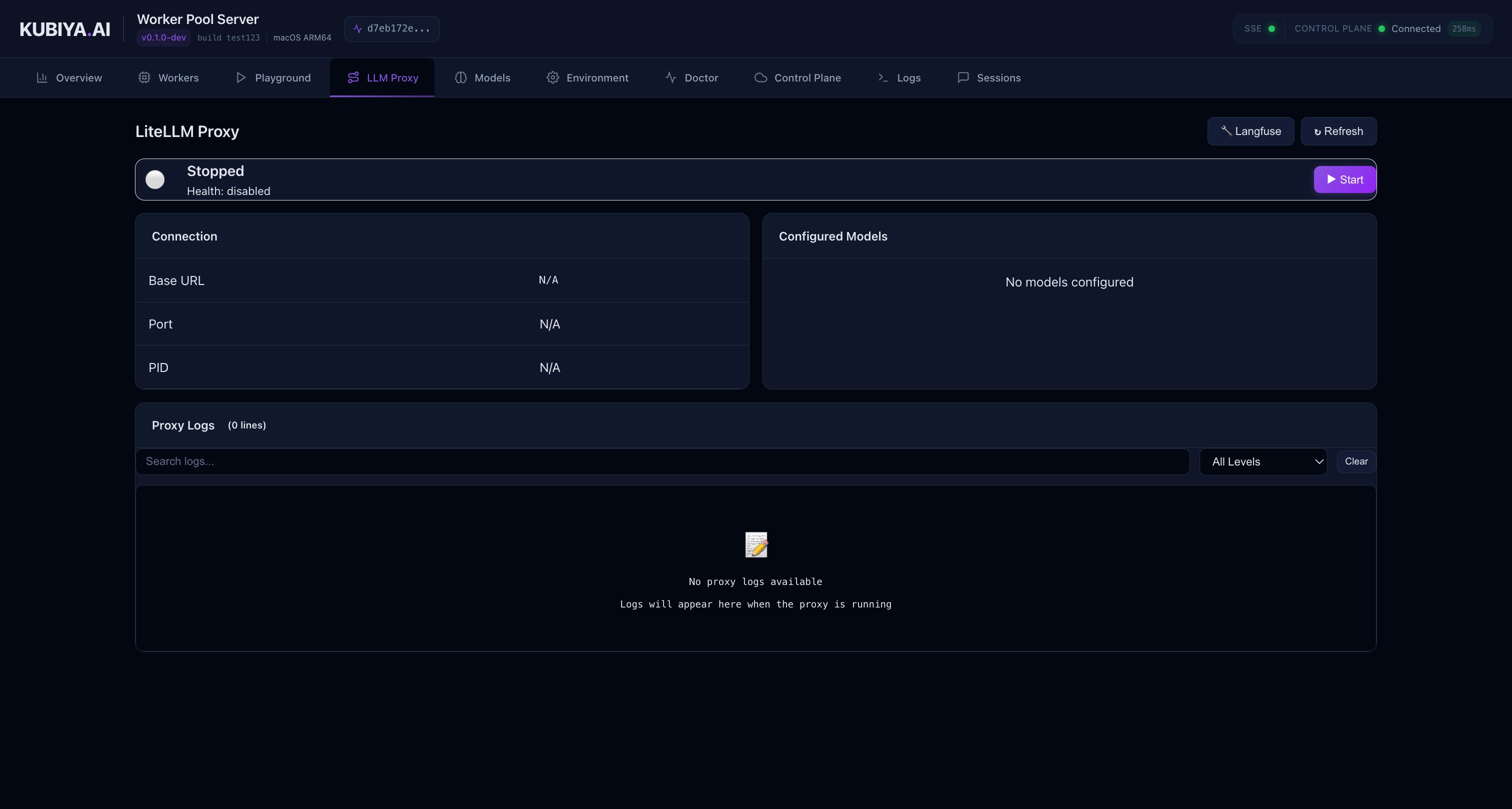
LLM Proxy Control
Manage your local LiteLLM proxy settings when using --enable-local-proxy.
The proxy panel allows you to:
View proxy status and health
Monitor request routing
Check configured model endpoints
Models
Browse and test available LLM models through your configured providers.
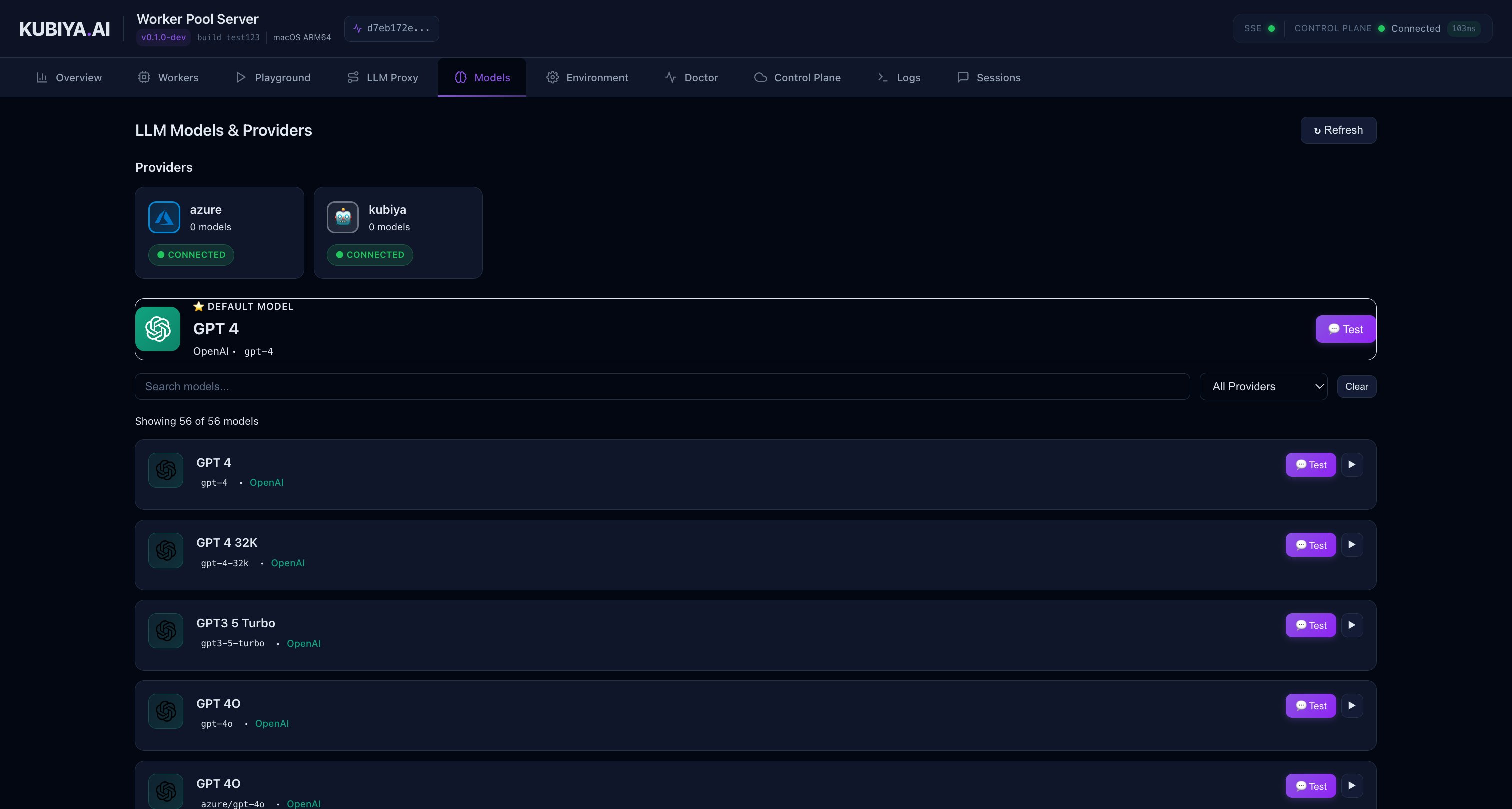
The models view displays:
Available model providers (OpenAI, Anthropic, Bedrock, etc.)
Model capabilities and pricing tiers
Quick access to test models in the Playground
Additional Pages
The WebUI includes several other useful pages:
Environment : View and manage environment variables
Doctor : Diagnostic checks for common configuration issues
Control Plane : Detailed control plane connection information
Logs : Real-time log streaming and historical log search
Sessions : View active and past execution sessions
Command Reference
Worker Start Command
The kubiya worker start command supports the following flags:
Required Flags
Worker queue identifier that matches a queue configured in the Control Plane
Worker deployment type: local or docker
Optional Flags
Run worker as background daemon process (shorthand: -d)
--max-log-size
integer
default: "104857600"
Maximum log file size in bytes before rotation (daemon mode only)
Number of rotated log files to keep (daemon mode only)
WebUI Flags
Port for the built-in web interface. The WebUI provides real-time monitoring, execution playground, and diagnostics.
Local LiteLLM Proxy Flags
Enable local LiteLLM proxy gateway alongside the worker. When enabled, the worker will route all LLM requests through a local proxy instead of the Control Plane gateway.
Path to LiteLLM proxy configuration file (JSON or YAML). Requires --enable-local-proxy.
Inline LiteLLM proxy configuration as JSON string. Requires --enable-local-proxy.
Model Override Flag
Explicit model ID to override agent/team configuration. When set, all LLM requests will use this model regardless of agent settings. Useful for testing, cost control, or debugging. Can also be set via KUBIYA_MODEL environment variable.
Other Worker Commands
# Stop worker (daemon mode)
kubiya worker stop --queue-id= < id >
# View worker status
kubiya worker status --queue-id= < id >
# List all workers
kubiya worker list
# View logs
kubiya worker logs --queue-id= < id >
# Clear worker data
kubiya worker clean --queue-id= < id >
Next Steps