> ## Documentation Index
> Fetch the complete documentation index at: https://docs.kubiya.ai/llms.txt
> Use this file to discover all available pages before exploring further.
# Entities Browser
> Table view for searching and filtering graph entities
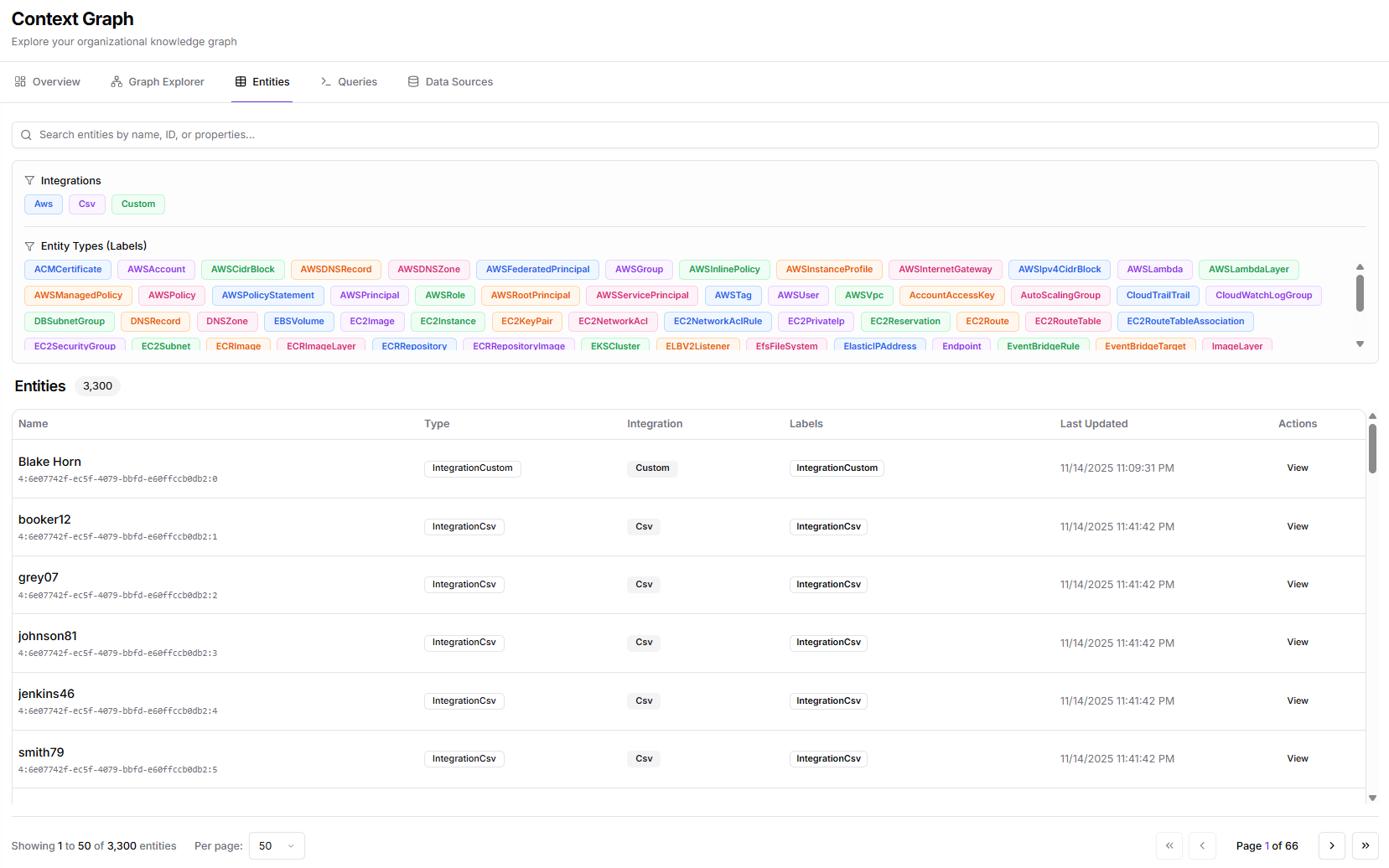
The Entities browser provides a table interface for searching, filtering, and inspecting entities in your Context Graph. It's ideal for finding specific resources and exploring their properties.
 ## Access
Click **Context Graph** > **Entities** in the sidebar.
## Interface Layout
### Toolbar
* **Filters** button - Toggle the filter panel
* **Entity count** - Shows "X entities filtered" based on current filters
* **Search bar** - Search entities by name or property
### Filter Panel
The left panel provides filtering options:
**Data Sources:**
Filter entities by their source:
* Account
* Azure
* Circle
* Cloud
* Dependency
* Dev
* Efs
* Elastic
* Endpoint
* Event
* Git
* Image
* Key
* Launch
* Memory
* Module
* Name
* Network
* And more
Each source shows a count of entities from that source.
### Entity Table
The main table displays:
| Column | Description |
| ---------------- | -------------------------------------------------------- |
| **Name** | Entity name and ID |
| **Type** | Entity type (e.g., Memory, TestNode, AWSInstanceProfile) |
| **Integration** | Source integration |
| **Labels** | Applied labels |
| **Last Updated** | When the entity was last synced |
| **Actions** | View details |
### Pagination
At the bottom:
* **Showing X to Y of Z entities**
* **Per page** selector (default: 50)
* Page navigation
## Filtering Entities
### By Data Source
1. Click **Filters** to show the filter panel
2. Check data sources to include
3. Uncheck to exclude
### By Search
Type in the search bar to filter by:
* Entity name
* Entity ID
* Property values
### Combined Filters
Filters combine with AND logic:
* Source filter AND search text must both match
## Entity Details
Click **View Details** or a row to see:
* **Full entity properties**
* **Relationships** to other entities
* **Source information**
* **Metadata and timestamps**
* **Raw JSON representation**
## Common Entity Types
| Type | Description |
| ---------------------- | ---------------------------- |
| **Memory** | Cognitive memory entries |
| **TestNode** | Test/verification entities |
| **GitHubRepository** | GitHub repository entities |
| **GitHubUser** | GitHub user accounts |
| **UserAccount** | User account entities |
| **AWSInstanceProfile** | AWS IAM instance profiles |
| **Dependency** | Package/library dependencies |
## Sorting
Click column headers to sort:
* Click once for ascending
* Click again for descending
* Click a third time to reset
## Exporting Data
For bulk data export, use the [Queries](/web-interface/context-graph/queries) interface with a Cypher query and export the results.
## Tips
1. **Start broad, then narrow** - Begin with all entities visible, then apply filters
2. **Use search for known entities** - Faster than scrolling through filters
3. **Check Last Updated** - Identify stale data that needs refresh
4. **Combine with Explorer** - Use the table to find entities, then visualize in Explorer
For natural language entity discovery, use the [Meta Agent](/core-concepts/meta-agent):
```
"Show me all EC2 instances in us-east-1"
```
## Related Pages
* **[Graph Explorer](/web-interface/context-graph/graph-explorer)** - Visual graph exploration
* **[Queries](/web-interface/context-graph/queries)** - Cypher query interface
* **[Data Ingestion](/web-interface/context-graph/data-ingestion)** - Manage data sources
## Access
Click **Context Graph** > **Entities** in the sidebar.
## Interface Layout
### Toolbar
* **Filters** button - Toggle the filter panel
* **Entity count** - Shows "X entities filtered" based on current filters
* **Search bar** - Search entities by name or property
### Filter Panel
The left panel provides filtering options:
**Data Sources:**
Filter entities by their source:
* Account
* Azure
* Circle
* Cloud
* Dependency
* Dev
* Efs
* Elastic
* Endpoint
* Event
* Git
* Image
* Key
* Launch
* Memory
* Module
* Name
* Network
* And more
Each source shows a count of entities from that source.
### Entity Table
The main table displays:
| Column | Description |
| ---------------- | -------------------------------------------------------- |
| **Name** | Entity name and ID |
| **Type** | Entity type (e.g., Memory, TestNode, AWSInstanceProfile) |
| **Integration** | Source integration |
| **Labels** | Applied labels |
| **Last Updated** | When the entity was last synced |
| **Actions** | View details |
### Pagination
At the bottom:
* **Showing X to Y of Z entities**
* **Per page** selector (default: 50)
* Page navigation
## Filtering Entities
### By Data Source
1. Click **Filters** to show the filter panel
2. Check data sources to include
3. Uncheck to exclude
### By Search
Type in the search bar to filter by:
* Entity name
* Entity ID
* Property values
### Combined Filters
Filters combine with AND logic:
* Source filter AND search text must both match
## Entity Details
Click **View Details** or a row to see:
* **Full entity properties**
* **Relationships** to other entities
* **Source information**
* **Metadata and timestamps**
* **Raw JSON representation**
## Common Entity Types
| Type | Description |
| ---------------------- | ---------------------------- |
| **Memory** | Cognitive memory entries |
| **TestNode** | Test/verification entities |
| **GitHubRepository** | GitHub repository entities |
| **GitHubUser** | GitHub user accounts |
| **UserAccount** | User account entities |
| **AWSInstanceProfile** | AWS IAM instance profiles |
| **Dependency** | Package/library dependencies |
## Sorting
Click column headers to sort:
* Click once for ascending
* Click again for descending
* Click a third time to reset
## Exporting Data
For bulk data export, use the [Queries](/web-interface/context-graph/queries) interface with a Cypher query and export the results.
## Tips
1. **Start broad, then narrow** - Begin with all entities visible, then apply filters
2. **Use search for known entities** - Faster than scrolling through filters
3. **Check Last Updated** - Identify stale data that needs refresh
4. **Combine with Explorer** - Use the table to find entities, then visualize in Explorer
For natural language entity discovery, use the [Meta Agent](/core-concepts/meta-agent):
```
"Show me all EC2 instances in us-east-1"
```
## Related Pages
* **[Graph Explorer](/web-interface/context-graph/graph-explorer)** - Visual graph exploration
* **[Queries](/web-interface/context-graph/queries)** - Cypher query interface
* **[Data Ingestion](/web-interface/context-graph/data-ingestion)** - Manage data sources