> ## Documentation Index
> Fetch the complete documentation index at: https://docs.kubiya.ai/llms.txt
> Use this file to discover all available pages before exploring further.
# Connectors
> Connect external services and credentials so agents can act across cloud platforms, DevOps tools, and collaboration services securely with authenticated execution.
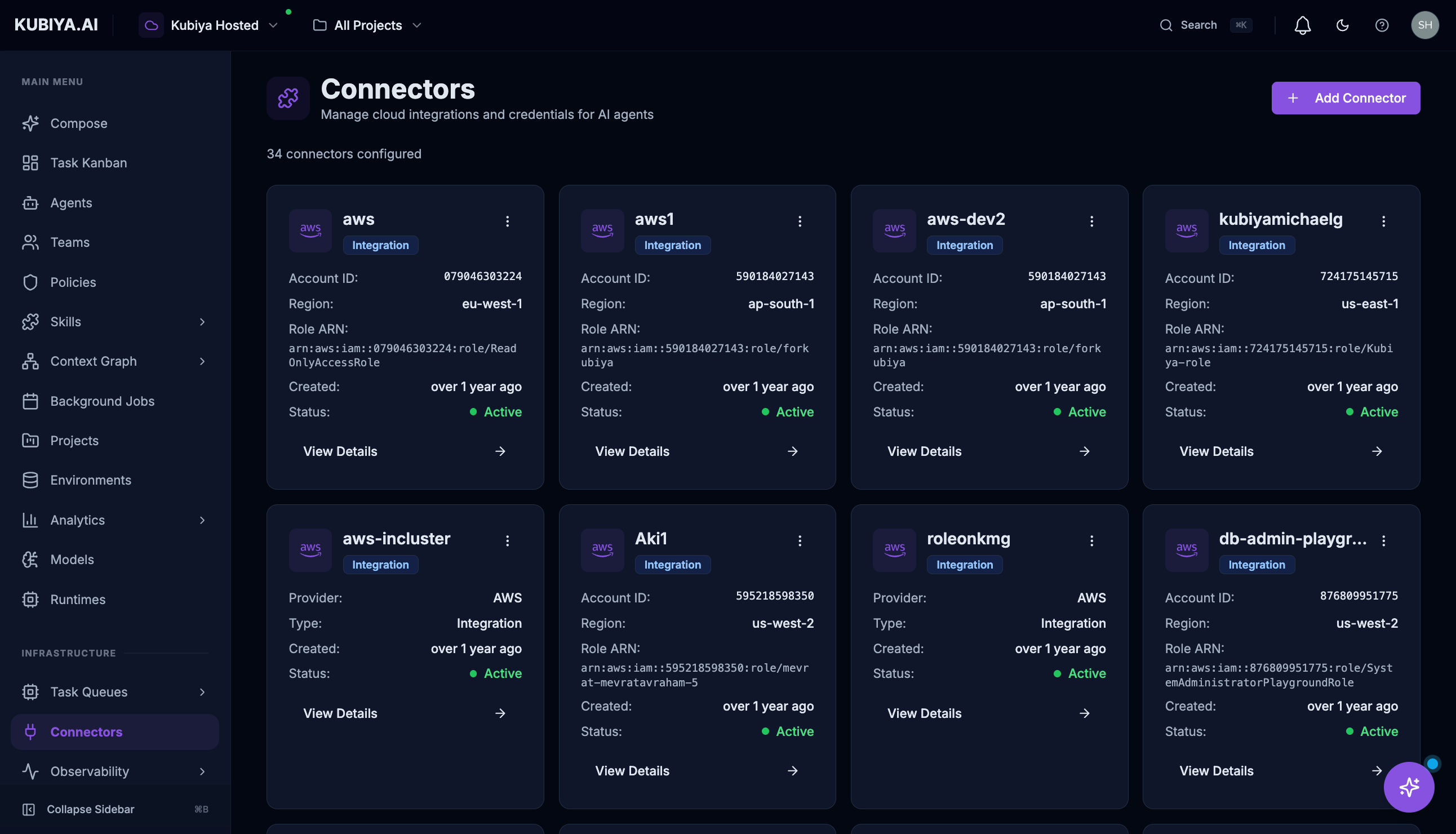 **Connectors** enable Kubiya agents to **act** on external systems—creating resources, modifying configurations, sending messages, and executing workflows across your infrastructure.
**Connectors vs Ingestion Sources:**
* **Connectors** (this page) enable agents to **act** on external systems—create, update, delete resources
* **[Ingestion Sources](/core-concepts/data-sources)** populate the Context Graph with **data** for analysis and exploration
You typically need both: ingestion sources to understand your infrastructure, and connectors to allow agents to manage it.
## **Available Connectors**
| Connector | Description |
| --------------------- | ------------------------------------------------------------------------- |
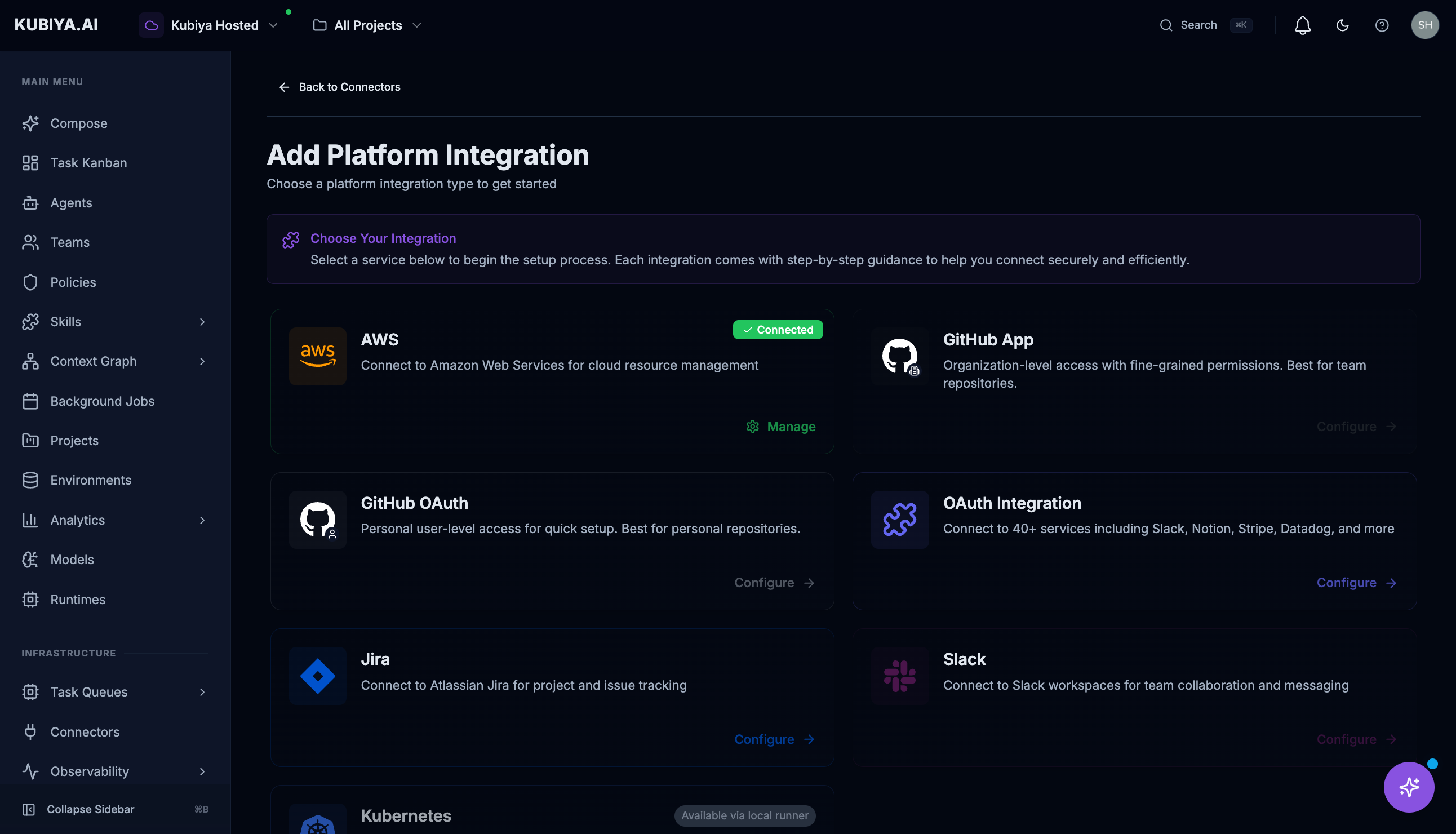
| **AWS** | Cloud resource management—EC2, S3, IAM, Lambda, RDS, and more |
| **GitHub App** | Organization-level repository access, CI/CD pipelines, pull requests |
| **GitHub OAuth** | Personal repository access and version management |
| **Jira** | Issue and project tracking, workflow automation |
| **Slack** | Team messaging, notifications, and collaboration |
| **Kubernetes** | Container orchestration, deployments, and cluster management (via runner) |
| **OAuth Integration** | 40+ additional services including Notion, Stripe, Datadog, and more |
## **How Connectors Work**
Connectors provide credential-based access for Kubiya's AI agents. When an agent needs to perform an action on an external system, it uses the stored credentials to authenticate securely.
```
User Request → Meta Agent → Agent with Connector → External System
↓ ↓ ↓ ↓
"Scale up the Routes to Uses AWS Modifies EC2
API servers" DevOps agent connector Auto Scaling
```
Agents use stored credentials such as:
* **API Keys** — For services like AWS, Datadog, PagerDuty
* **OAuth Tokens** — For services like GitHub, Slack, Jira
* **Service Accounts** — For Kubernetes clusters
* **IAM Roles** — For cross-account AWS access
## **Adding a Connector**
Click **Add Connector** to open the configuration wizard.
**Connectors** enable Kubiya agents to **act** on external systems—creating resources, modifying configurations, sending messages, and executing workflows across your infrastructure.
**Connectors vs Ingestion Sources:**
* **Connectors** (this page) enable agents to **act** on external systems—create, update, delete resources
* **[Ingestion Sources](/core-concepts/data-sources)** populate the Context Graph with **data** for analysis and exploration
You typically need both: ingestion sources to understand your infrastructure, and connectors to allow agents to manage it.
## **Available Connectors**
| Connector | Description |
| --------------------- | ------------------------------------------------------------------------- |
| **AWS** | Cloud resource management—EC2, S3, IAM, Lambda, RDS, and more |
| **GitHub App** | Organization-level repository access, CI/CD pipelines, pull requests |
| **GitHub OAuth** | Personal repository access and version management |
| **Jira** | Issue and project tracking, workflow automation |
| **Slack** | Team messaging, notifications, and collaboration |
| **Kubernetes** | Container orchestration, deployments, and cluster management (via runner) |
| **OAuth Integration** | 40+ additional services including Notion, Stripe, Datadog, and more |
## **How Connectors Work**
Connectors provide credential-based access for Kubiya's AI agents. When an agent needs to perform an action on an external system, it uses the stored credentials to authenticate securely.
```
User Request → Meta Agent → Agent with Connector → External System
↓ ↓ ↓ ↓
"Scale up the Routes to Uses AWS Modifies EC2
API servers" DevOps agent connector Auto Scaling
```
Agents use stored credentials such as:
* **API Keys** — For services like AWS, Datadog, PagerDuty
* **OAuth Tokens** — For services like GitHub, Slack, Jira
* **Service Accounts** — For Kubernetes clusters
* **IAM Roles** — For cross-account AWS access
## **Adding a Connector**
Click **Add Connector** to open the configuration wizard.
 ### **AWS Connector**
The AWS connector enables agents to manage your cloud infrastructure. Setup requires creating an IAM role with a trust relationship to Kubiya's AWS account.
**[See the full AWS setup guide →](/infrastructure/connect-aws)**
### **GitHub Connector**
Two options are available:
### **AWS Connector**
The AWS connector enables agents to manage your cloud infrastructure. Setup requires creating an IAM role with a trust relationship to Kubiya's AWS account.
**[See the full AWS setup guide →](/infrastructure/connect-aws)**
### **GitHub Connector**
Two options are available:
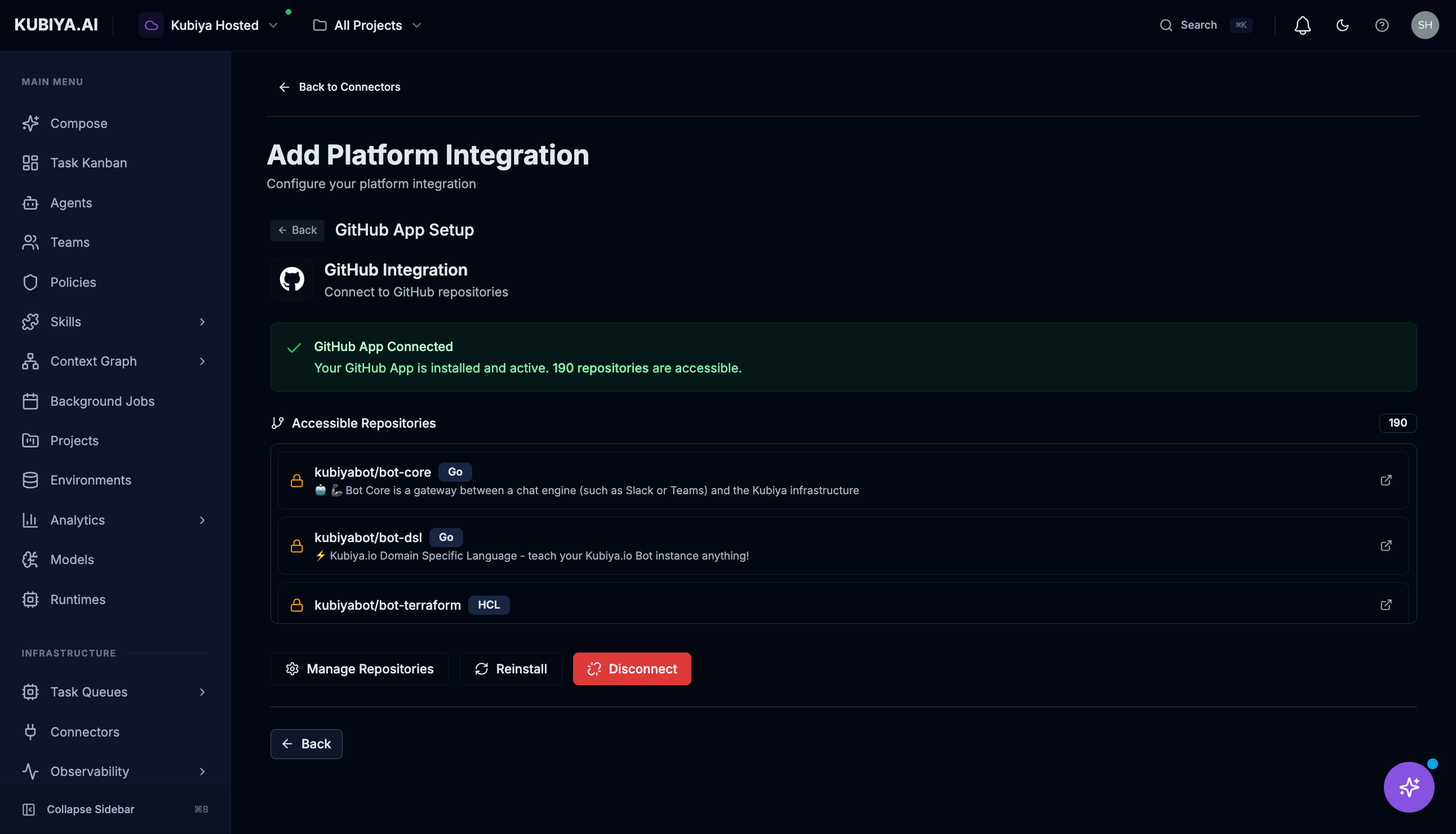 * **GitHub App** — Recommended for organizations. Provides granular permissions and doesn't rely on individual user tokens.
* **GitHub OAuth** — For personal access. Uses your GitHub account's permissions.
### **Slack Connector**
Connect Slack workspaces for team collaboration and messaging.
* **GitHub App** — Recommended for organizations. Provides granular permissions and doesn't rely on individual user tokens.
* **GitHub OAuth** — For personal access. Uses your GitHub account's permissions.
### **Slack Connector**
Connect Slack workspaces for team collaboration and messaging.
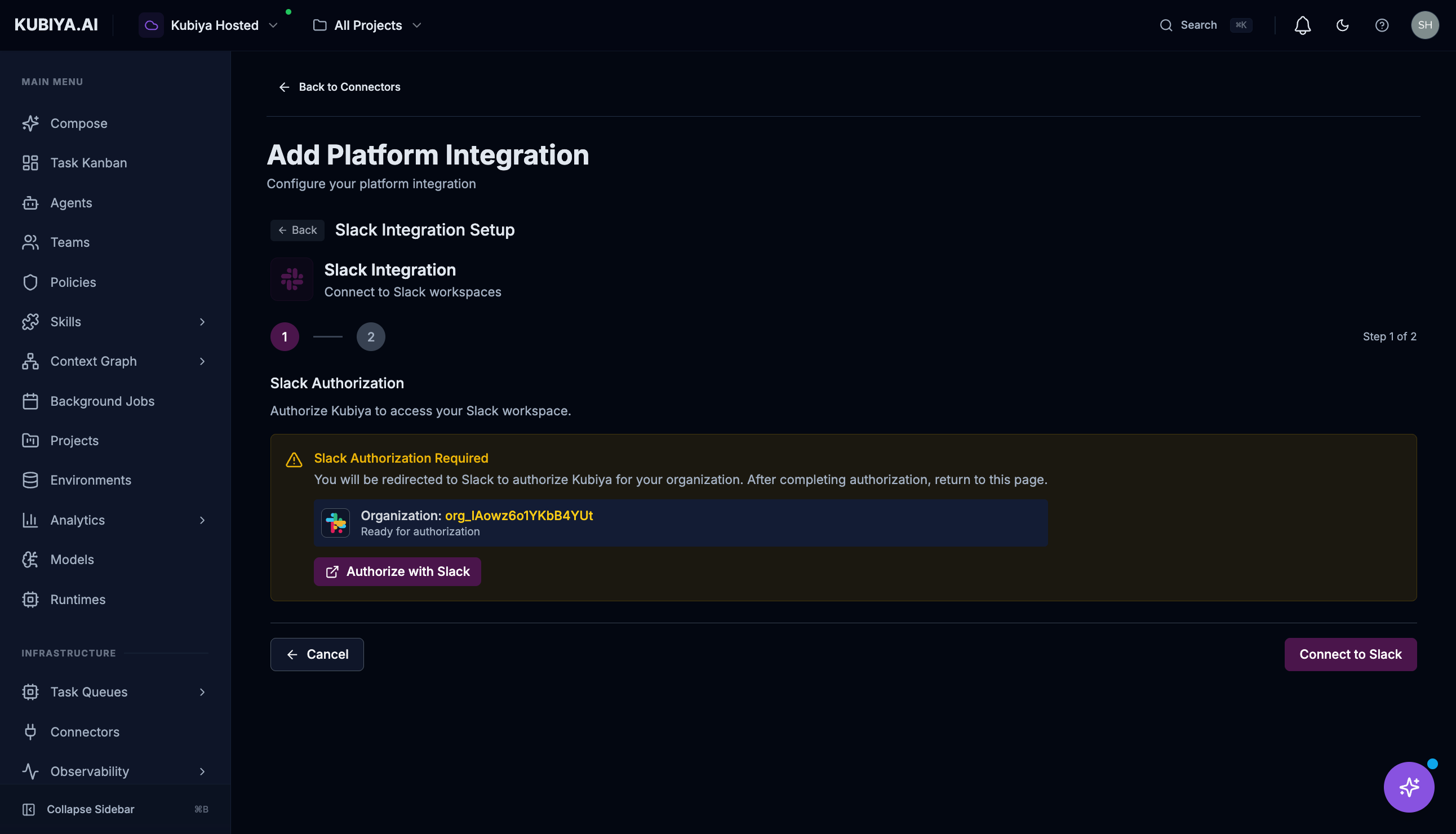 The Slack connector uses OAuth authorization to securely connect to your workspace.
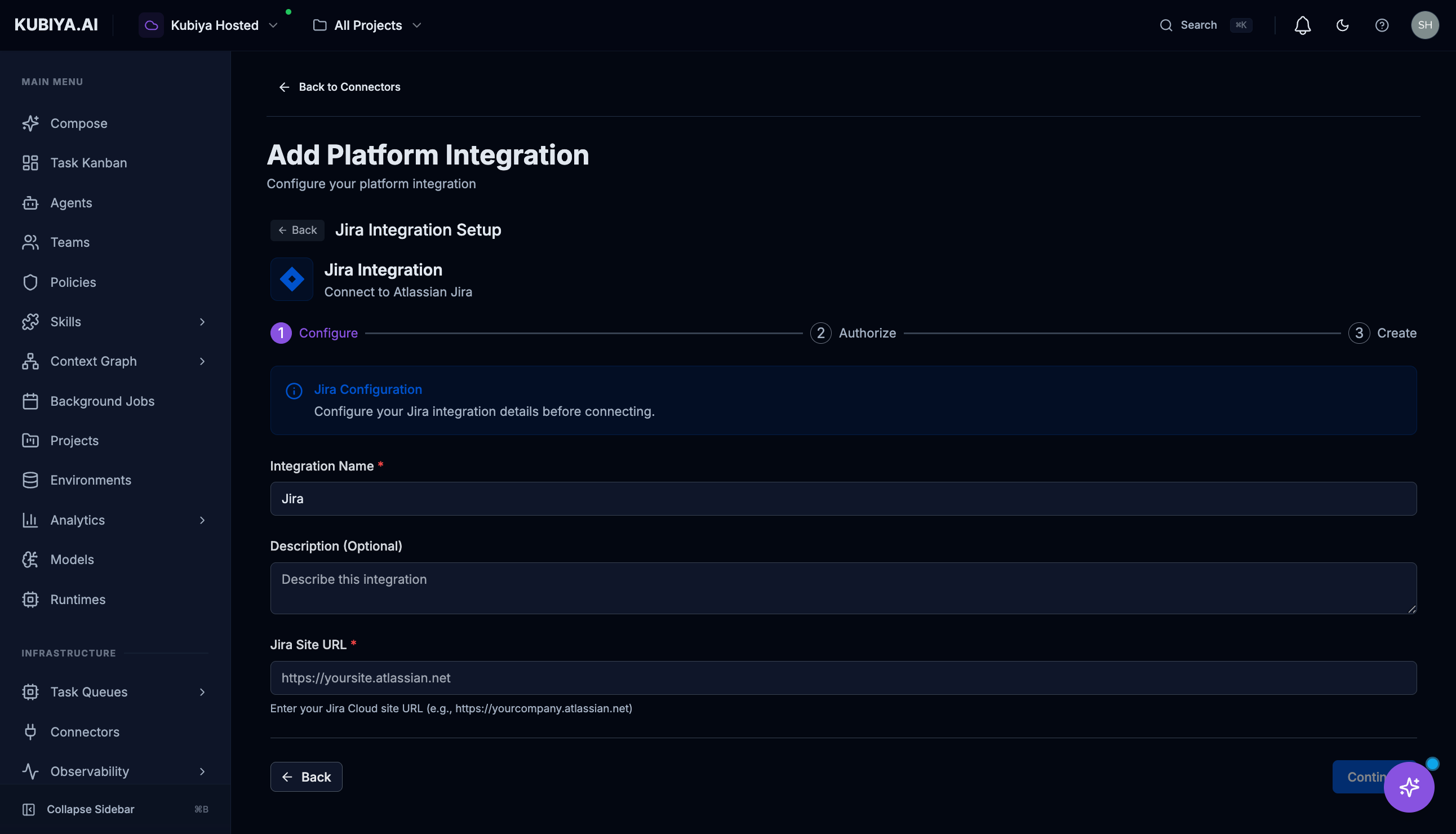
### **Jira Connector**
Connect to Atlassian Jira for project and issue tracking.
The Slack connector uses OAuth authorization to securely connect to your workspace.
### **Jira Connector**
Connect to Atlassian Jira for project and issue tracking.
 ### **Kubernetes Connector**
Connects to Kubernetes clusters for container management. Requires a runner deployed in your cluster with appropriate RBAC permissions.
See [Workers](/core-concepts/execution-infrastructure/workers) for runner deployment instructions.
### **OAuth Integrations**
Connect to 40+ supported services through OAuth:
* **Collaboration:** Slack, Notion, Asana, Monday.com
* **Monitoring:** Datadog, PagerDuty, New Relic
* **Finance:** Stripe, QuickBooks
* **Sales:** Salesforce, HubSpot
* And many more...
## **Managing Connectors**
Each connector card displays:
* **Status** — Connected, disconnected, or error state
* **Provider** — The service type (AWS, GitHub, Slack, etc.)
* **Created** — When the connector was added
* **Details** — Configuration specifics like Account ID, Region, Role ARN
**Actions:**
* **View Details** — See full configuration
* **Settings** — Modify credentials or permissions
* **Refresh** — Validate the connection
* **Delete** — Remove the connector (via menu)
## **Security**
* All credentials are encrypted at rest and in transit
* Credentials are never exposed to end users or in logs
* OAuth tokens are automatically refreshed when possible
* IAM roles use external IDs to prevent confused deputy attacks
* Audit logs track all connector usage by agents
## **Best Practices**
* **Principle of Least Privilege** — Grant connectors only the permissions agents need
* **Use IAM Roles for AWS** — Avoid long-lived access keys when possible
* **Prefer GitHub Apps** — More secure and auditable than personal OAuth tokens
* **Regular Rotation** — Rotate credentials periodically for non-OAuth connectors
* **Monitor Usage** — Review audit logs to understand how connectors are being used
## **What's Next**
* **[AWS Integration](/infrastructure/connect-aws)** — Connect your AWS account with IAM trust relationship
* **[GitHub Integration](/infrastructure/connect-github)** — Detailed GitHub connector setup
* **[Jira Integration](/infrastructure/connect-jira)** — Connect Jira for issue tracking
* **[Slack Integration](/infrastructure/connect-slack)** — Enable Slack messaging for agents
* **[Ingestion Sources](/core-concepts/data-sources)** — Populate the Context Graph with your infrastructure data
* **[Meta Agent Tools](/core-concepts/meta-agent/tools/connectors)** — See what tools connectors enable
### **Kubernetes Connector**
Connects to Kubernetes clusters for container management. Requires a runner deployed in your cluster with appropriate RBAC permissions.
See [Workers](/core-concepts/execution-infrastructure/workers) for runner deployment instructions.
### **OAuth Integrations**
Connect to 40+ supported services through OAuth:
* **Collaboration:** Slack, Notion, Asana, Monday.com
* **Monitoring:** Datadog, PagerDuty, New Relic
* **Finance:** Stripe, QuickBooks
* **Sales:** Salesforce, HubSpot
* And many more...
## **Managing Connectors**
Each connector card displays:
* **Status** — Connected, disconnected, or error state
* **Provider** — The service type (AWS, GitHub, Slack, etc.)
* **Created** — When the connector was added
* **Details** — Configuration specifics like Account ID, Region, Role ARN
**Actions:**
* **View Details** — See full configuration
* **Settings** — Modify credentials or permissions
* **Refresh** — Validate the connection
* **Delete** — Remove the connector (via menu)
## **Security**
* All credentials are encrypted at rest and in transit
* Credentials are never exposed to end users or in logs
* OAuth tokens are automatically refreshed when possible
* IAM roles use external IDs to prevent confused deputy attacks
* Audit logs track all connector usage by agents
## **Best Practices**
* **Principle of Least Privilege** — Grant connectors only the permissions agents need
* **Use IAM Roles for AWS** — Avoid long-lived access keys when possible
* **Prefer GitHub Apps** — More secure and auditable than personal OAuth tokens
* **Regular Rotation** — Rotate credentials periodically for non-OAuth connectors
* **Monitor Usage** — Review audit logs to understand how connectors are being used
## **What's Next**
* **[AWS Integration](/infrastructure/connect-aws)** — Connect your AWS account with IAM trust relationship
* **[GitHub Integration](/infrastructure/connect-github)** — Detailed GitHub connector setup
* **[Jira Integration](/infrastructure/connect-jira)** — Connect Jira for issue tracking
* **[Slack Integration](/infrastructure/connect-slack)** — Enable Slack messaging for agents
* **[Ingestion Sources](/core-concepts/data-sources)** — Populate the Context Graph with your infrastructure data
* **[Meta Agent Tools](/core-concepts/meta-agent/tools/connectors)** — See what tools connectors enable