> ## Documentation Index
> Fetch the complete documentation index at: https://docs.kubiya.ai/llms.txt
> Use this file to discover all available pages before exploring further.
# Teams
> Groups of agents that share context, tools, credentials, and guardrails. Coordinate multiple agents by function, domain, or project with inherited settings for consistent, policy‑compliant execution.
Create and manage groups of agents that work together with shared context, tools, and guardrails.
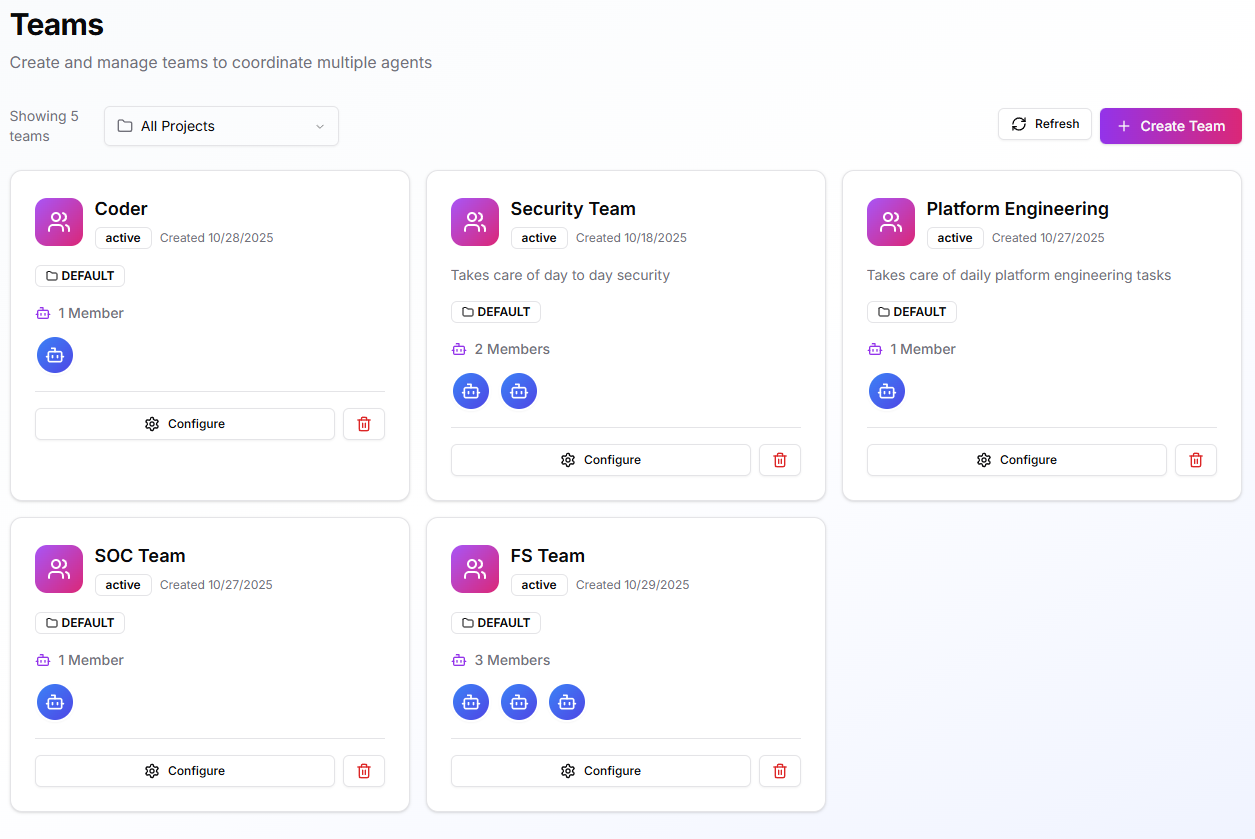 **Advanced Feature**: Teams coordinate multiple agents for complex operations. Most users interact through the [Meta Agent](/core-concepts/meta-agent) for general orchestration. Create teams only when you need multi-agent collaboration on specialized domains.
A team is a coordination layer over multiple agents. Teams inherit execution settings from environments, share credentials and Skills, and run with consistent OPA policies. Use teams to align agents around a function (e.g., Platform Engineering), a domain (e.g., Security Operations), or a project.
## **When to Use**
Create a team when:
* Several specialized agents must collaborate on related tasks
* You need shared credentials, tools, and policies applied consistently
* Clear separation is required by department, sensitivity, or project
* Multi-agent coordination is needed beyond Meta Agent capabilities
For general exploration and single-domain tasks, use the [Meta Agent](/core-concepts/meta-agent) or individual agents.
## **Prerequisites**
* At least one **Environment** (Ready).
* One or more **Agents** created.
* Any required **secrets** or **integration credentials** are available (ideally attached at the environment level).
## **Team Cognitive Memory**
**Teams inherit the same cognitive memory capabilities as individual agents.** All team members share knowledge through environment-based datasets.
### **Shared Team Knowledge**
When agents are part of a team in the same environment, they automatically share memories through the environment's dataset:
```mermaid theme={null}
graph TB
subgraph Team[Platform Engineering Team]
T1[Kubernetes Agent]
T2[Database Agent]
T3[Monitoring Agent]
end
Dataset[production Dataset]
T1 --> Dataset
T2 --> Dataset
T3 --> Dataset
style Dataset fill:#e3f2fd,stroke:#1976d2,stroke-width:3px
style Team fill:#e8f5e9,stroke:#4caf50,stroke-width:2px
```
### **Team Memory Benefits**
* **Collective Intelligence** - Team learns from every agent's experiences
* **Knowledge Continuity** - New team members access historical context
* **Cross-Function Learning** - Database agent learns from Kubernetes agent's solutions
* **Consistent Responses** - Team provides unified answers based on shared knowledge
* **Audit Trail** - Track which team member stored each memory
### **Team Memory Use Cases**
**Incident Response Team:**
```mermaid theme={null}
sequenceDiagram
participant K8s as Kubernetes Agent
participant Dataset as Team Memory
participant DB as Database Agent
K8s->>Dataset: store_memory()
Note right of Dataset: Pod crash from DB timeout
DB->>Dataset: recall_memory()
Dataset-->>DB: Returns solution from K8s Agent
DB->>Dataset: store_memory()
Note right of Dataset: Stores DB fix
```
**Platform Engineering Team:**
* **K8s Agent**: Stores cluster configuration changes and scaling decisions
* **Database Agent**: Records query optimizations and connection tuning
* **Monitoring Agent**: Saves alert patterns and resolution steps
* **All agents**: Access complete platform operational history
### **Environment Isolation for Teams**
Teams respect environment-based dataset isolation:
```mermaid theme={null}
graph TB
subgraph Prod[Production Environment]
ProdTeam[SRE Team]
ProdDataset[production Dataset]
ProdTeam --> ProdDataset
end
subgraph Stage[Staging Environment]
StageTeam[SRE Team]
StageDataset[staging Dataset]
StageTeam --> StageDataset
end
style ProdDataset fill:#e3f2fd,stroke:#1976d2,stroke-width:3px
style StageDataset fill:#fff3e0,stroke:#f57c00,stroke-width:3px
```
Same team, different environments = separate knowledge bases.
Learn more about cognitive memory in [Cognitive Memory Overview](/core-concepts/cognitive-memory/overview).
## **Create a Team**
**Open:** **Teams > Create Team** and complete the tabs below. You can save and edit later.
**Advanced Feature**: Teams coordinate multiple agents for complex operations. Most users interact through the [Meta Agent](/core-concepts/meta-agent) for general orchestration. Create teams only when you need multi-agent collaboration on specialized domains.
A team is a coordination layer over multiple agents. Teams inherit execution settings from environments, share credentials and Skills, and run with consistent OPA policies. Use teams to align agents around a function (e.g., Platform Engineering), a domain (e.g., Security Operations), or a project.
## **When to Use**
Create a team when:
* Several specialized agents must collaborate on related tasks
* You need shared credentials, tools, and policies applied consistently
* Clear separation is required by department, sensitivity, or project
* Multi-agent coordination is needed beyond Meta Agent capabilities
For general exploration and single-domain tasks, use the [Meta Agent](/core-concepts/meta-agent) or individual agents.
## **Prerequisites**
* At least one **Environment** (Ready).
* One or more **Agents** created.
* Any required **secrets** or **integration credentials** are available (ideally attached at the environment level).
## **Team Cognitive Memory**
**Teams inherit the same cognitive memory capabilities as individual agents.** All team members share knowledge through environment-based datasets.
### **Shared Team Knowledge**
When agents are part of a team in the same environment, they automatically share memories through the environment's dataset:
```mermaid theme={null}
graph TB
subgraph Team[Platform Engineering Team]
T1[Kubernetes Agent]
T2[Database Agent]
T3[Monitoring Agent]
end
Dataset[production Dataset]
T1 --> Dataset
T2 --> Dataset
T3 --> Dataset
style Dataset fill:#e3f2fd,stroke:#1976d2,stroke-width:3px
style Team fill:#e8f5e9,stroke:#4caf50,stroke-width:2px
```
### **Team Memory Benefits**
* **Collective Intelligence** - Team learns from every agent's experiences
* **Knowledge Continuity** - New team members access historical context
* **Cross-Function Learning** - Database agent learns from Kubernetes agent's solutions
* **Consistent Responses** - Team provides unified answers based on shared knowledge
* **Audit Trail** - Track which team member stored each memory
### **Team Memory Use Cases**
**Incident Response Team:**
```mermaid theme={null}
sequenceDiagram
participant K8s as Kubernetes Agent
participant Dataset as Team Memory
participant DB as Database Agent
K8s->>Dataset: store_memory()
Note right of Dataset: Pod crash from DB timeout
DB->>Dataset: recall_memory()
Dataset-->>DB: Returns solution from K8s Agent
DB->>Dataset: store_memory()
Note right of Dataset: Stores DB fix
```
**Platform Engineering Team:**
* **K8s Agent**: Stores cluster configuration changes and scaling decisions
* **Database Agent**: Records query optimizations and connection tuning
* **Monitoring Agent**: Saves alert patterns and resolution steps
* **All agents**: Access complete platform operational history
### **Environment Isolation for Teams**
Teams respect environment-based dataset isolation:
```mermaid theme={null}
graph TB
subgraph Prod[Production Environment]
ProdTeam[SRE Team]
ProdDataset[production Dataset]
ProdTeam --> ProdDataset
end
subgraph Stage[Staging Environment]
StageTeam[SRE Team]
StageDataset[staging Dataset]
StageTeam --> StageDataset
end
style ProdDataset fill:#e3f2fd,stroke:#1976d2,stroke-width:3px
style StageDataset fill:#fff3e0,stroke:#f57c00,stroke-width:3px
```
Same team, different environments = separate knowledge bases.
Learn more about cognitive memory in [Cognitive Memory Overview](/core-concepts/cognitive-memory/overview).
## **Create a Team**
**Open:** **Teams > Create Team** and complete the tabs below. You can save and edit later.
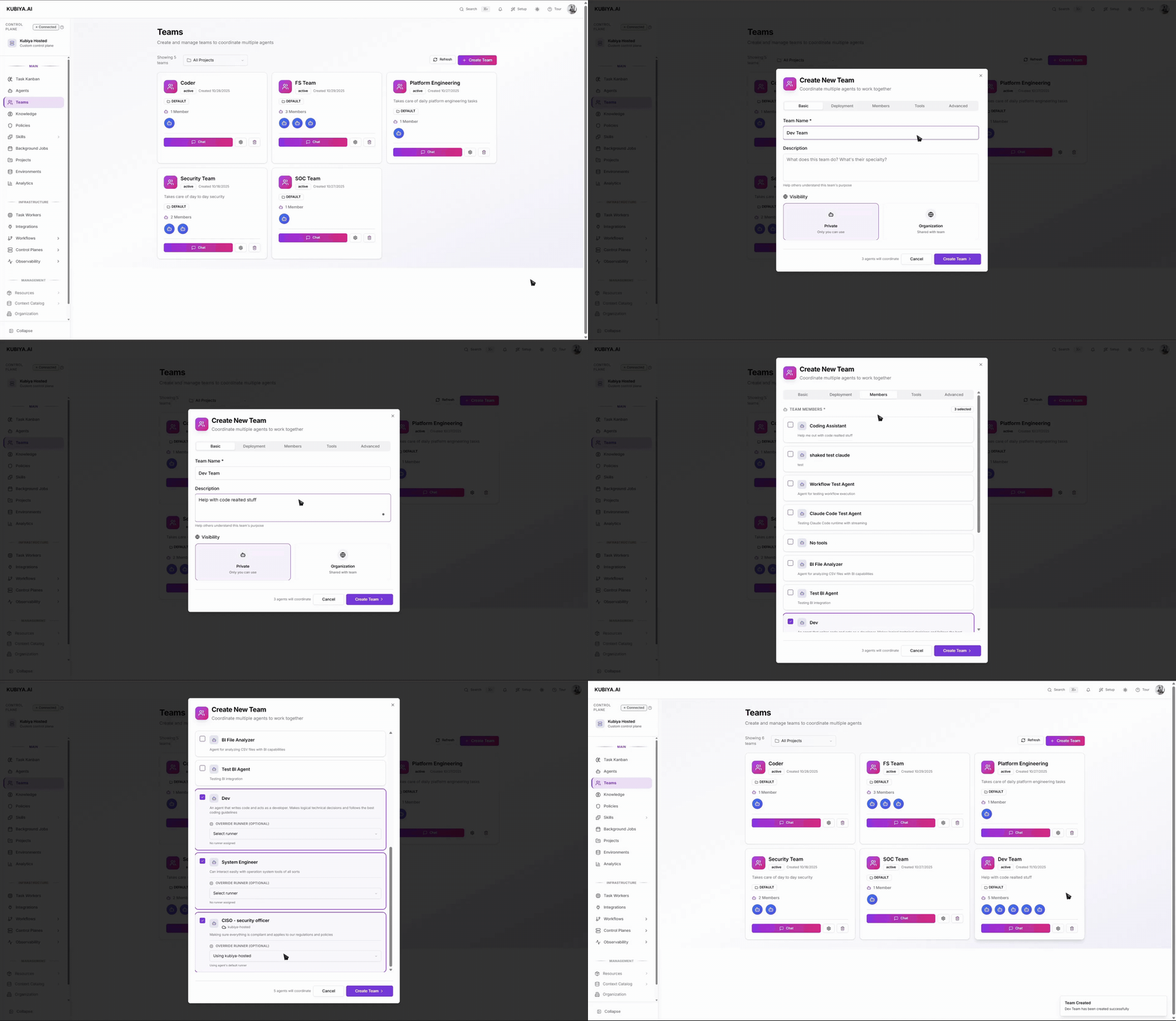 #### **1) Basic**
* **Team Name** and **Description**: keep purpose-driven and clear.
* **Visibility**:
* **Private** – only you can use.
* **Organization** – shared with your org.
#### **2) Deployment**
Defines where the team can run and what it inherits.
* **Runtime**: Choose the execution engine for your team's agents. [Learn about runtime options](/core-concepts/runtimes/overview) and [compare features](/core-concepts/runtimes/comparison).
* **Environments**: add one or more environments. Teams inherit env-level configuration and can run wherever there's capacity.
* **Execution Environment** (per team):
* **Environment Variables** – non-secret parameters.
* **Secrets** – attach only if team-specific (prefer env-level).
* **Integration Credentials** – connect clouds, chat, observability, etc.
*Tip:* If you’ll run the same team in dev/stage/prod, add all environments now and keep variations (endpoints, tokens) at the **environment** level.
#### **3) Members**
* Select the **agents** that belong to this team. Add as many as needed.
#### **4) Tools**
* Attach **Skills** the team can use (file ops, shell, Docker, Python, …).
* Teams also **inherit** any Skills configured on the selected environments.
#### **5) Advanced**
* **Team Instructions** – system prompt for coordination guidance.
* **AI Model** & **Temperature** – defaults for team coordination.
* **Team Context** – add **Knowledge Base** items and **Resources** the whole team can access.
* **OPA Policies** – select policies to enforce rules and constraints at the team level.
*Note:* Context and policies here are visible to all agents in the team.
Click **Create Team**.
For more info on how to use the cli to manage teams go to [Teams Cli](./../cli/resources#teams)
## **Runtime behavior**
When a task targets a team, Kubiya uses the team’s environments, credentials, tools, and policies to coordinate member agents through the workflow. Each step still runs in an isolated container with streaming logs and a full audit trail.
### **Manage**
* **Configure** the team anytime to adjust environments, tools, context, or policies.
* **Add/Remove members** as responsibilities change.
* Use the **project filter** on the Teams page to keep views focused.
* **Delete** unused teams (agents remain available for other teams).
## **Best practices**
* Start with the minimum set of agents and **least-privileged** Skills.
* Centralize shared config in **Environments**; attach at team level only when unique.
* Use descriptive names tied to purpose (e.g., “Security Operations”).
* Add **OPA policies** early for safety.
## **Troubleshooting**
* **Team can’t access a system**: Verify the Environment, Secrets, and Integration Credentials are attached and valid.
* **Tasks stay pending**: Ensure at least one worker is connected to a queue in the target Environment.
* **Permission denied**: Check OPA policies at both **Team** and **Environment** levels.
* **Tool missing at runtime**: Confirm the Skill is attached to the **Team** (and still present on the Environment, if inherited).
#### **1) Basic**
* **Team Name** and **Description**: keep purpose-driven and clear.
* **Visibility**:
* **Private** – only you can use.
* **Organization** – shared with your org.
#### **2) Deployment**
Defines where the team can run and what it inherits.
* **Runtime**: Choose the execution engine for your team's agents. [Learn about runtime options](/core-concepts/runtimes/overview) and [compare features](/core-concepts/runtimes/comparison).
* **Environments**: add one or more environments. Teams inherit env-level configuration and can run wherever there's capacity.
* **Execution Environment** (per team):
* **Environment Variables** – non-secret parameters.
* **Secrets** – attach only if team-specific (prefer env-level).
* **Integration Credentials** – connect clouds, chat, observability, etc.
*Tip:* If you’ll run the same team in dev/stage/prod, add all environments now and keep variations (endpoints, tokens) at the **environment** level.
#### **3) Members**
* Select the **agents** that belong to this team. Add as many as needed.
#### **4) Tools**
* Attach **Skills** the team can use (file ops, shell, Docker, Python, …).
* Teams also **inherit** any Skills configured on the selected environments.
#### **5) Advanced**
* **Team Instructions** – system prompt for coordination guidance.
* **AI Model** & **Temperature** – defaults for team coordination.
* **Team Context** – add **Knowledge Base** items and **Resources** the whole team can access.
* **OPA Policies** – select policies to enforce rules and constraints at the team level.
*Note:* Context and policies here are visible to all agents in the team.
Click **Create Team**.
For more info on how to use the cli to manage teams go to [Teams Cli](./../cli/resources#teams)
## **Runtime behavior**
When a task targets a team, Kubiya uses the team’s environments, credentials, tools, and policies to coordinate member agents through the workflow. Each step still runs in an isolated container with streaming logs and a full audit trail.
### **Manage**
* **Configure** the team anytime to adjust environments, tools, context, or policies.
* **Add/Remove members** as responsibilities change.
* Use the **project filter** on the Teams page to keep views focused.
* **Delete** unused teams (agents remain available for other teams).
## **Best practices**
* Start with the minimum set of agents and **least-privileged** Skills.
* Centralize shared config in **Environments**; attach at team level only when unique.
* Use descriptive names tied to purpose (e.g., “Security Operations”).
* Add **OPA policies** early for safety.
## **Troubleshooting**
* **Team can’t access a system**: Verify the Environment, Secrets, and Integration Credentials are attached and valid.
* **Tasks stay pending**: Ensure at least one worker is connected to a queue in the target Environment.
* **Permission denied**: Check OPA policies at both **Team** and **Environment** levels.
* **Tool missing at runtime**: Confirm the Skill is attached to the **Team** (and still present on the Environment, if inherited).