> ## Documentation Index
> Fetch the complete documentation index at: https://docs.kubiya.ai/llms.txt
> Use this file to discover all available pages before exploring further.
# Task Kanban
> Visual board for tracking agentic task executions initiated by Meta Agent, API, or SDK across remote workers and task queues.
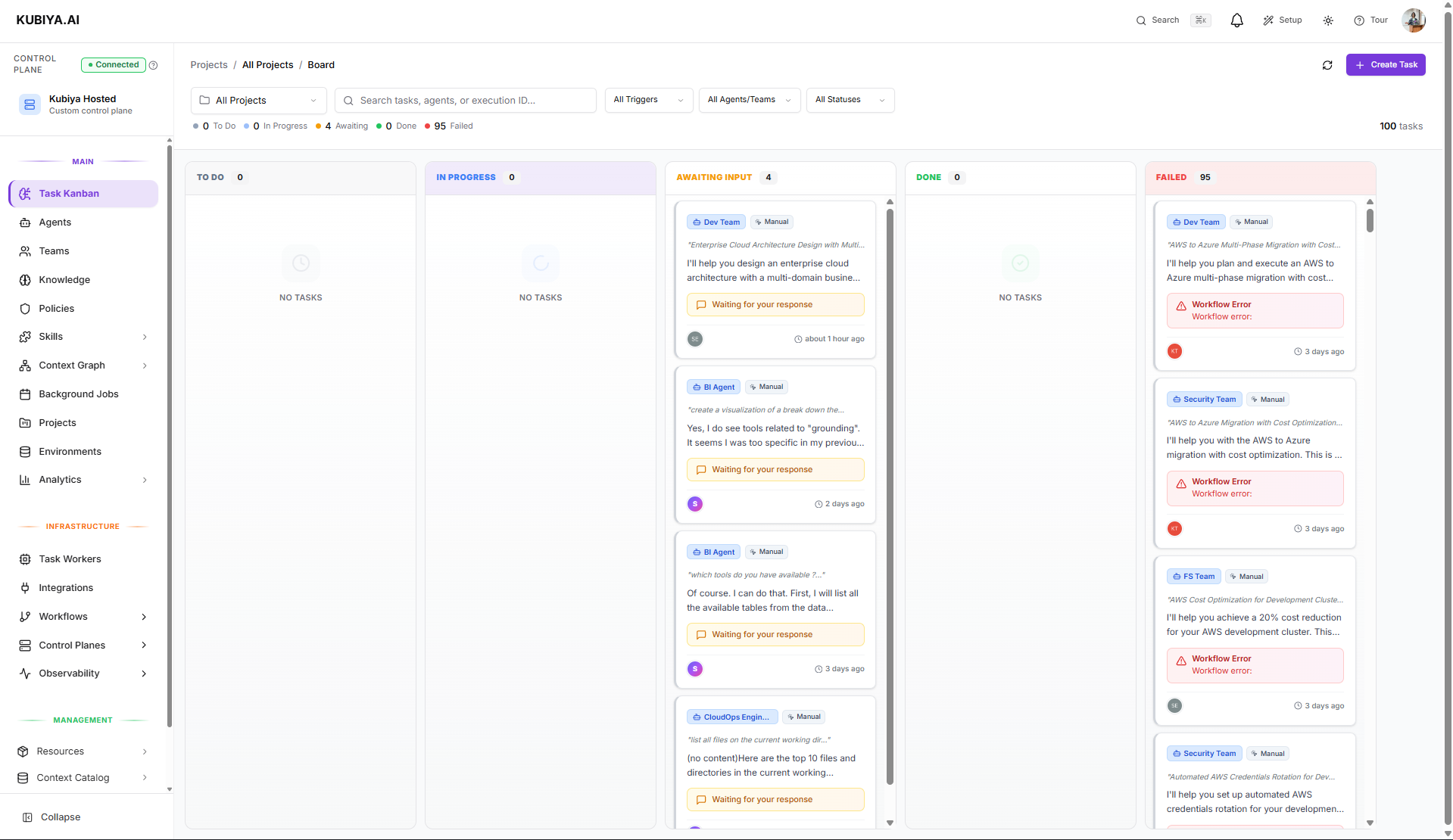 The Task Kanban is a **real-time visual board for tracking agentic task executions**. Every task executed through the [Meta Agent](/core-concepts/meta-agent), [API](/api-reference/overview), or [SDK](/sdk/overview) appears here, providing visibility into:
* **Running executions** on remote workers
* **Task state** (Planning, Executing, Completed, Failed)
* **Agent activity** and tool calls in real-time
* **Execution history** for audit and debugging
**This is not a project management board.** The Task Kanban specifically tracks **agentic task executions**—work performed by AI agents on remote workers through task queues. For project planning, use the [Projects](/core-concepts/projects) feature.
## How Tasks Get Here
Tasks appear on the Kanban when you:
| Method | Example |
| -------------- | --------------------------------------------------------------------------------- |
| **Meta Agent** | "Execute the DevOps agent to check K8s cluster health" |
| **SDK** | `client.agents.execute(agent_id, execution_data)` |
| **CLI** | `kubiya exec "Deploy my app to staging"` or `kubiya exec agent AGENT_ID "prompt"` |
Each execution creates a **durable task** that persists through worker restarts and can be monitored asynchronously.
## When to Use the Task Kanban
Use the Kanban when you need to:
* **Monitor running agent executions** across workers and queues
* **Track task state** from pending through completion
* **Debug failed executions** by reviewing logs and tool calls
* **Audit historical executions** for compliance or troubleshooting
* **Cancel or retry** tasks that need intervention
## Task Lifecycle
When you execute an agent (via Meta Agent, API, or SDK), the task flows through these states:
```mermaid theme={null}
stateDiagram-v2
[*] --> Pending: Task Created
Pending --> Running: Worker Picks Up
Running --> Completed: Success
Running --> Failed: Error
Running --> RequiresInput: Agent Needs Clarification
RequiresInput --> Running: User Responds
Completed --> [*]
Failed --> [*]
```
### **Pending**
Task is queued, waiting for an available worker on the target task queue.
### **Running**
A worker has picked up the task. You can see:
* Real-time agent reasoning
* Tool calls being executed (Bash, API calls, etc.)
* Streaming output from the agent
### **Requires Input**
The agent needs clarification before continuing. Respond to unblock execution.
### **Completed**
Task finished successfully. Results and artifacts are available.
### **Failed**
Task encountered an error. Review logs to diagnose:
* Policy violations
* Missing prerequisites
* Tool execution errors
* Worker connectivity issues
## Viewing Task Details
Click any task on the Kanban to see:
| Section | Information |
| --------------- | ----------------------------------------------------------- |
| **Overview** | Agent, runtime, environment, task queue, execution ID |
| **Live Output** | Real-time streaming of agent reasoning and actions |
| **Tool Calls** | Each tool invocation with status (Running, Success, Failed) |
| **Logs** | Full execution logs for debugging |
| **Artifacts** | Files or outputs generated by the task |
## Execution via Meta Agent
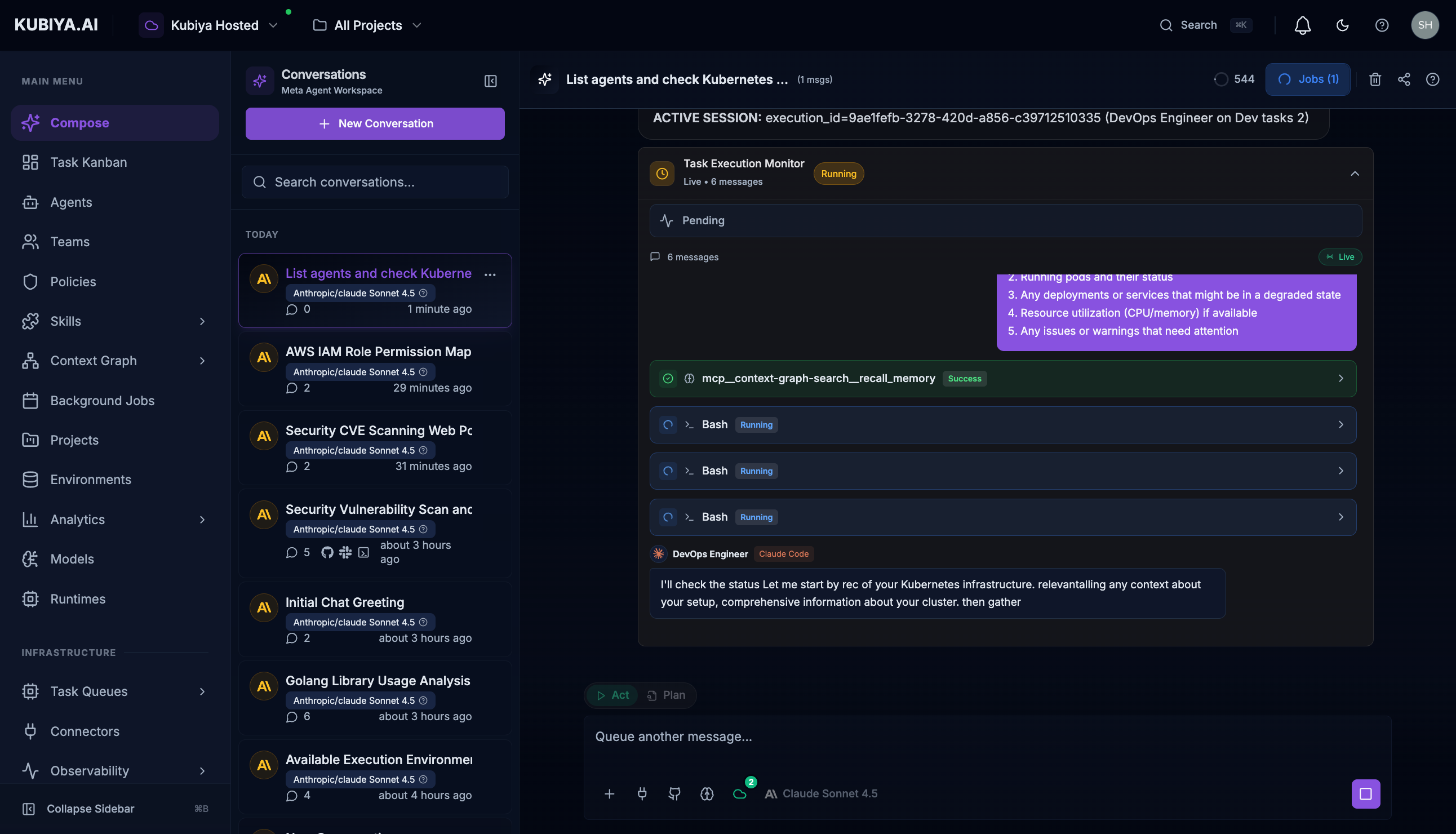
The most common way to create tasks is through the Meta Agent:
```
"Execute the DevOps agent to check our Kubernetes cluster health"
```
The Meta Agent will:
1. List available agents and active worker queues
2. Create a durable task on the appropriate queue
3. Stream execution output in real-time
4. The task appears on the Kanban for tracking
The Task Kanban is a **real-time visual board for tracking agentic task executions**. Every task executed through the [Meta Agent](/core-concepts/meta-agent), [API](/api-reference/overview), or [SDK](/sdk/overview) appears here, providing visibility into:
* **Running executions** on remote workers
* **Task state** (Planning, Executing, Completed, Failed)
* **Agent activity** and tool calls in real-time
* **Execution history** for audit and debugging
**This is not a project management board.** The Task Kanban specifically tracks **agentic task executions**—work performed by AI agents on remote workers through task queues. For project planning, use the [Projects](/core-concepts/projects) feature.
## How Tasks Get Here
Tasks appear on the Kanban when you:
| Method | Example |
| -------------- | --------------------------------------------------------------------------------- |
| **Meta Agent** | "Execute the DevOps agent to check K8s cluster health" |
| **SDK** | `client.agents.execute(agent_id, execution_data)` |
| **CLI** | `kubiya exec "Deploy my app to staging"` or `kubiya exec agent AGENT_ID "prompt"` |
Each execution creates a **durable task** that persists through worker restarts and can be monitored asynchronously.
## When to Use the Task Kanban
Use the Kanban when you need to:
* **Monitor running agent executions** across workers and queues
* **Track task state** from pending through completion
* **Debug failed executions** by reviewing logs and tool calls
* **Audit historical executions** for compliance or troubleshooting
* **Cancel or retry** tasks that need intervention
## Task Lifecycle
When you execute an agent (via Meta Agent, API, or SDK), the task flows through these states:
```mermaid theme={null}
stateDiagram-v2
[*] --> Pending: Task Created
Pending --> Running: Worker Picks Up
Running --> Completed: Success
Running --> Failed: Error
Running --> RequiresInput: Agent Needs Clarification
RequiresInput --> Running: User Responds
Completed --> [*]
Failed --> [*]
```
### **Pending**
Task is queued, waiting for an available worker on the target task queue.
### **Running**
A worker has picked up the task. You can see:
* Real-time agent reasoning
* Tool calls being executed (Bash, API calls, etc.)
* Streaming output from the agent
### **Requires Input**
The agent needs clarification before continuing. Respond to unblock execution.
### **Completed**
Task finished successfully. Results and artifacts are available.
### **Failed**
Task encountered an error. Review logs to diagnose:
* Policy violations
* Missing prerequisites
* Tool execution errors
* Worker connectivity issues
## Viewing Task Details
Click any task on the Kanban to see:
| Section | Information |
| --------------- | ----------------------------------------------------------- |
| **Overview** | Agent, runtime, environment, task queue, execution ID |
| **Live Output** | Real-time streaming of agent reasoning and actions |
| **Tool Calls** | Each tool invocation with status (Running, Success, Failed) |
| **Logs** | Full execution logs for debugging |
| **Artifacts** | Files or outputs generated by the task |
## Execution via Meta Agent
The most common way to create tasks is through the Meta Agent:
```
"Execute the DevOps agent to check our Kubernetes cluster health"
```
The Meta Agent will:
1. List available agents and active worker queues
2. Create a durable task on the appropriate queue
3. Stream execution output in real-time
4. The task appears on the Kanban for tracking
 ## Execution via SDK
For programmatic execution, use the [Python SDK](/sdk/client-agents):
```python theme={null}
from kubiya.control_plane_client import ControlPlaneClient
import os
client = ControlPlaneClient(
api_key=os.environ.get("KUBIYA_API_KEY"),
base_url="https://control-plane.kubiya.ai"
)
# Get agent ID (resolve by name or use known UUID)
agent_id = "e9df18d2-a33f-4570-aafd-347e5018e047"
# Prepare execution payload
execution_data = {
"worker_queue_id": "c33658da-8831-4323-869e-0188ec8e2187",
"prompt": "Check Kubernetes cluster health and report any issues",
"parameters": {
"cluster_name": "production-cluster",
"namespace": "default"
}
}
result = client.agents.execute(agent_id, execution_data)
print(f"Execution started: {result.get('execution_id')}")
```
**Required fields:**
* `agent_id` - UUID of the agent to execute
* `worker_queue_id` - ID of the worker queue handling execution
* `prompt` - Instruction describing the task to perform
Tasks created via SDK appear on the Kanban with full visibility.
See the [Agents SDK documentation](/sdk/client-agents#execute) for complete examples and additional options.
## Execution via CLI
Execute agents directly from the command line:
```bash theme={null}
# Auto-planning mode (selects best agent)
kubiya exec "Deploy my app to staging"
# Direct execution with specific agent
kubiya exec agent AGENT_ID "Check Kubernetes cluster health"
# Local execution with ephemeral worker
kubiya exec "Run tests for changed files" --local --cwd $(pwd)
```
Tasks created via CLI appear on the Kanban with full visibility.
See the [CLI On-Demand Execution documentation](/cli/on-demand-execution) for complete examples and additional options.
## Managing Executions via CLI
Use the CLI to list, inspect, monitor, and control all task executions. Executions represent any task that has been approved and sent to an agent or team for processing.
### **1. List Executions**
Lists all executions with optional filters for status, agent, team, or type.
**Commands**
```bash theme={null}
kubiya execution list
```
```bash theme={null}
kubiya execution list --status running
```
```bash theme={null}
kubiya execution list --agent
```
```bash theme={null}
kubiya execution list --team
```
```bash theme={null}
kubiya execution list --type agent
```
```bash theme={null}
kubiya execution list --limit 50
```
**Flags**
| Flag | Description |
| ---------- | ----------------------------------------------------- |
| `--status` | Filter by status: pending, running, completed, failed |
| `--agent` | Filter by agent ID |
| `--team` | Filter by team ID |
| `--type` | Filter by execution type: agent or team |
| `--limit` | Limit result count (default 50) |
**Examples**
```bash theme={null}
# List running executions
kubiya execution list --status running
```
```bash theme={null}
# List executions for a specific agent
kubiya execution list --agent 8064f4c8-fb5c-4a52-99f8-9075521500a3
```
```bash theme={null}
# List team-based executions only
kubiya execution list --type team --limit 20
```
### **2. Get Execution Details**
Displays full execution metadata including plan, steps, environment, and final results.
**Commands**
```bash theme={null}
kubiya execution get
```
**Examples**
```bash theme={null}
kubiya execution get abc123-def456
```
```bash theme={null}
kubiya execution get 8064f4c8-fb5c-4a52-99f8-9075521500a3
```
### **3. Stream Execution Logs**
Streams real-time logs and events for an active execution.
Use **Ctrl+C** to exit log streaming.
**Commands**
```bash theme={null}
kubiya execution logs
```
**Examples**
```bash theme={null}
# Watch execution progress
kubiya execution logs abc123-def456
```
### **4. Cancel Executions**
Cancels a running execution. Kubiya attempts a graceful shutdown and halts remaining steps.
**Commands**
```bash theme={null}
kubiya execution cancel
```
**Examples**
```bash theme={null}
# Cancel a running job
kubiya execution cancel abc123-def456
```
```bash theme={null}
# Stop another execution
kubiya execution cancel 8064f4c8-fb5c-4a52-99f8-9075521500a3
```
## Best Practices
* Describe tasks with outcomes, requirements, and constraints
* Approve plans only after reviewing steps and risk notes
* Respond promptly if agents request clarification
* Cancel tasks that hang or are no longer needed
* Use CLI streaming for debugging failing or long-running tasks
* Check policies if tasks fail unexpectedly
* Ensure active workers are connected for real-time execution
## Execution via SDK
For programmatic execution, use the [Python SDK](/sdk/client-agents):
```python theme={null}
from kubiya.control_plane_client import ControlPlaneClient
import os
client = ControlPlaneClient(
api_key=os.environ.get("KUBIYA_API_KEY"),
base_url="https://control-plane.kubiya.ai"
)
# Get agent ID (resolve by name or use known UUID)
agent_id = "e9df18d2-a33f-4570-aafd-347e5018e047"
# Prepare execution payload
execution_data = {
"worker_queue_id": "c33658da-8831-4323-869e-0188ec8e2187",
"prompt": "Check Kubernetes cluster health and report any issues",
"parameters": {
"cluster_name": "production-cluster",
"namespace": "default"
}
}
result = client.agents.execute(agent_id, execution_data)
print(f"Execution started: {result.get('execution_id')}")
```
**Required fields:**
* `agent_id` - UUID of the agent to execute
* `worker_queue_id` - ID of the worker queue handling execution
* `prompt` - Instruction describing the task to perform
Tasks created via SDK appear on the Kanban with full visibility.
See the [Agents SDK documentation](/sdk/client-agents#execute) for complete examples and additional options.
## Execution via CLI
Execute agents directly from the command line:
```bash theme={null}
# Auto-planning mode (selects best agent)
kubiya exec "Deploy my app to staging"
# Direct execution with specific agent
kubiya exec agent AGENT_ID "Check Kubernetes cluster health"
# Local execution with ephemeral worker
kubiya exec "Run tests for changed files" --local --cwd $(pwd)
```
Tasks created via CLI appear on the Kanban with full visibility.
See the [CLI On-Demand Execution documentation](/cli/on-demand-execution) for complete examples and additional options.
## Managing Executions via CLI
Use the CLI to list, inspect, monitor, and control all task executions. Executions represent any task that has been approved and sent to an agent or team for processing.
### **1. List Executions**
Lists all executions with optional filters for status, agent, team, or type.
**Commands**
```bash theme={null}
kubiya execution list
```
```bash theme={null}
kubiya execution list --status running
```
```bash theme={null}
kubiya execution list --agent
```
```bash theme={null}
kubiya execution list --team
```
```bash theme={null}
kubiya execution list --type agent
```
```bash theme={null}
kubiya execution list --limit 50
```
**Flags**
| Flag | Description |
| ---------- | ----------------------------------------------------- |
| `--status` | Filter by status: pending, running, completed, failed |
| `--agent` | Filter by agent ID |
| `--team` | Filter by team ID |
| `--type` | Filter by execution type: agent or team |
| `--limit` | Limit result count (default 50) |
**Examples**
```bash theme={null}
# List running executions
kubiya execution list --status running
```
```bash theme={null}
# List executions for a specific agent
kubiya execution list --agent 8064f4c8-fb5c-4a52-99f8-9075521500a3
```
```bash theme={null}
# List team-based executions only
kubiya execution list --type team --limit 20
```
### **2. Get Execution Details**
Displays full execution metadata including plan, steps, environment, and final results.
**Commands**
```bash theme={null}
kubiya execution get
```
**Examples**
```bash theme={null}
kubiya execution get abc123-def456
```
```bash theme={null}
kubiya execution get 8064f4c8-fb5c-4a52-99f8-9075521500a3
```
### **3. Stream Execution Logs**
Streams real-time logs and events for an active execution.
Use **Ctrl+C** to exit log streaming.
**Commands**
```bash theme={null}
kubiya execution logs
```
**Examples**
```bash theme={null}
# Watch execution progress
kubiya execution logs abc123-def456
```
### **4. Cancel Executions**
Cancels a running execution. Kubiya attempts a graceful shutdown and halts remaining steps.
**Commands**
```bash theme={null}
kubiya execution cancel
```
**Examples**
```bash theme={null}
# Cancel a running job
kubiya execution cancel abc123-def456
```
```bash theme={null}
# Stop another execution
kubiya execution cancel 8064f4c8-fb5c-4a52-99f8-9075521500a3
```
## Best Practices
* Describe tasks with outcomes, requirements, and constraints
* Approve plans only after reviewing steps and risk notes
* Respond promptly if agents request clarification
* Cancel tasks that hang or are no longer needed
* Use CLI streaming for debugging failing or long-running tasks
* Check policies if tasks fail unexpectedly
* Ensure active workers are connected for real-time execution