> ## Documentation Index
> Fetch the complete documentation index at: https://docs.kubiya.ai/llms.txt
> Use this file to discover all available pages before exploring further.
# Skills
> System-level capabilities that define what your agents can do. From file operations to Docker management, Skills provide controlled, secure access to essential functionalities.
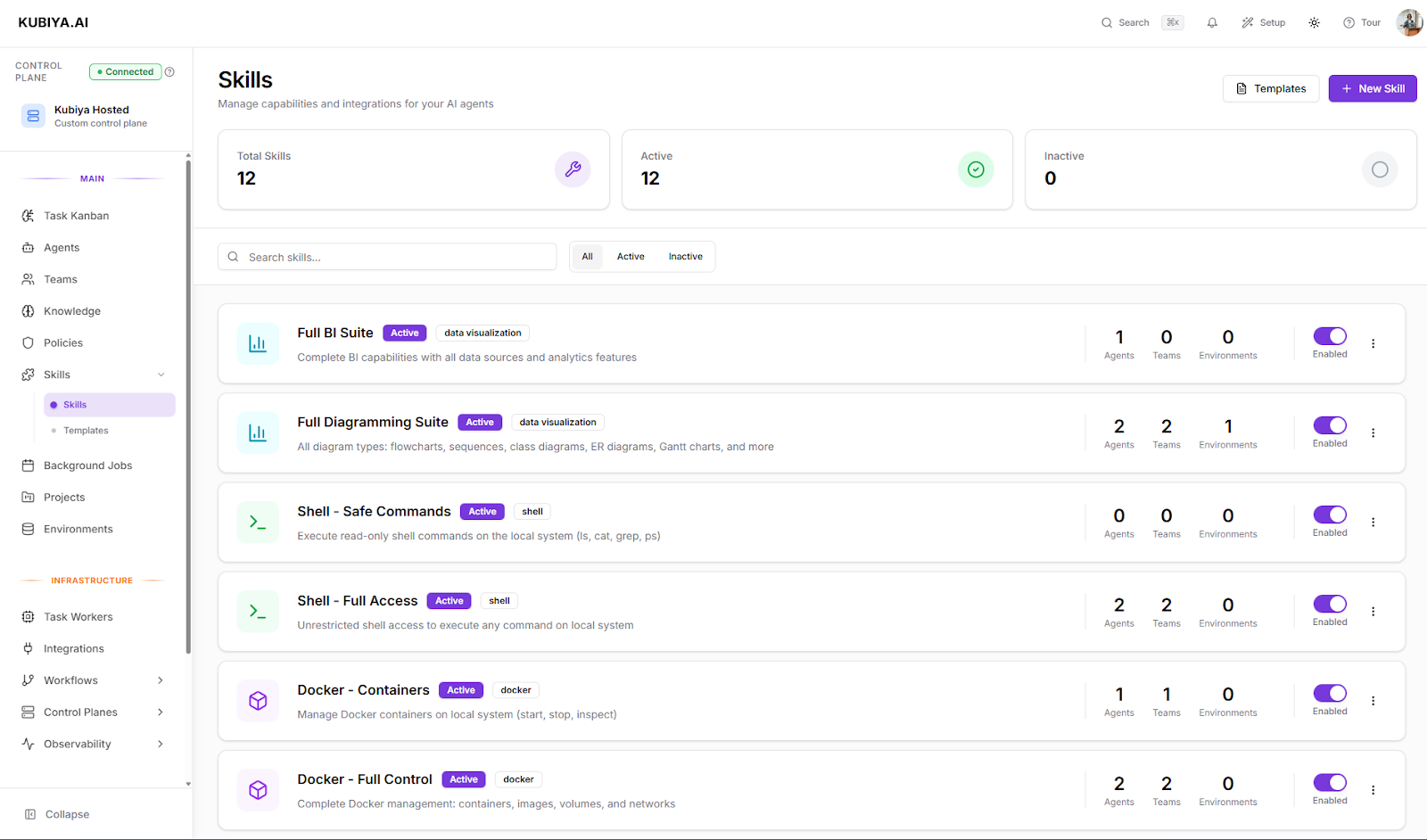 Skills are the building blocks of agent capabilities in Kubiya. They define what actions your agents can perform—from reading files and executing shell commands to managing Docker containers and orchestrating multi-agent workflows.
Ready-to-use capabilities for common operations
Variants for different permission levels
Create custom Skills for your needs
***
## Why Skills Matter
Skills define **what agents can do** with precise control over permissions. An agent with "Shell - Safe Commands" can only run approved diagnostic commands, while "Shell - Full Access" enables any command execution.
Built-in security variants follow the **principle of least privilege**. Start with read-only or safe variants, then expand permissions only as needed. Sandboxed environments provide additional isolation.
Create custom Skills to integrate with proprietary APIs, services, and tools. Skills make your organization's unique capabilities available to agents.
***
## Get Started
Select from **built-in Skills** or create a custom one:
* **File System** - Read, write, and manage files
* **Shell** - Execute commands with configurable restrictions
* **Python** - Run Python code with import controls
* **Docker** - Manage containers, images, and networks
* **Agent Communication** - Enable multi-agent orchestration
* **And more...**
Explore the complete reference with use cases and configuration options
Pick a pre-configured security level:
**Minimal permissions** for monitoring and observation
* No write or destructive actions
* Perfect for audit and compliance
* Example: Read-only file access for log monitoring
**Balanced permissions** for most use cases
* Restricted command sets
* Sandboxed environments available
* Example: Safe shell commands for diagnostics
**Maximum permissions** for power users
* Complete control when needed
* Use with caution in production
* Example: Full Docker management for deployments
Understand how to choose the right variant for your use case
Create a Skill instance and attach it to agents or teams:
```bash theme={null}
# Create a skill with a specific variant
kubiya skill create \
--name "Production Shell" \
--type shell \
--variant safe_commands \
--enabled
# Assign to an agent
kubiya skill associate agent
```
Complete command documentation
Real-world configurations
***
## Explore Skills
**Comprehensive guide** to understanding and managing Skills
Learn about the Skills lifecycle, UI workflow, best practices, and troubleshooting
**Complete catalog** of all built-in Skills
File System, Shell, Python, Docker, Workflows, Agent Communication, and more
**Master security variants** and skill instances
Learn how to create properly configured instances following least privilege
**Extend Kubiya** with custom capabilities
Step-by-step guide to creating Skills with .kubiya/skills directory
**Command-line tools** for Skills management
Create, list, update, delete, and associate Skills programmatically
**Practical configurations** and patterns
Production deployments, monitoring agents, sandbox environments, and more
***
## Common Use Cases
**Skills:** Shell (Safe Commands), File System (Full Access), Docker (Full Control)
Enable controlled deployments with restricted command execution
**Skills:** File System (Read Only), Shell (Read Only), Data Visualization
Observe systems without risk of accidental changes
**Skills:** File System (Sandboxed), Shell (Full Access), Python (Full Access)
Give developers freedom to experiment in isolated environments
**Skills:** Agent Communication (Limited), Workflow Executor
Coordinate complex workflows across specialist agents
**Skills:** Custom Skills (Slack, GitHub, JIRA, etc.)
Connect agents to your organization's tools and APIs
**Skills:** All Skills (Read Only variants)
Ensure agents can observe but never modify critical systems
***
## Best Practices
**Security First**: Always start with the most restrictive variant that meets your needs. You can upgrade permissions later if required.
Only grant the minimum permissions required for the task
Leverage built-in templates instead of custom configurations
Validate Skill configurations before deploying to production
Include clear descriptions and usage instructions
***
## Quick Links
Skills are the building blocks of agent capabilities in Kubiya. They define what actions your agents can perform—from reading files and executing shell commands to managing Docker containers and orchestrating multi-agent workflows.
Ready-to-use capabilities for common operations
Variants for different permission levels
Create custom Skills for your needs
***
## Why Skills Matter
Skills define **what agents can do** with precise control over permissions. An agent with "Shell - Safe Commands" can only run approved diagnostic commands, while "Shell - Full Access" enables any command execution.
Built-in security variants follow the **principle of least privilege**. Start with read-only or safe variants, then expand permissions only as needed. Sandboxed environments provide additional isolation.
Create custom Skills to integrate with proprietary APIs, services, and tools. Skills make your organization's unique capabilities available to agents.
***
## Get Started
Select from **built-in Skills** or create a custom one:
* **File System** - Read, write, and manage files
* **Shell** - Execute commands with configurable restrictions
* **Python** - Run Python code with import controls
* **Docker** - Manage containers, images, and networks
* **Agent Communication** - Enable multi-agent orchestration
* **And more...**
Explore the complete reference with use cases and configuration options
Pick a pre-configured security level:
**Minimal permissions** for monitoring and observation
* No write or destructive actions
* Perfect for audit and compliance
* Example: Read-only file access for log monitoring
**Balanced permissions** for most use cases
* Restricted command sets
* Sandboxed environments available
* Example: Safe shell commands for diagnostics
**Maximum permissions** for power users
* Complete control when needed
* Use with caution in production
* Example: Full Docker management for deployments
Understand how to choose the right variant for your use case
Create a Skill instance and attach it to agents or teams:
```bash theme={null}
# Create a skill with a specific variant
kubiya skill create \
--name "Production Shell" \
--type shell \
--variant safe_commands \
--enabled
# Assign to an agent
kubiya skill associate agent
```
Complete command documentation
Real-world configurations
***
## Explore Skills
**Comprehensive guide** to understanding and managing Skills
Learn about the Skills lifecycle, UI workflow, best practices, and troubleshooting
**Complete catalog** of all built-in Skills
File System, Shell, Python, Docker, Workflows, Agent Communication, and more
**Master security variants** and skill instances
Learn how to create properly configured instances following least privilege
**Extend Kubiya** with custom capabilities
Step-by-step guide to creating Skills with .kubiya/skills directory
**Command-line tools** for Skills management
Create, list, update, delete, and associate Skills programmatically
**Practical configurations** and patterns
Production deployments, monitoring agents, sandbox environments, and more
***
## Common Use Cases
**Skills:** Shell (Safe Commands), File System (Full Access), Docker (Full Control)
Enable controlled deployments with restricted command execution
**Skills:** File System (Read Only), Shell (Read Only), Data Visualization
Observe systems without risk of accidental changes
**Skills:** File System (Sandboxed), Shell (Full Access), Python (Full Access)
Give developers freedom to experiment in isolated environments
**Skills:** Agent Communication (Limited), Workflow Executor
Coordinate complex workflows across specialist agents
**Skills:** Custom Skills (Slack, GitHub, JIRA, etc.)
Connect agents to your organization's tools and APIs
**Skills:** All Skills (Read Only variants)
Ensure agents can observe but never modify critical systems
***
## Best Practices
**Security First**: Always start with the most restrictive variant that meets your needs. You can upgrade permissions later if required.
Only grant the minimum permissions required for the task
Leverage built-in templates instead of custom configurations
Validate Skill configurations before deploying to production
Include clear descriptions and usage instructions
***
## Quick Links