> ## Documentation Index
> Fetch the complete documentation index at: https://docs.kubiya.ai/llms.txt
> Use this file to discover all available pages before exploring further.
# Projects
> Group agents and teams under shared goals, context, and policies with optional default models. Establish inheritance (Project > Team > Agent) to standardize access, governance, and execution.
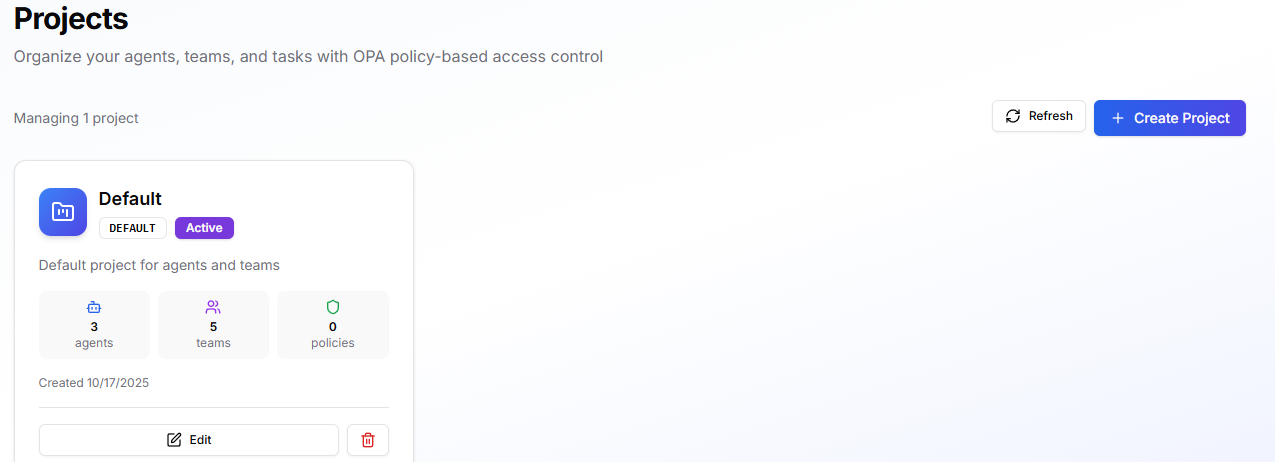
Projects group agents and teams under shared goals, shared context, and shared guardrails. They’re where you define what the work is about, what information is available, and which policies are enforced. Every account includes a **Default** project so you can use the platform immediately.
 ## **When to use**
* Separate work by product, business unit, customer, or lifecycle (e.g., *Payments*, *Security*, *Production*).
* Apply different OPA policies to different areas of work.
* Provide a shared knowledge base and resources to all agents and teams in that area.
* Set a project-wide default LLM model (teams/agents can still override).
## **What it touches**
* **Inheritance:** Project > Team > Agent. Teams and agents inherit project **context** (Knowledge Base, Resources) and **policies**; they may add more at their own level.
* **Model precedence:** Agent > Team > Project default > platform default.
* **Execution:** Projects organize access and context; **Environments** and **Task Queues** determine where and how tasks run.
## **Before you begin**
* Have at least one **Policy** ready if you plan to enforce guardrails from day one.
* Add any **Knowledge Base** items and **Resources** you want available project-wide.
## **Create a project**
## **When to use**
* Separate work by product, business unit, customer, or lifecycle (e.g., *Payments*, *Security*, *Production*).
* Apply different OPA policies to different areas of work.
* Provide a shared knowledge base and resources to all agents and teams in that area.
* Set a project-wide default LLM model (teams/agents can still override).
## **What it touches**
* **Inheritance:** Project > Team > Agent. Teams and agents inherit project **context** (Knowledge Base, Resources) and **policies**; they may add more at their own level.
* **Model precedence:** Agent > Team > Project default > platform default.
* **Execution:** Projects organize access and context; **Environments** and **Task Queues** determine where and how tasks run.
## **Before you begin**
* Have at least one **Policy** ready if you plan to enforce guardrails from day one.
* Add any **Knowledge Base** items and **Resources** you want available project-wide.
## **Create a project**
 1. Go to **Projects** > **Create Project**.
2. **Project Name** and **Project Key**: enter a clear name and a short identifier.
3. **Description**: summarize the project’s scope.
4. **Project Goals**: outline what this project aims to achieve (helps planning and discovery).
5. **Default LLM Model (optional)**: choose a fallback model for teams/agents that don’t specify one.
6. **Project Context**
* **Knowledge Base**: add docs/runbooks/wiki entries relevant to all work here.
* **Resources**: select APIs, datasets, services from your catalog.
7. **OPA Policies**: add one or more policies to enforce across the project.
8. Click **Create Project**. Any Teams or Agents added to this project will inherit the context and policies.
## **Manage and operate**
* **Edit** a project at any time to update goals, default model, context, or policies; changes apply to future runs immediately.
* **Assign Teams and Agents** to bring existing assets under the project’s context/guardrails.
* **Scope changes**: moving a team/agent between projects changes what they inherit (review policies and context after moving).
* **Auditing**: use Projects to filter views and audit activity relevant to a specific product or customer area.
## **Typical setups**
* **Product-based:** *Mobile App*, *Payments*, *Data Platform*, each with its own resources and policies.
* **Customer-based:** *ACME Corp*, *Contoso*, useful for MSSP or multi-tenant work.
* **Lifecycle-based:** *Sandbox*, *Staging*, *Production*, same teams, different guardrails.
For more info on how to use the cli to manage projects go to [Projects Cli](./../cli/resources#projects)
## **Tips**
* Keep project goals short and actionable; they double as planning context.
* Centralize shared docs and service endpoints in the **Project Context**; add sensitive credentials at the **Environment** level.
* Start with permissive policies in non-prod, then tighten in production.
* Use consistent naming/keys so teams and agents are easy to find and filter.
1. Go to **Projects** > **Create Project**.
2. **Project Name** and **Project Key**: enter a clear name and a short identifier.
3. **Description**: summarize the project’s scope.
4. **Project Goals**: outline what this project aims to achieve (helps planning and discovery).
5. **Default LLM Model (optional)**: choose a fallback model for teams/agents that don’t specify one.
6. **Project Context**
* **Knowledge Base**: add docs/runbooks/wiki entries relevant to all work here.
* **Resources**: select APIs, datasets, services from your catalog.
7. **OPA Policies**: add one or more policies to enforce across the project.
8. Click **Create Project**. Any Teams or Agents added to this project will inherit the context and policies.
## **Manage and operate**
* **Edit** a project at any time to update goals, default model, context, or policies; changes apply to future runs immediately.
* **Assign Teams and Agents** to bring existing assets under the project’s context/guardrails.
* **Scope changes**: moving a team/agent between projects changes what they inherit (review policies and context after moving).
* **Auditing**: use Projects to filter views and audit activity relevant to a specific product or customer area.
## **Typical setups**
* **Product-based:** *Mobile App*, *Payments*, *Data Platform*, each with its own resources and policies.
* **Customer-based:** *ACME Corp*, *Contoso*, useful for MSSP or multi-tenant work.
* **Lifecycle-based:** *Sandbox*, *Staging*, *Production*, same teams, different guardrails.
For more info on how to use the cli to manage projects go to [Projects Cli](./../cli/resources#projects)
## **Tips**
* Keep project goals short and actionable; they double as planning context.
* Centralize shared docs and service endpoints in the **Project Context**; add sensitive credentials at the **Environment** level.
* Start with permissive policies in non-prod, then tighten in production.
* Use consistent naming/keys so teams and agents are easy to find and filter.