> ## Documentation Index
> Fetch the complete documentation index at: https://docs.kubiya.ai/llms.txt
> Use this file to discover all available pages before exploring further.
# Policies
> Define and enforce organization guardrails in OPA Rego. Attach policies to Environments, Teams, and Agents to govern who can run what, when, and how—centrally versioned, auditable, and safe.
Policies define the guardrails under which agents, teams, workflows, and tasks must operate. Kubiya uses **OPA (Open Policy Agent)** to enforce consistent governance across environments, ensuring safe, compliant, and deterministic automation.
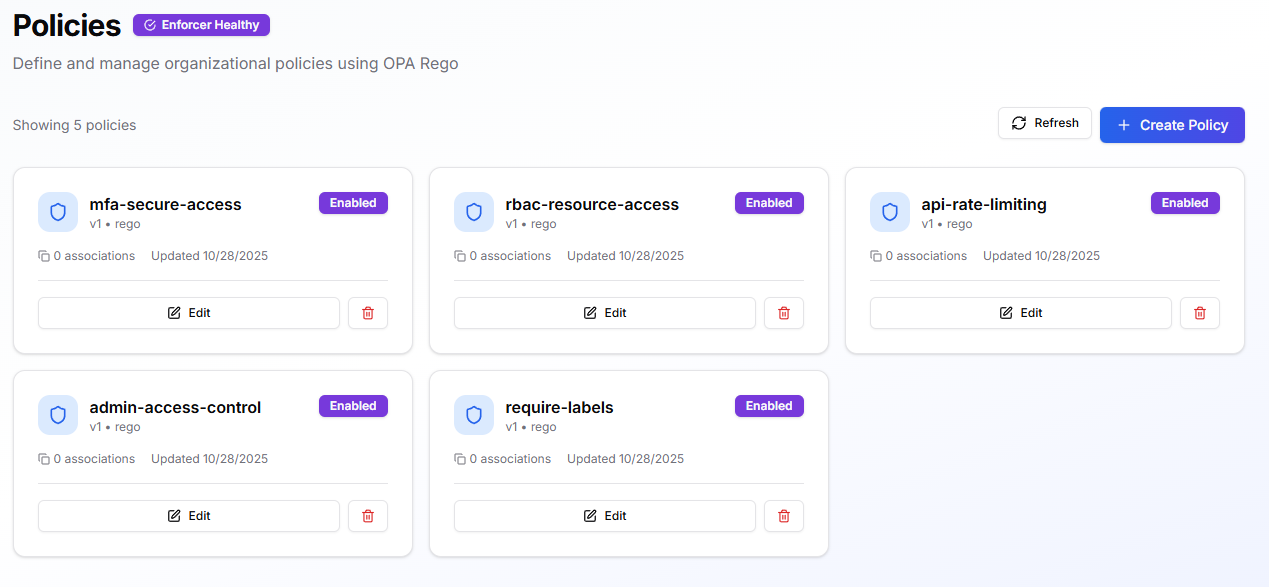 Policies govern **who can run what, when tasks can execute, which tools or resources can be accessed, and what validations must occur before actions are taken**. All policy evaluation is handled by Kubiya’s built-in enforcer.
## **When to use**
Use policies when you need to enforce:
* **Execution rules**, like business hours, environment restrictions, or approval workflows.
* **Access control**, limiting which users, agents, or tools can act on resources.
* **Safety constraints**, preventing destructive changes, unauthorized workflows, or sensitive tool calls.
* **Organization-wide standards**, such as label requirements, naming rules, or mandatory parameters.
* **Consistent governance**, applied across multiple agents, teams, or environments without duplicating configuration.
## **How policies fit into Kubiya**
### Scope & attachment
Policies are defined centrally and can be attached to:
* **Environments** — strongest, inherited by every team/agent running in that environment
* **Teams** — applies to all member agents
* **Agents** — most specific level
These scopes combine; if any attached policy denies an action, the run is blocked.
### Evaluation model
* Policies are checked before the task starts and at relevant steps during execution.
* Any `deny` or `lack` of allow halts the action and returns a clear violation message.
* Allowed steps run normally.
### Versioning & lifecycle
* Each update creates a new version (v1, v2, …).
* Policies can be enabled/disabled at any time.
* The policy card shows:
* Associations (where it is attached)
* Last updated
* Status (“Enabled”, “Disabled”)
## **Prerequisites**
Before creating a policy:
* You must have permission to manage policies in the active control plane.
* Determine where the policy should apply (Environment, Team, Agent).
* Prepare any business logic or conditions you want to enforce.
## **Creating a Policy**
Navigate to **Policies > Create Policy**.
### **1. Details**
* **Policy Name**
Use clear, consistent naming such as `business-hours-policy` or `prod-restrictions`.
* **Description**
A short explanation of what it enforces.
* **Enable Policy**
Turn on if you want it enforced immediately.
* **Tags**
Add labels such as `security`, `governance`, `operations`.
### **2. Policy Content**
You can start from:
* **Templates** (Business Hours, Approved Users, etc.)
* **Blank** (write your own Rego)
Basic structure:
```bash theme={null}
package my_policy
default allow = false
allow {
# conditions go here
}
violations[msg] {
not allow
msg := "Policy violation: explain reason here"
}
```
Click **Create Policy** to publish version `v1`.
## **Attach & Test Policies**
### **Attach a policy**
* **Environment:** Environments → Edit → Policies
* **Team:** Teams → Configure → Advanced → OPA Policies
* **Agent:** Agents → (open agent) → Policies
### **Verify**
Run a simple task that should be:
* **Allowed** (confirm normal behavior), and
* **Denied** (confirm your `violations[msg]` message appears)
If the evaluator is active, the UI shows **Enforcer Healthy**.
## **Runtime Behavior**
* All applicable policies are evaluated for every task or workflow step.
* A deny halts only the **relevant action**, not the entire system.
* Detailed violation messages appear in the task log.
* Policies stack: stricter rules win.
## **Managing Policies**
* **Enable / Disable** policies from the policy card.
* **Update** to publish a new version.
* **Detach** from specific agents/teams/environments without deleting.
* **Delete** unused policies.
## **Useful Starter Policies**
* **Business Hours** — restrict execution to weekdays 09:00–17:00.
* **Approved Users** — only members of a specific group/team may execute.
* **Required Labels** — block runs missing `owner`, `service`, `purpose`.
* **Rate Limits** — restrict frequency of tool/API calls.
* **Sensitive Actions Require MFA** — require explicit confirmation or security signals.
## **Best Practices**
* Start permissive in dev/test; tighten policies in production.
* Always define a useful `violations[msg]` explaining how to resolve the issue.
* Use consistent tagging (e.g., `security`, `cost`, `compliance`).
* Prefer attaching policies at **Environment** level for broad governance.
* Update carefully: disable → edit → re-enable → test with read-only tasks.
## **Troubleshooting**
* **Unexpected block:** Check violation message, then review all attached policies.
* **Policy not enforced:** Verify it is *Enabled* and attached, and **Enforcer Healthy** is active.
* **Tool call denied:** Look for deny rules tied to tool name, args, or missing metadata.
* **Workflow blocked in prod but not staging:** A prod-level environment policy is likely enforcing stronger restrictions.
## **CLI Usage**
Below is the structured CLI reference following the same format as the Agents docs.
Kubiya CLI commands for policies use:
```bash theme={null}
kubiya policy
```
Use:
```bash theme={null}
kubiya policy --help
```
for details.
### **1. List Policies**
Lists all OPA policies in the workspace.
### **Commands**
```bash theme={null}
kubiya policy list
```
```bash theme={null}
kubiya policy list --output json
```
### **Flags**
| Flag | Description |
| ---------- | -------------------------------- |
| `--output` | Output format (`text` or `json`) |
### **2. Get Policy Details**
Retrieve complete information about a specific policy including content, versions, and associations.
### **Commands**
```bash theme={null}
kubiya policy get my-policy
```
```bash theme={null}
kubiya policy get my-policy --output json
```
### **Flags**
| Flag | Description |
| ---------- | ---------------------- |
| `--output` | Output as JSON or text |
### **3. Create a New Policy**
Create an OPA policy using a file or inline content.
### **Commands**
```bash theme={null}
kubiya policy create --name "prod-restrictions" --file policy.rego --env prod
```
or inline:
```bash theme={null}
kubiya policy create --name "tool-access" \
--policy 'package tools; default allow=false; allow { input.tool == "kubectl" }'
```
### **Flags**
| Flag | Description |
| ------------ | -------------------------------------- |
| `--name` | Name of the policy (required) |
| `--file` | Path to a `.rego` file |
| `--policy` | Inline Rego content |
| `--env` | Target environments (comma-separated) |
| `--validate` | Validate before saving (default: true) |
### **4. Update a Policy**
Publish a new version of an existing policy.
### **Commands**
```bash theme={null}
kubiya policy update prod-restrictions --file updated.rego
```
```bash theme={null}
kubiya policy update tool-access --policy 'package tools; allow=true'
```
### **Flags**
| Flag | Description |
| ------------ | ------------------------------- |
| `--file` | New policy file |
| `--policy` | Inline policy text |
| `--env` | Update environment associations |
| `--validate` | Validate before updating |
### **5. Delete a Policy**
### **Command**
```bash theme={null}
kubiya policy delete prod-restrictions --confirm
```
### **Flags**
| Flag | Description |
| ----------- | ------------------ |
| `--confirm` | Required to delete |
### **6. Validate a Policy Without Creating It**
Useful for CI checks or development.
### **Commands**
```bash theme={null}
kubiya policy validate --name "test" --file policy.rego
```
```bash theme={null}
kubiya policy validate --name "test" --policy 'package x; allow=true'
```
### **Flags**
| Flag | Description |
| ---------- | ------------------------------- |
| `--name` | Policy name (required) |
| `--file` | File to validate |
| `--policy` | Inline policy |
| `--env` | Validation context environments |
### **7. Evaluate a Policy Against Input Data**
Run a policy against specific input to test Rego behavior and queries.
### **Usage**
```bash theme={null}
kubiya policy evaluate [flags]
```
### **Examples**
Evaluate policy file + input file + query:
```bash theme={null}
kubiya policy evaluate \
--policy-file policy.rego \
--input-file input.json \
--query "data.tools.allow"
```
Inline policy + inline input:
```bash theme={null}
kubiya policy evaluate \
--policy "package tools; allow = true" \
--input '{"tool": "kubectl"}' \
--query "allow"
```
### **Flags**
| Flag | Description |
| --------------- | ------------------------------ |
| `--policy` | Inline policy content |
| `--policy-file` | Path to `.rego` file |
| `--input` | Input JSON string |
| `--input-file` | Input JSON file |
| `--data` | Additional data JSON string |
| `--data-file` | Additional data JSON file |
| `-q`, `--query` | Query string (default: `data`) |
| `-h`, `--help` | Help for evaluate |
### **8. Test Tool Permissions**
Simulate whether a tool call is allowed.
### **Commands**
```bash theme={null}
kubiya policy test-tool --tool kubectl --args '{"command": "get pods"}' --runner prod
```
### **Flags**
| Flag | Description |
| ------------- | ------------------------ |
| `--tool` | Tool name (required) |
| `--args` | JSON string of tool args |
| `--args-file` | JSON file of tool args |
| `--runner` | Runner name |
### **9. Test Workflow Permissions**
### **Commands**
```bash theme={null}
kubiya policy test-workflow --file workflow.yaml --runner prod
```
```bash theme={null}
kubiya policy test-workflow --file workflow.yaml --params '{"env":"prod"}'
```
### **Flags**
| Flag | Description |
| --------------- | ----------------------------------- |
| `--file` | Workflow definition file (required) |
| `--params` | Workflow params JSON |
| `--params-file` | Workflow params file |
| `--runner` | Runner name |
## **Next Steps**
* Add policies to all relevant environments to enforce consistent governance.
* Combine policies with Teams to enforce multi-agent guardrails.
* Use `test-tool` and `test-workflow` to validate safety before enabling strict enforcement.
Policies govern **who can run what, when tasks can execute, which tools or resources can be accessed, and what validations must occur before actions are taken**. All policy evaluation is handled by Kubiya’s built-in enforcer.
## **When to use**
Use policies when you need to enforce:
* **Execution rules**, like business hours, environment restrictions, or approval workflows.
* **Access control**, limiting which users, agents, or tools can act on resources.
* **Safety constraints**, preventing destructive changes, unauthorized workflows, or sensitive tool calls.
* **Organization-wide standards**, such as label requirements, naming rules, or mandatory parameters.
* **Consistent governance**, applied across multiple agents, teams, or environments without duplicating configuration.
## **How policies fit into Kubiya**
### Scope & attachment
Policies are defined centrally and can be attached to:
* **Environments** — strongest, inherited by every team/agent running in that environment
* **Teams** — applies to all member agents
* **Agents** — most specific level
These scopes combine; if any attached policy denies an action, the run is blocked.
### Evaluation model
* Policies are checked before the task starts and at relevant steps during execution.
* Any `deny` or `lack` of allow halts the action and returns a clear violation message.
* Allowed steps run normally.
### Versioning & lifecycle
* Each update creates a new version (v1, v2, …).
* Policies can be enabled/disabled at any time.
* The policy card shows:
* Associations (where it is attached)
* Last updated
* Status (“Enabled”, “Disabled”)
## **Prerequisites**
Before creating a policy:
* You must have permission to manage policies in the active control plane.
* Determine where the policy should apply (Environment, Team, Agent).
* Prepare any business logic or conditions you want to enforce.
## **Creating a Policy**
Navigate to **Policies > Create Policy**.
### **1. Details**
* **Policy Name**
Use clear, consistent naming such as `business-hours-policy` or `prod-restrictions`.
* **Description**
A short explanation of what it enforces.
* **Enable Policy**
Turn on if you want it enforced immediately.
* **Tags**
Add labels such as `security`, `governance`, `operations`.
### **2. Policy Content**
You can start from:
* **Templates** (Business Hours, Approved Users, etc.)
* **Blank** (write your own Rego)
Basic structure:
```bash theme={null}
package my_policy
default allow = false
allow {
# conditions go here
}
violations[msg] {
not allow
msg := "Policy violation: explain reason here"
}
```
Click **Create Policy** to publish version `v1`.
## **Attach & Test Policies**
### **Attach a policy**
* **Environment:** Environments → Edit → Policies
* **Team:** Teams → Configure → Advanced → OPA Policies
* **Agent:** Agents → (open agent) → Policies
### **Verify**
Run a simple task that should be:
* **Allowed** (confirm normal behavior), and
* **Denied** (confirm your `violations[msg]` message appears)
If the evaluator is active, the UI shows **Enforcer Healthy**.
## **Runtime Behavior**
* All applicable policies are evaluated for every task or workflow step.
* A deny halts only the **relevant action**, not the entire system.
* Detailed violation messages appear in the task log.
* Policies stack: stricter rules win.
## **Managing Policies**
* **Enable / Disable** policies from the policy card.
* **Update** to publish a new version.
* **Detach** from specific agents/teams/environments without deleting.
* **Delete** unused policies.
## **Useful Starter Policies**
* **Business Hours** — restrict execution to weekdays 09:00–17:00.
* **Approved Users** — only members of a specific group/team may execute.
* **Required Labels** — block runs missing `owner`, `service`, `purpose`.
* **Rate Limits** — restrict frequency of tool/API calls.
* **Sensitive Actions Require MFA** — require explicit confirmation or security signals.
## **Best Practices**
* Start permissive in dev/test; tighten policies in production.
* Always define a useful `violations[msg]` explaining how to resolve the issue.
* Use consistent tagging (e.g., `security`, `cost`, `compliance`).
* Prefer attaching policies at **Environment** level for broad governance.
* Update carefully: disable → edit → re-enable → test with read-only tasks.
## **Troubleshooting**
* **Unexpected block:** Check violation message, then review all attached policies.
* **Policy not enforced:** Verify it is *Enabled* and attached, and **Enforcer Healthy** is active.
* **Tool call denied:** Look for deny rules tied to tool name, args, or missing metadata.
* **Workflow blocked in prod but not staging:** A prod-level environment policy is likely enforcing stronger restrictions.
## **CLI Usage**
Below is the structured CLI reference following the same format as the Agents docs.
Kubiya CLI commands for policies use:
```bash theme={null}
kubiya policy
```
Use:
```bash theme={null}
kubiya policy --help
```
for details.
### **1. List Policies**
Lists all OPA policies in the workspace.
### **Commands**
```bash theme={null}
kubiya policy list
```
```bash theme={null}
kubiya policy list --output json
```
### **Flags**
| Flag | Description |
| ---------- | -------------------------------- |
| `--output` | Output format (`text` or `json`) |
### **2. Get Policy Details**
Retrieve complete information about a specific policy including content, versions, and associations.
### **Commands**
```bash theme={null}
kubiya policy get my-policy
```
```bash theme={null}
kubiya policy get my-policy --output json
```
### **Flags**
| Flag | Description |
| ---------- | ---------------------- |
| `--output` | Output as JSON or text |
### **3. Create a New Policy**
Create an OPA policy using a file or inline content.
### **Commands**
```bash theme={null}
kubiya policy create --name "prod-restrictions" --file policy.rego --env prod
```
or inline:
```bash theme={null}
kubiya policy create --name "tool-access" \
--policy 'package tools; default allow=false; allow { input.tool == "kubectl" }'
```
### **Flags**
| Flag | Description |
| ------------ | -------------------------------------- |
| `--name` | Name of the policy (required) |
| `--file` | Path to a `.rego` file |
| `--policy` | Inline Rego content |
| `--env` | Target environments (comma-separated) |
| `--validate` | Validate before saving (default: true) |
### **4. Update a Policy**
Publish a new version of an existing policy.
### **Commands**
```bash theme={null}
kubiya policy update prod-restrictions --file updated.rego
```
```bash theme={null}
kubiya policy update tool-access --policy 'package tools; allow=true'
```
### **Flags**
| Flag | Description |
| ------------ | ------------------------------- |
| `--file` | New policy file |
| `--policy` | Inline policy text |
| `--env` | Update environment associations |
| `--validate` | Validate before updating |
### **5. Delete a Policy**
### **Command**
```bash theme={null}
kubiya policy delete prod-restrictions --confirm
```
### **Flags**
| Flag | Description |
| ----------- | ------------------ |
| `--confirm` | Required to delete |
### **6. Validate a Policy Without Creating It**
Useful for CI checks or development.
### **Commands**
```bash theme={null}
kubiya policy validate --name "test" --file policy.rego
```
```bash theme={null}
kubiya policy validate --name "test" --policy 'package x; allow=true'
```
### **Flags**
| Flag | Description |
| ---------- | ------------------------------- |
| `--name` | Policy name (required) |
| `--file` | File to validate |
| `--policy` | Inline policy |
| `--env` | Validation context environments |
### **7. Evaluate a Policy Against Input Data**
Run a policy against specific input to test Rego behavior and queries.
### **Usage**
```bash theme={null}
kubiya policy evaluate [flags]
```
### **Examples**
Evaluate policy file + input file + query:
```bash theme={null}
kubiya policy evaluate \
--policy-file policy.rego \
--input-file input.json \
--query "data.tools.allow"
```
Inline policy + inline input:
```bash theme={null}
kubiya policy evaluate \
--policy "package tools; allow = true" \
--input '{"tool": "kubectl"}' \
--query "allow"
```
### **Flags**
| Flag | Description |
| --------------- | ------------------------------ |
| `--policy` | Inline policy content |
| `--policy-file` | Path to `.rego` file |
| `--input` | Input JSON string |
| `--input-file` | Input JSON file |
| `--data` | Additional data JSON string |
| `--data-file` | Additional data JSON file |
| `-q`, `--query` | Query string (default: `data`) |
| `-h`, `--help` | Help for evaluate |
### **8. Test Tool Permissions**
Simulate whether a tool call is allowed.
### **Commands**
```bash theme={null}
kubiya policy test-tool --tool kubectl --args '{"command": "get pods"}' --runner prod
```
### **Flags**
| Flag | Description |
| ------------- | ------------------------ |
| `--tool` | Tool name (required) |
| `--args` | JSON string of tool args |
| `--args-file` | JSON file of tool args |
| `--runner` | Runner name |
### **9. Test Workflow Permissions**
### **Commands**
```bash theme={null}
kubiya policy test-workflow --file workflow.yaml --runner prod
```
```bash theme={null}
kubiya policy test-workflow --file workflow.yaml --params '{"env":"prod"}'
```
### **Flags**
| Flag | Description |
| --------------- | ----------------------------------- |
| `--file` | Workflow definition file (required) |
| `--params` | Workflow params JSON |
| `--params-file` | Workflow params file |
| `--runner` | Runner name |
## **Next Steps**
* Add policies to all relevant environments to enforce consistent governance.
* Combine policies with Teams to enforce multi-agent guardrails.
* Use `test-tool` and `test-workflow` to validate safety before enabling strict enforcement.