> ## Documentation Index
> Fetch the complete documentation index at: https://docs.kubiya.ai/llms.txt
> Use this file to discover all available pages before exploring further.
# Task Management Tools
> Tools for executing agents on workers, creating durable tasks, and managing background jobs across distributed compute environments.
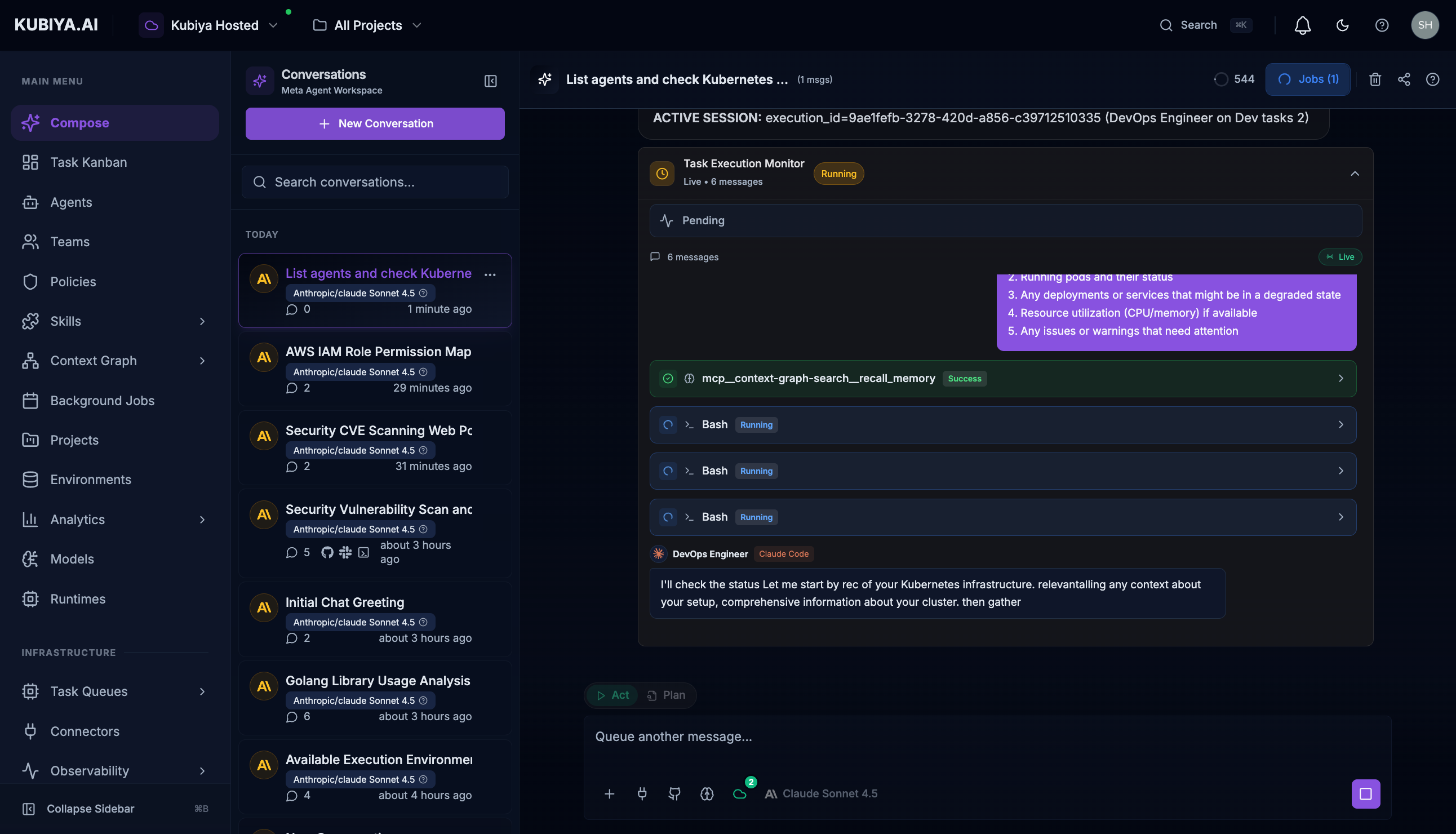
Task Management tools enable the Meta Agent to **execute agents on remote workers**, create and manage tasks in the Kubiya Kanban board, and schedule background jobs. These tools provide **durable task execution** that persists across worker restarts and can span multiple compute environments.
 ## Agent Execution Tools
The Meta Agent can execute any configured agent on available workers through task queues.
| Tool | Description |
| ----------------------------- | ------------------------------------ |
| `list_executors` | List available agents and teams |
| `list_execution_environments` | List task queues with active workers |
| `execute_agent` | Execute an agent on a worker queue |
| `get_execution_status` | Get real-time execution status |
| `stream_execution` | Stream execution output live |
### Executing Agents
Execute agents with natural language - the Meta Agent handles routing to the appropriate worker.
**Example Usage:**
```
"Execute the DevOps agent to check Kubernetes cluster health"
"Run the Security Engineer agent to scan for CVEs"
"Have the SRE agent investigate the production incident"
"Execute the AWS Engineer to list all EC2 instances"
```
### How It Works
1. **List available agents** - Meta Agent checks which agents are configured
2. **Find active workers** - Identifies task queues with connected workers
3. **Create durable task** - Task is persisted and tracked
4. **Route to worker** - Task sent to appropriate queue based on environment
5. **Stream results** - Real-time output displayed as agent works
6. **Track completion** - Execution ID provided for monitoring
Tasks are **durable** - they persist through worker restarts, network issues, and can be monitored asynchronously. Each execution gets a unique ID for tracking and audit.
***
## Task Tools
| Tool | Description |
| ------------- | --------------------------------- |
| `create_task` | Create a new task in the Kanban |
| `update_task` | Update task status or details |
| `list_tasks` | List tasks with optional filters |
| `get_task` | Get detailed task information |
| `assign_task` | Assign a task to an agent or team |
***
## Creating Tasks
Create tasks directly from conversation.
**Example Usage:**
```
"Create a task to update the SSL certificates"
"Add a high-priority task for the security vulnerability fix"
"Create a task and assign it to the DevOps team"
```
Tasks created through the Meta Agent appear in the **[Task Kanban](/core-concepts/task-kanban)** board.
***
## Managing Tasks
Update and track task progress.
**Example Usage:**
```
"Mark the SSL certificate task as complete"
"Move task #123 to In Progress"
"Add a comment to the database migration task"
"What tasks are currently blocked?"
```
***
## Listing Tasks
Filter and search tasks.
**Example Usage:**
```
"Show me all open tasks assigned to the Platform team"
"List high-priority tasks due this week"
"What tasks are in the In Progress column?"
"Find all tasks related to security"
```
***
## Background Jobs
Schedule and manage recurring background jobs.
| Tool | Description |
| ---------------- | ------------------------------ |
| `list_jobs` | List scheduled background jobs |
| `create_job` | Schedule a new recurring job |
| `get_job_status` | Get job execution history |
| `pause_job` | Pause a scheduled job |
| `resume_job` | Resume a paused job |
**Example Usage:**
```
"Schedule a daily backup verification job"
"List all background jobs and their schedules"
"Pause the nightly report job"
"Show me the execution history for the cleanup job"
```
***
## Workflow Examples
### Incident to Task
```
User: "We found a critical vulnerability in the auth service"
Meta Agent: Creates a high-priority task, assigns to security team,
and notifies via Slack
```
### Automated Follow-up
```
User: "Create a task to review the PR once tests pass"
Meta Agent: Creates a conditional task that activates when
CI/CD status changes
```
### Bulk Task Creation
```
User: "Create tasks for each item in this migration checklist"
Meta Agent: Parses the checklist and creates individual tasks
with appropriate assignments
```
***
## Related
* **[Task Kanban](/core-concepts/task-kanban)** - Kanban board interface
* **[Background Jobs](/core-concepts/background-jobs)** - Job scheduling details
* **[Teams](/core-concepts/teams)** - Team task assignment
## Agent Execution Tools
The Meta Agent can execute any configured agent on available workers through task queues.
| Tool | Description |
| ----------------------------- | ------------------------------------ |
| `list_executors` | List available agents and teams |
| `list_execution_environments` | List task queues with active workers |
| `execute_agent` | Execute an agent on a worker queue |
| `get_execution_status` | Get real-time execution status |
| `stream_execution` | Stream execution output live |
### Executing Agents
Execute agents with natural language - the Meta Agent handles routing to the appropriate worker.
**Example Usage:**
```
"Execute the DevOps agent to check Kubernetes cluster health"
"Run the Security Engineer agent to scan for CVEs"
"Have the SRE agent investigate the production incident"
"Execute the AWS Engineer to list all EC2 instances"
```
### How It Works
1. **List available agents** - Meta Agent checks which agents are configured
2. **Find active workers** - Identifies task queues with connected workers
3. **Create durable task** - Task is persisted and tracked
4. **Route to worker** - Task sent to appropriate queue based on environment
5. **Stream results** - Real-time output displayed as agent works
6. **Track completion** - Execution ID provided for monitoring
Tasks are **durable** - they persist through worker restarts, network issues, and can be monitored asynchronously. Each execution gets a unique ID for tracking and audit.
***
## Task Tools
| Tool | Description |
| ------------- | --------------------------------- |
| `create_task` | Create a new task in the Kanban |
| `update_task` | Update task status or details |
| `list_tasks` | List tasks with optional filters |
| `get_task` | Get detailed task information |
| `assign_task` | Assign a task to an agent or team |
***
## Creating Tasks
Create tasks directly from conversation.
**Example Usage:**
```
"Create a task to update the SSL certificates"
"Add a high-priority task for the security vulnerability fix"
"Create a task and assign it to the DevOps team"
```
Tasks created through the Meta Agent appear in the **[Task Kanban](/core-concepts/task-kanban)** board.
***
## Managing Tasks
Update and track task progress.
**Example Usage:**
```
"Mark the SSL certificate task as complete"
"Move task #123 to In Progress"
"Add a comment to the database migration task"
"What tasks are currently blocked?"
```
***
## Listing Tasks
Filter and search tasks.
**Example Usage:**
```
"Show me all open tasks assigned to the Platform team"
"List high-priority tasks due this week"
"What tasks are in the In Progress column?"
"Find all tasks related to security"
```
***
## Background Jobs
Schedule and manage recurring background jobs.
| Tool | Description |
| ---------------- | ------------------------------ |
| `list_jobs` | List scheduled background jobs |
| `create_job` | Schedule a new recurring job |
| `get_job_status` | Get job execution history |
| `pause_job` | Pause a scheduled job |
| `resume_job` | Resume a paused job |
**Example Usage:**
```
"Schedule a daily backup verification job"
"List all background jobs and their schedules"
"Pause the nightly report job"
"Show me the execution history for the cleanup job"
```
***
## Workflow Examples
### Incident to Task
```
User: "We found a critical vulnerability in the auth service"
Meta Agent: Creates a high-priority task, assigns to security team,
and notifies via Slack
```
### Automated Follow-up
```
User: "Create a task to review the PR once tests pass"
Meta Agent: Creates a conditional task that activates when
CI/CD status changes
```
### Bulk Task Creation
```
User: "Create tasks for each item in this migration checklist"
Meta Agent: Parses the checklist and creates individual tasks
with appropriate assignments
```
***
## Related
* **[Task Kanban](/core-concepts/task-kanban)** - Kanban board interface
* **[Background Jobs](/core-concepts/background-jobs)** - Job scheduling details
* **[Teams](/core-concepts/teams)** - Team task assignment