> ## Documentation Index
> Fetch the complete documentation index at: https://docs.kubiya.ai/llms.txt
> Use this file to discover all available pages before exploring further.
# Meta Agent Overview
> Unified orchestration interface connecting users to the Kubiya platform through natural language and MCP-powered APIs.
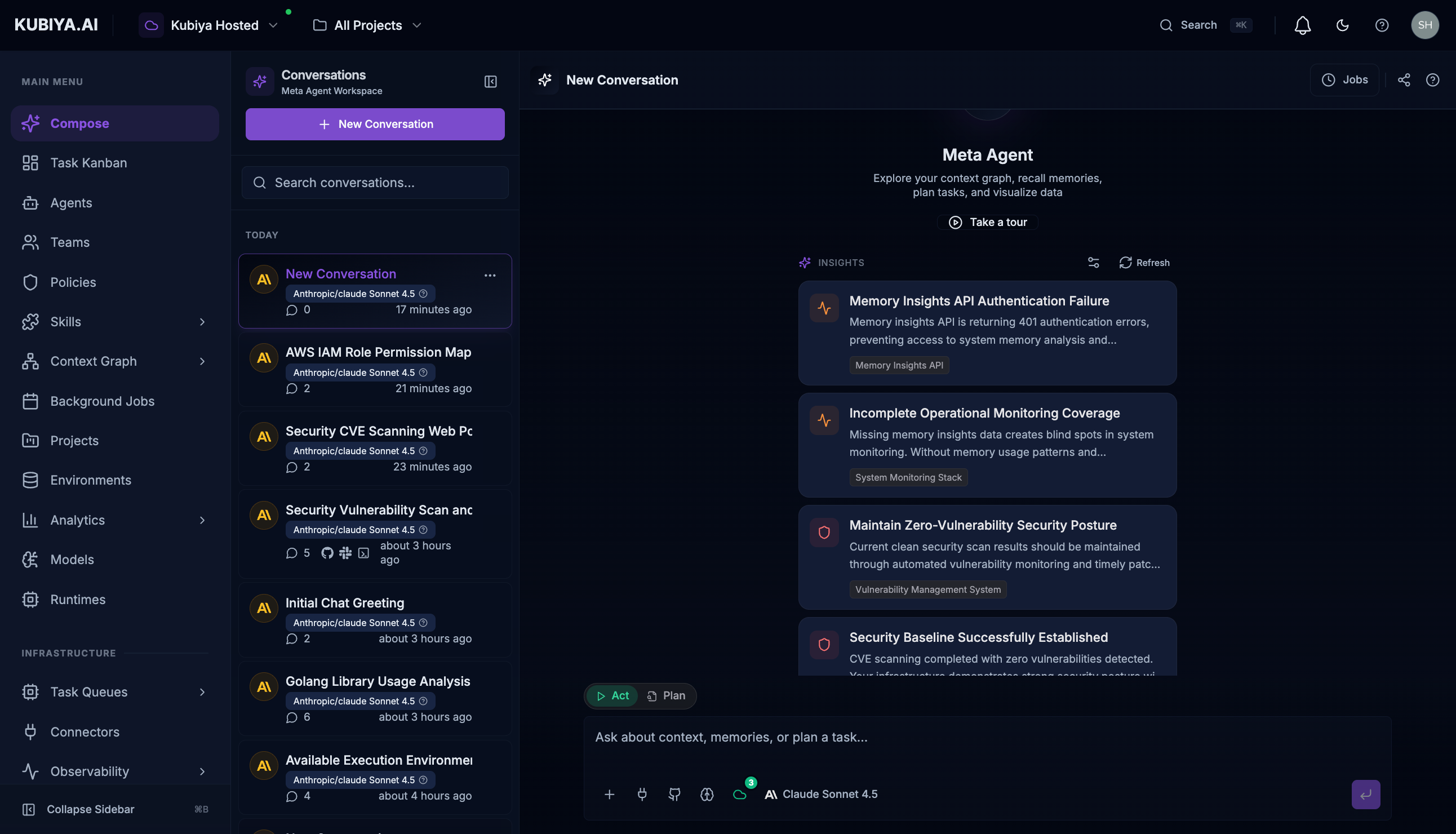 The Meta Agent is Kubiya's **unified orchestration interface**—a coordination layer that connects any user to the full Kubiya platform through natural language. Unlike individual agents that specialize in specific domains, the Meta Agent acts as an intelligent router and coordinator that understands your intent and orchestrates the appropriate resources, agents, teams, and workflows to accomplish your goals.
Built on the **Model Context Protocol (MCP)**, the Meta Agent has direct access to all Kubiya Platform APIs, enabling it to manage agents, teams, environments, projects, executions, cognitive memory, and the context graph—all from a single conversational interface.
**Meta Agent is your primary interface for exploring infrastructure.** Instead of writing Cypher queries or navigating visual graph tools, simply ask the Meta Agent about your infrastructure relationships, dependencies, and resources in natural language.
## Why Meta Agent?
Kubiya provides powerful primitives: agents, teams, environments, skills, policies, and cognitive memory. But navigating these resources typically requires understanding the platform deeply. The Meta Agent eliminates this barrier:
| User Type | Without Meta Agent | With Meta Agent |
| ---------------------- | ---------------------------------------------------------------- | --------------------------------------------------- |
| **Business Users** | Need to learn platform UI, create agents, configure environments | Ask questions in natural language, get results |
| **Developers** | Write API calls, configure MCP servers, manage agent lifecycles | Describe what they need, Meta Agent orchestrates |
| **Data Engineers** | Navigate context graph queries, manage datasets manually | Query infrastructure relationships conversationally |
| **Platform Engineers** | Manually coordinate agents, teams, and executions | Let Meta Agent route tasks to the right resources |
## Key Capabilities
| Capability | Description |
| ----------------------------------------------------------------------------------------------------- | ----------------------------------------------- |
| **[Intelligent Task Routing](/core-concepts/meta-agent/capabilities#intelligent-task-routing)** | Routes requests to appropriate agents and teams |
| **[Context Graph Exploration](/core-concepts/meta-agent/capabilities#context-graph-exploration)** | Query infrastructure without writing Cypher |
| **[Cognitive Memory Access](/core-concepts/meta-agent/capabilities#cognitive-memory-access)** | Tap into organizational knowledge |
| **[Cross-Resource Coordination](/core-concepts/meta-agent/capabilities#cross-resource-coordination)** | Orchestrate complex multi-step operations |
## MCP-Powered Architecture
The Meta Agent connects to the Kubiya Control Plane through MCP, giving it access to all platform capabilities:
| Category | Capabilities |
| -------------------- | --------------------------------------------------- |
| **Agents** | List, create, update, delete, execute agents |
| **Teams** | Manage teams, assign agents, execute team workflows |
| **Environments** | Create and configure execution environments |
| **Projects** | Organize work by objective or domain |
| **Executions** | Monitor, stream, and control running tasks |
| **Context Graph** | Query infrastructure relationships and dependencies |
| **Cognitive Memory** | Store and recall organizational knowledge |
| **Background Jobs** | Schedule and manage recurring automation |
## Quick Start
1. **Open the workspace**: Click **Compose** in the sidebar or press `Cmd+J` (Mac) / `Ctrl+J` (Windows)
2. **Ask a question**: Type naturally, like "Show me all agents with shell access"
3. **Review the response**: See tool calls, reasoning, and structured results
4. **Follow up**: Ask clarifying questions or request actions
## What's Next
* **[Chat Interface](/core-concepts/meta-agent/chat-interface)** - Learn the UI controls and features
* **[Capabilities](/core-concepts/meta-agent/capabilities)** - Explore what Meta Agent can do
* **[Examples](/core-concepts/meta-agent/examples)** - See real-world use cases
* **[Built-in Tools](/core-concepts/meta-agent/tools/overview)** - Reference for all available tools
The Meta Agent is Kubiya's **unified orchestration interface**—a coordination layer that connects any user to the full Kubiya platform through natural language. Unlike individual agents that specialize in specific domains, the Meta Agent acts as an intelligent router and coordinator that understands your intent and orchestrates the appropriate resources, agents, teams, and workflows to accomplish your goals.
Built on the **Model Context Protocol (MCP)**, the Meta Agent has direct access to all Kubiya Platform APIs, enabling it to manage agents, teams, environments, projects, executions, cognitive memory, and the context graph—all from a single conversational interface.
**Meta Agent is your primary interface for exploring infrastructure.** Instead of writing Cypher queries or navigating visual graph tools, simply ask the Meta Agent about your infrastructure relationships, dependencies, and resources in natural language.
## Why Meta Agent?
Kubiya provides powerful primitives: agents, teams, environments, skills, policies, and cognitive memory. But navigating these resources typically requires understanding the platform deeply. The Meta Agent eliminates this barrier:
| User Type | Without Meta Agent | With Meta Agent |
| ---------------------- | ---------------------------------------------------------------- | --------------------------------------------------- |
| **Business Users** | Need to learn platform UI, create agents, configure environments | Ask questions in natural language, get results |
| **Developers** | Write API calls, configure MCP servers, manage agent lifecycles | Describe what they need, Meta Agent orchestrates |
| **Data Engineers** | Navigate context graph queries, manage datasets manually | Query infrastructure relationships conversationally |
| **Platform Engineers** | Manually coordinate agents, teams, and executions | Let Meta Agent route tasks to the right resources |
## Key Capabilities
| Capability | Description |
| ----------------------------------------------------------------------------------------------------- | ----------------------------------------------- |
| **[Intelligent Task Routing](/core-concepts/meta-agent/capabilities#intelligent-task-routing)** | Routes requests to appropriate agents and teams |
| **[Context Graph Exploration](/core-concepts/meta-agent/capabilities#context-graph-exploration)** | Query infrastructure without writing Cypher |
| **[Cognitive Memory Access](/core-concepts/meta-agent/capabilities#cognitive-memory-access)** | Tap into organizational knowledge |
| **[Cross-Resource Coordination](/core-concepts/meta-agent/capabilities#cross-resource-coordination)** | Orchestrate complex multi-step operations |
## MCP-Powered Architecture
The Meta Agent connects to the Kubiya Control Plane through MCP, giving it access to all platform capabilities:
| Category | Capabilities |
| -------------------- | --------------------------------------------------- |
| **Agents** | List, create, update, delete, execute agents |
| **Teams** | Manage teams, assign agents, execute team workflows |
| **Environments** | Create and configure execution environments |
| **Projects** | Organize work by objective or domain |
| **Executions** | Monitor, stream, and control running tasks |
| **Context Graph** | Query infrastructure relationships and dependencies |
| **Cognitive Memory** | Store and recall organizational knowledge |
| **Background Jobs** | Schedule and manage recurring automation |
## Quick Start
1. **Open the workspace**: Click **Compose** in the sidebar or press `Cmd+J` (Mac) / `Ctrl+J` (Windows)
2. **Ask a question**: Type naturally, like "Show me all agents with shell access"
3. **Review the response**: See tool calls, reasoning, and structured results
4. **Follow up**: Ask clarifying questions or request actions
## What's Next
* **[Chat Interface](/core-concepts/meta-agent/chat-interface)** - Learn the UI controls and features
* **[Capabilities](/core-concepts/meta-agent/capabilities)** - Explore what Meta Agent can do
* **[Examples](/core-concepts/meta-agent/examples)** - See real-world use cases
* **[Built-in Tools](/core-concepts/meta-agent/tools/overview)** - Reference for all available tools