> ## Documentation Index
> Fetch the complete documentation index at: https://docs.kubiya.ai/llms.txt
> Use this file to discover all available pages before exploring further.
# Examples
> Real-world examples and walkthroughs demonstrating Meta Agent capabilities.
This page provides practical examples of using the Meta Agent for common tasks.
## Example 1: CVE Remediation Workflow
This walkthrough demonstrates the Meta Agent's end-to-end capabilities by scanning a repository for CVEs and automatically creating a pull request with fixes.
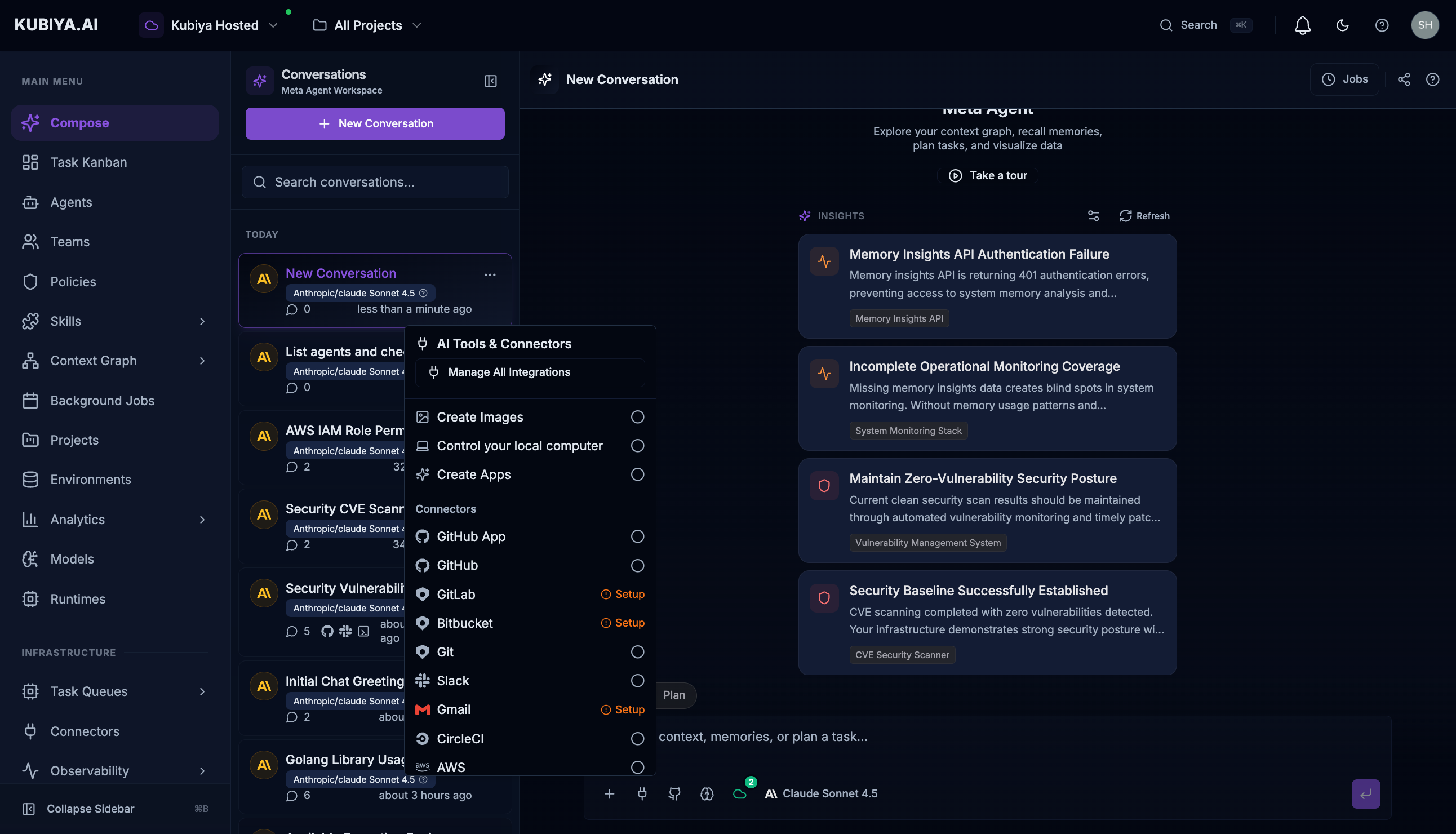
### Step 1: Enable Connectors
First, enable the connectors you'll need. Click the connectors menu and enable **GitHub** and **Sandbox**:
 ### Step 2: Request CVE Scan and Remediation
Enter a prompt asking the Meta Agent to scan for vulnerabilities and fix them:
```
Scan the repository kubiyabot/example-app for CVEs and create
a pull request with fixes for any critical vulnerabilities found.
```
### Step 3: Review Results
The Meta Agent will:
1. Clone the repository in a sandbox environment
2. Run vulnerability scanning tools (like Trivy)
3. Analyze the results and identify fixable issues
4. Generate updated dependency files
5. Create a pull request with the remediation
### What You Get
* **Scan Results** - List of vulnerabilities with severity levels
* **Remediation Plan** - What will be changed and why
* **Pull Request** - Ready for review with detailed description
* **Slack Notification** - Optional alert to your team
***
## Example 2: Infrastructure Discovery
Query your infrastructure without writing Cypher:
### Find Dependencies
```
What services depend on the user-auth database?
```
**Response includes:**
* List of dependent services
* Relationship types (CONNECTS\_TO, DEPENDS\_ON)
* Impact assessment for changes
### Permission Analysis
```
What IAM roles have administrator access across our AWS accounts?
```
**Response includes:**
* Role names and ARNs
* Attached policies
* Account breakdown
* Security recommendations
### Resource Discovery
```
List all EC2 instances in production with their IAM roles
```
**Response includes:**
* Instance IDs and names
* Associated IAM roles
* Region and account information
* Running status
***
## Example 3: Agent Execution
This example demonstrates executing an agent on a remote worker through Meta Agent's durable task management.
### List and Execute Agents
Ask the Meta Agent to list available agents and execute one:
```
List all available agents in the platform, then execute the DevOps
agent to check the status of our Kubernetes infrastructure
```
### Step 2: Request CVE Scan and Remediation
Enter a prompt asking the Meta Agent to scan for vulnerabilities and fix them:
```
Scan the repository kubiyabot/example-app for CVEs and create
a pull request with fixes for any critical vulnerabilities found.
```
### Step 3: Review Results
The Meta Agent will:
1. Clone the repository in a sandbox environment
2. Run vulnerability scanning tools (like Trivy)
3. Analyze the results and identify fixable issues
4. Generate updated dependency files
5. Create a pull request with the remediation
### What You Get
* **Scan Results** - List of vulnerabilities with severity levels
* **Remediation Plan** - What will be changed and why
* **Pull Request** - Ready for review with detailed description
* **Slack Notification** - Optional alert to your team
***
## Example 2: Infrastructure Discovery
Query your infrastructure without writing Cypher:
### Find Dependencies
```
What services depend on the user-auth database?
```
**Response includes:**
* List of dependent services
* Relationship types (CONNECTS\_TO, DEPENDS\_ON)
* Impact assessment for changes
### Permission Analysis
```
What IAM roles have administrator access across our AWS accounts?
```
**Response includes:**
* Role names and ARNs
* Attached policies
* Account breakdown
* Security recommendations
### Resource Discovery
```
List all EC2 instances in production with their IAM roles
```
**Response includes:**
* Instance IDs and names
* Associated IAM roles
* Region and account information
* Running status
***
## Example 3: Agent Execution
This example demonstrates executing an agent on a remote worker through Meta Agent's durable task management.
### List and Execute Agents
Ask the Meta Agent to list available agents and execute one:
```
List all available agents in the platform, then execute the DevOps
agent to check the status of our Kubernetes infrastructure
```
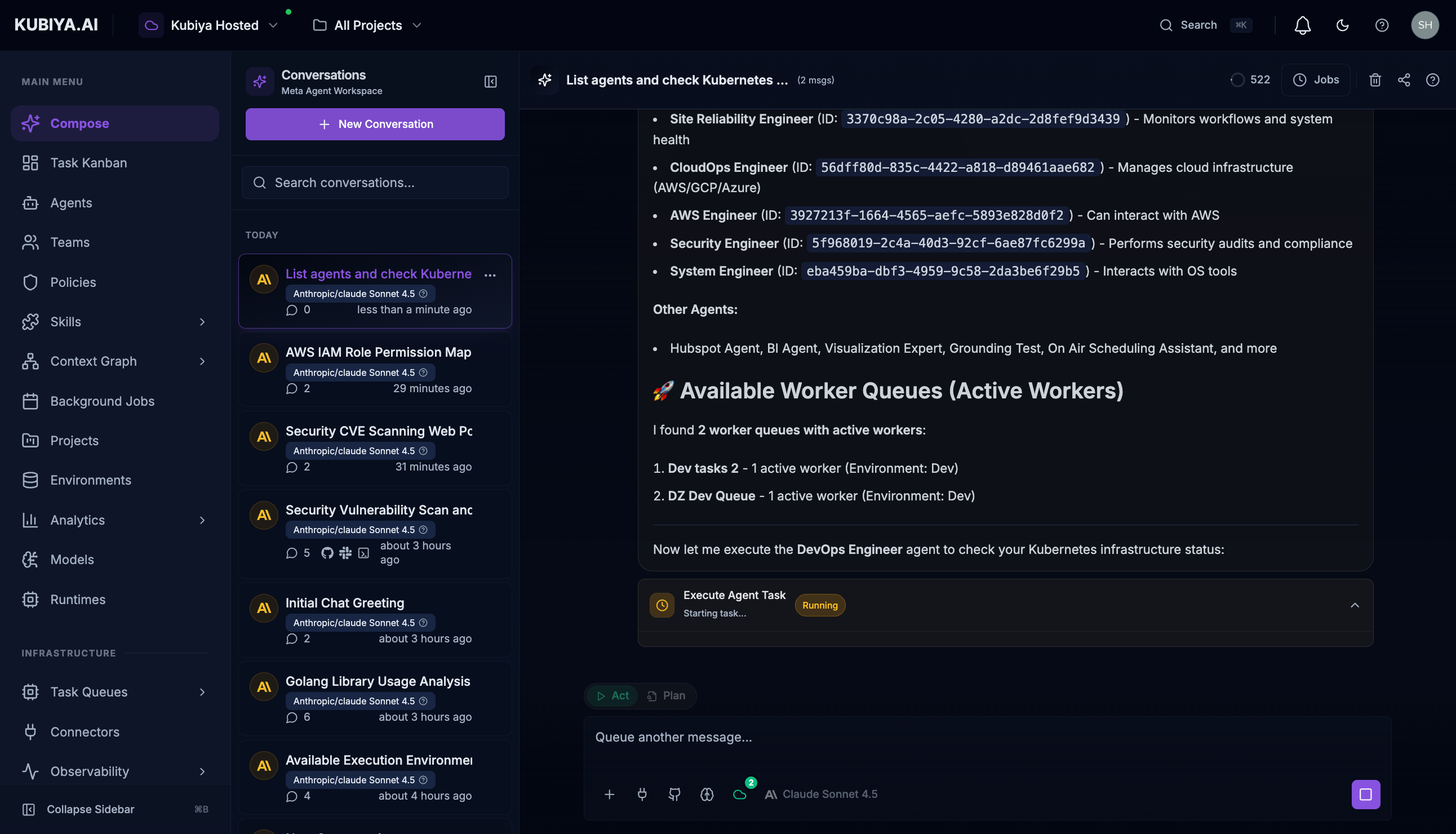 **The Meta Agent will:**
1. List all configured agents with their capabilities
2. Identify available worker queues with active workers
3. Create a durable task and route it to the appropriate queue
4. Stream real-time execution output as the agent works
### Live Task Execution
Watch the agent execute in real-time with full visibility into tool calls:
**The Meta Agent will:**
1. List all configured agents with their capabilities
2. Identify available worker queues with active workers
3. Create a durable task and route it to the appropriate queue
4. Stream real-time execution output as the agent works
### Live Task Execution
Watch the agent execute in real-time with full visibility into tool calls:
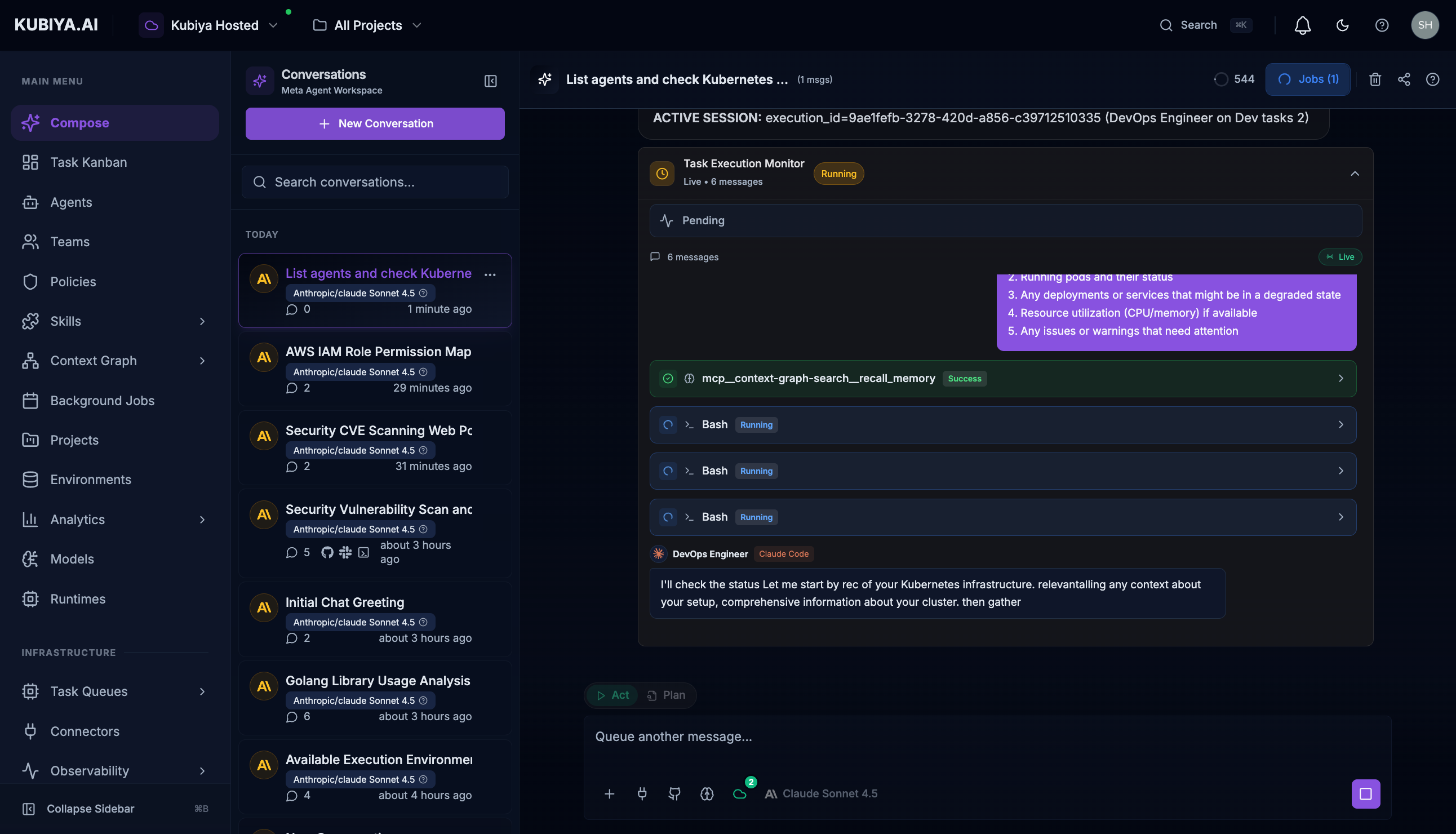 **What you see:**
* **Task Started** indicator with execution ID
* **Runtime** (Claude Code) and **Agent** (DevOps Engineer) details
* **Worker Queue** where the task is executing
* **Live message stream** showing agent reasoning and tool calls
* **Tool execution status** (Running, Success, Failed)
### Create a New Agent
```
Create a new agent called "Database Admin" with PostgreSQL and
MySQL skills, assign it to the Platform team
```
**Meta Agent will:**
1. Create the agent with specified configuration
2. Attach the requested skills
3. Assign to the team
4. Return the agent details
***
## Example 4: Team Coordination
### Create a Team
```
Create a Platform Engineering team with the DevOps agent and
SRE agent, give them access to production environment
```
### Check Team Status
```
Show me all teams and which agents are assigned to each
```
### Execute Team Workflow
```
Have the Security team run a full compliance audit on our
AWS infrastructure
```
***
## Example 5: Memory and Learning
### Query Past Incidents
```
What did we learn from the last production outage?
```
**Response includes:**
* Incident summary from cognitive memory
* Root cause analysis
* Remediation steps taken
* Lessons learned
### Store New Knowledge
```
Store this runbook for future reference: When the API gateway
returns 503 errors, first check the upstream services...
```
### Find Runbooks
```
Find the runbook for database failover procedures
```
***
## Example 6: Background Jobs
### Schedule a Job
```
Schedule a daily backup verification job that runs at 2am UTC
```
### Check Job Status
```
Show me all background jobs and their last execution status
```
### Pause/Resume Jobs
```
Pause the nightly report job until next Monday
```
***
## Example 7: Cross-Platform Operations
### Create Project with Full Setup
```
Create a new project for Q1 cost optimization:
- Assign the FinOps team
- Schedule weekly cloud spend analysis
- Create a Slack channel for updates
- Set up a Jira board for tracking
```
**Meta Agent orchestrates:**
1. Project creation
2. Team assignment
3. Background job scheduling
4. Slack channel creation (with Slack connector)
5. Jira board setup (with Jira connector)
***
## Best Practices
1. **Be Specific** - Include context about what you're looking for
2. **Leverage Natural Language** - Write as you would explain to a colleague
3. **Follow Up** - Ask clarifying questions based on responses
4. **Use Suggestions** - Act on AI-powered insights for proactive management
5. **Review Tool Calls** - Check which platform resources were accessed
6. **Enable Appropriate Connectors** - Make sure needed integrations are enabled
***
## What's Next
* **[Chat Interface](/core-concepts/meta-agent/chat-interface)** - Master the UI controls
* **[Capabilities](/core-concepts/meta-agent/capabilities)** - Full capability reference
* **[Built-in Tools](/core-concepts/meta-agent/tools/overview)** - All available tools
**What you see:**
* **Task Started** indicator with execution ID
* **Runtime** (Claude Code) and **Agent** (DevOps Engineer) details
* **Worker Queue** where the task is executing
* **Live message stream** showing agent reasoning and tool calls
* **Tool execution status** (Running, Success, Failed)
### Create a New Agent
```
Create a new agent called "Database Admin" with PostgreSQL and
MySQL skills, assign it to the Platform team
```
**Meta Agent will:**
1. Create the agent with specified configuration
2. Attach the requested skills
3. Assign to the team
4. Return the agent details
***
## Example 4: Team Coordination
### Create a Team
```
Create a Platform Engineering team with the DevOps agent and
SRE agent, give them access to production environment
```
### Check Team Status
```
Show me all teams and which agents are assigned to each
```
### Execute Team Workflow
```
Have the Security team run a full compliance audit on our
AWS infrastructure
```
***
## Example 5: Memory and Learning
### Query Past Incidents
```
What did we learn from the last production outage?
```
**Response includes:**
* Incident summary from cognitive memory
* Root cause analysis
* Remediation steps taken
* Lessons learned
### Store New Knowledge
```
Store this runbook for future reference: When the API gateway
returns 503 errors, first check the upstream services...
```
### Find Runbooks
```
Find the runbook for database failover procedures
```
***
## Example 6: Background Jobs
### Schedule a Job
```
Schedule a daily backup verification job that runs at 2am UTC
```
### Check Job Status
```
Show me all background jobs and their last execution status
```
### Pause/Resume Jobs
```
Pause the nightly report job until next Monday
```
***
## Example 7: Cross-Platform Operations
### Create Project with Full Setup
```
Create a new project for Q1 cost optimization:
- Assign the FinOps team
- Schedule weekly cloud spend analysis
- Create a Slack channel for updates
- Set up a Jira board for tracking
```
**Meta Agent orchestrates:**
1. Project creation
2. Team assignment
3. Background job scheduling
4. Slack channel creation (with Slack connector)
5. Jira board setup (with Jira connector)
***
## Best Practices
1. **Be Specific** - Include context about what you're looking for
2. **Leverage Natural Language** - Write as you would explain to a colleague
3. **Follow Up** - Ask clarifying questions based on responses
4. **Use Suggestions** - Act on AI-powered insights for proactive management
5. **Review Tool Calls** - Check which platform resources were accessed
6. **Enable Appropriate Connectors** - Make sure needed integrations are enabled
***
## What's Next
* **[Chat Interface](/core-concepts/meta-agent/chat-interface)** - Master the UI controls
* **[Capabilities](/core-concepts/meta-agent/capabilities)** - Full capability reference
* **[Built-in Tools](/core-concepts/meta-agent/tools/overview)** - All available tools