> ## Documentation Index
> Fetch the complete documentation index at: https://docs.kubiya.ai/llms.txt
> Use this file to discover all available pages before exploring further.
# Meta Agent
> Unified orchestration interface connecting users to the Kubiya platform through natural language and MCP-powered APIs.
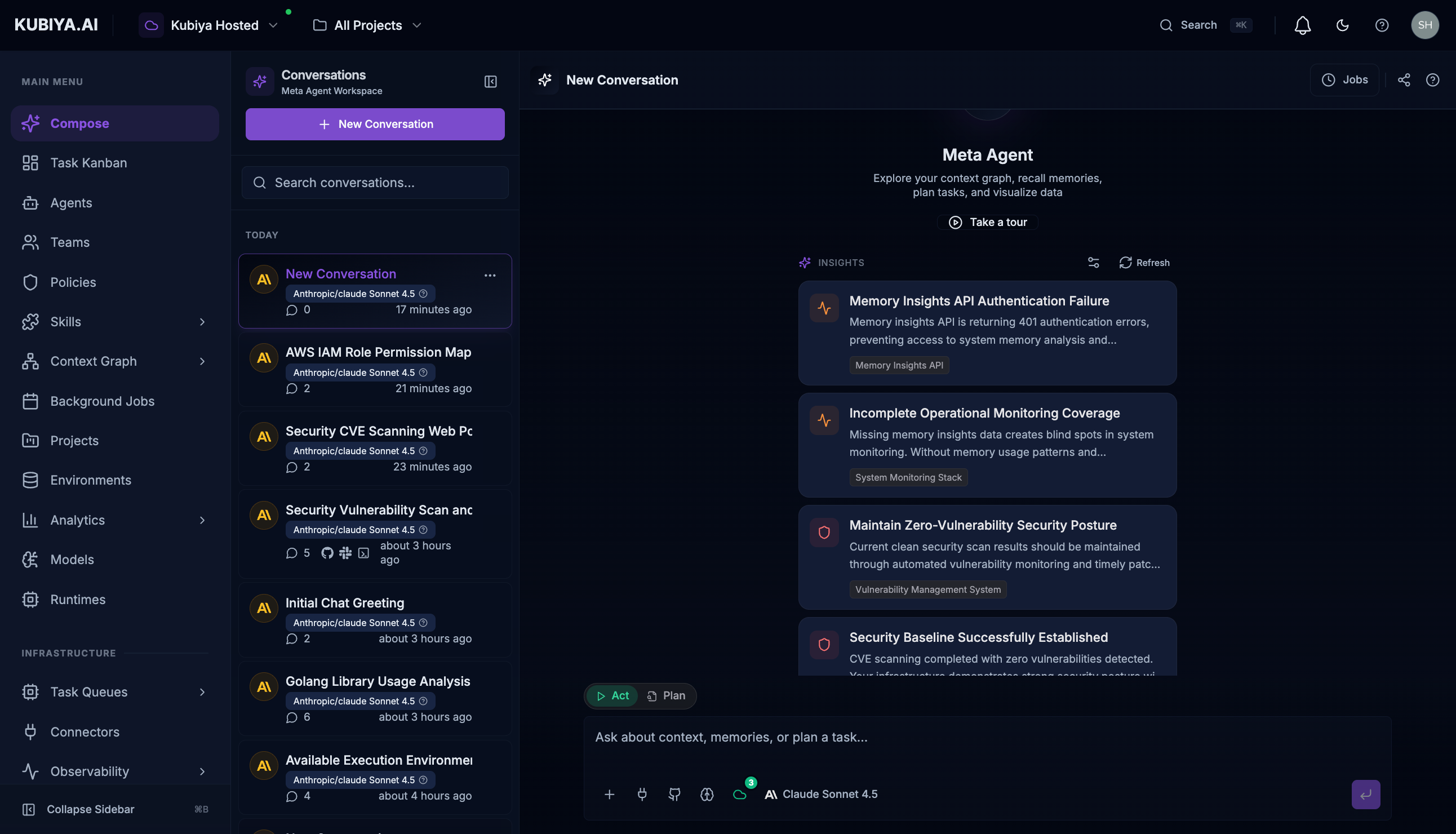 The Meta Agent is Kubiya's **unified orchestration interface**—a coordination layer that connects any user to the full Kubiya platform through natural language. Unlike individual agents that specialize in specific domains, the Meta Agent acts as an intelligent router and coordinator that understands your intent and orchestrates the appropriate resources, agents, teams, and workflows to accomplish your goals.
Built on the **Model Context Protocol (MCP)**, the Meta Agent has direct access to all Kubiya Platform APIs, enabling it to manage agents, teams, environments, projects, executions, cognitive memory, and the context graph—all from a single conversational interface.
## Quick Start
1. **Open the workspace**: Click **Compose** in the sidebar or press `Cmd+J` (Mac) / `Ctrl+J` (Windows)
2. **Ask a question**: Type naturally, like "Show me all agents with shell access"
3. **Review the response**: See tool calls, reasoning, and structured results
4. **Follow up**: Ask clarifying questions or request actions
## Documentation
| Section | Description |
| -------------------------------------------------------------- | ---------------------------------------------- |
| **[Overview](/core-concepts/meta-agent/overview)** | Introduction and architecture |
| **[Chat Interface](/core-concepts/meta-agent/chat-interface)** | UI controls, connectors, model selection |
| **[Capabilities](/core-concepts/meta-agent/capabilities)** | Task routing, graph exploration, memory access |
| **[Examples](/core-concepts/meta-agent/examples)** | Real-world walkthroughs |
## Built-in Tools
The Meta Agent has access to a comprehensive set of tools:
| Category | Description |
| ------------------------------------------------------------------------ | ---------------------------------------------- |
| **[Platform Tools](/core-concepts/meta-agent/tools/platform)** | Manage agents, teams, environments, executions |
| **[Context Graph](/core-concepts/meta-agent/tools/context-graph)** | Query infrastructure relationships |
| **[Cognitive Memory](/core-concepts/meta-agent/tools/cognitive-memory)** | Access organizational knowledge |
| **[Task Management](/core-concepts/meta-agent/tools/task-management)** | Create and track tasks |
| **[Connectors](/core-concepts/meta-agent/tools/connectors)** | External service integrations |
| **[Sandbox](/core-concepts/meta-agent/tools/sandbox)** | Safe code execution |
## Why Meta Agent?
| User Type | Without Meta Agent | With Meta Agent |
| ---------------------- | ---------------------------------------------------------------- | --------------------------------------------------- |
| **Business Users** | Need to learn platform UI, create agents, configure environments | Ask questions in natural language, get results |
| **Developers** | Write API calls, configure MCP servers, manage agent lifecycles | Describe what they need, Meta Agent orchestrates |
| **Data Engineers** | Navigate context graph queries, manage datasets manually | Query infrastructure relationships conversationally |
| **Platform Engineers** | Manually coordinate agents, teams, and executions | Let Meta Agent route tasks to the right resources |
## Keyboard Shortcuts
| Shortcut | Action |
| --------------- | --------------------------- |
| `Cmd/Ctrl + J` | Open/close Meta Agent panel |
| `Cmd/Ctrl + B` | Toggle sidebar |
| `Enter` | Send message |
| `Shift + Enter` | New line in message |
| `Escape` | Close Meta Agent panel |
The Meta Agent is Kubiya's **unified orchestration interface**—a coordination layer that connects any user to the full Kubiya platform through natural language. Unlike individual agents that specialize in specific domains, the Meta Agent acts as an intelligent router and coordinator that understands your intent and orchestrates the appropriate resources, agents, teams, and workflows to accomplish your goals.
Built on the **Model Context Protocol (MCP)**, the Meta Agent has direct access to all Kubiya Platform APIs, enabling it to manage agents, teams, environments, projects, executions, cognitive memory, and the context graph—all from a single conversational interface.
## Quick Start
1. **Open the workspace**: Click **Compose** in the sidebar or press `Cmd+J` (Mac) / `Ctrl+J` (Windows)
2. **Ask a question**: Type naturally, like "Show me all agents with shell access"
3. **Review the response**: See tool calls, reasoning, and structured results
4. **Follow up**: Ask clarifying questions or request actions
## Documentation
| Section | Description |
| -------------------------------------------------------------- | ---------------------------------------------- |
| **[Overview](/core-concepts/meta-agent/overview)** | Introduction and architecture |
| **[Chat Interface](/core-concepts/meta-agent/chat-interface)** | UI controls, connectors, model selection |
| **[Capabilities](/core-concepts/meta-agent/capabilities)** | Task routing, graph exploration, memory access |
| **[Examples](/core-concepts/meta-agent/examples)** | Real-world walkthroughs |
## Built-in Tools
The Meta Agent has access to a comprehensive set of tools:
| Category | Description |
| ------------------------------------------------------------------------ | ---------------------------------------------- |
| **[Platform Tools](/core-concepts/meta-agent/tools/platform)** | Manage agents, teams, environments, executions |
| **[Context Graph](/core-concepts/meta-agent/tools/context-graph)** | Query infrastructure relationships |
| **[Cognitive Memory](/core-concepts/meta-agent/tools/cognitive-memory)** | Access organizational knowledge |
| **[Task Management](/core-concepts/meta-agent/tools/task-management)** | Create and track tasks |
| **[Connectors](/core-concepts/meta-agent/tools/connectors)** | External service integrations |
| **[Sandbox](/core-concepts/meta-agent/tools/sandbox)** | Safe code execution |
## Why Meta Agent?
| User Type | Without Meta Agent | With Meta Agent |
| ---------------------- | ---------------------------------------------------------------- | --------------------------------------------------- |
| **Business Users** | Need to learn platform UI, create agents, configure environments | Ask questions in natural language, get results |
| **Developers** | Write API calls, configure MCP servers, manage agent lifecycles | Describe what they need, Meta Agent orchestrates |
| **Data Engineers** | Navigate context graph queries, manage datasets manually | Query infrastructure relationships conversationally |
| **Platform Engineers** | Manually coordinate agents, teams, and executions | Let Meta Agent route tasks to the right resources |
## Keyboard Shortcuts
| Shortcut | Action |
| --------------- | --------------------------- |
| `Cmd/Ctrl + J` | Open/close Meta Agent panel |
| `Cmd/Ctrl + B` | Toggle sidebar |
| `Enter` | Send message |
| `Shift + Enter` | New line in message |
| `Escape` | Close Meta Agent panel |