> ## Documentation Index
> Fetch the complete documentation index at: https://docs.kubiya.ai/llms.txt
> Use this file to discover all available pages before exploring further.
# Environments
> Execution contexts (dev, staging, prod, regions) that define settings, shared context, Skills, and OPA policies. Teams and agents inherit configuration for consistent, governed task execution.
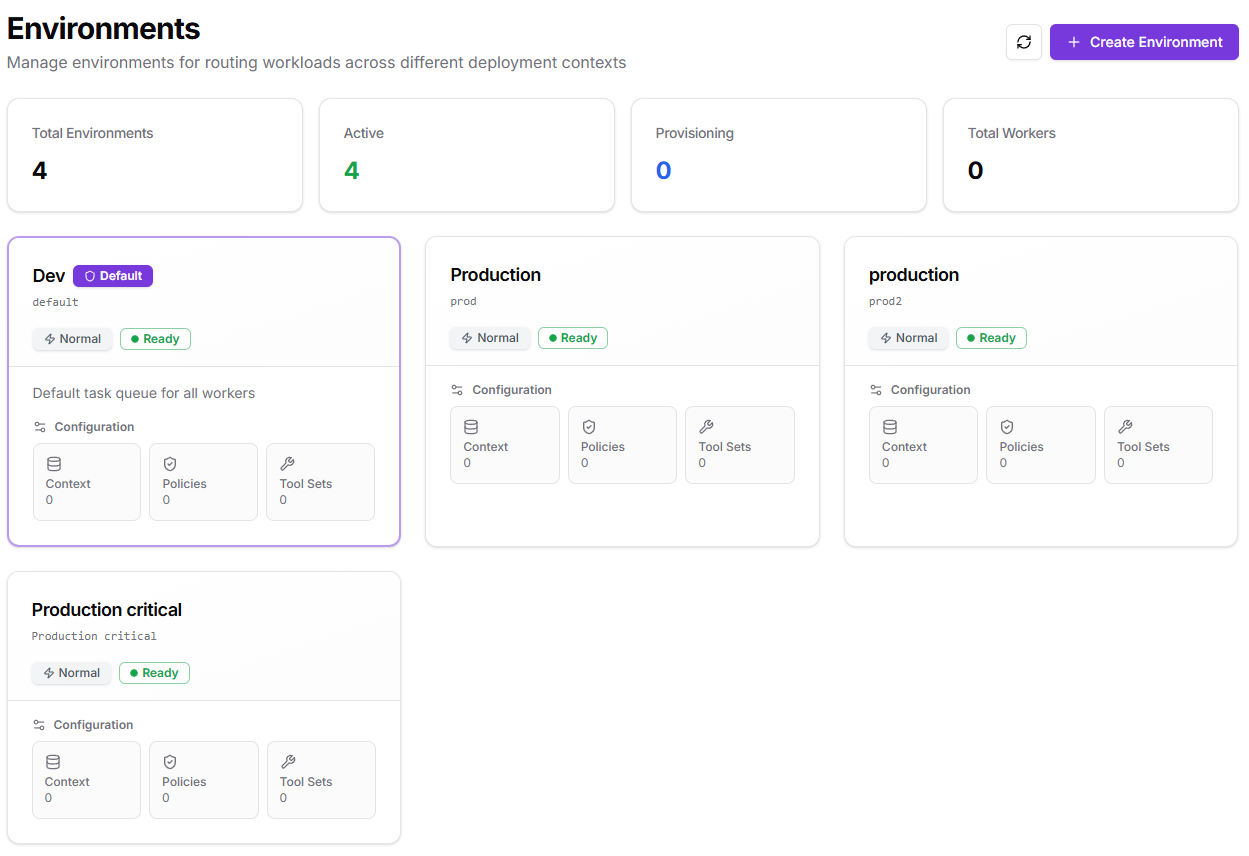
Routing contexts for where Kubiya runs work (e.g., dev, staging, prod, or regional). Each environment carries its own execution settings, context, policies, and Skills. Items you configure here are **inherited by every team and agent** deployed to that environment.
 ## **When to use**
* You need separate runtime settings for dev/staging/prod.
* You want regional routing (us-east, eu-west) or data-sensitivity boundaries.
* You want distinct policy enforcement (e.g., prod is read-only, dev is open).
## **What it configures**
* **Execution settings:** environment variables, secrets, and integration credentials available to all workloads in this environment.
* **Context:** shared knowledge bases and resource catalogs agents can reference while executing.
* **OPA policies:** rules that must be satisfied (time windows, RBAC, labeling, approvals).
* **Skills:** system-level capabilities (filesystem, shell, Docker, Python, etc.).
* **Priority:** scheduling weight when multiple environments are eligible.
Tip: Environments don't create capacity by themselves. Capacity comes from **Workers** connected to your task queues. The environment tells Kubiya *how* and *with what context* to run.
## **How it works in Kubiya**
1. You create one or more environments (a default is provided).
2. Teams/agents are deployed to one or more environments.
3. When you start a task, Kubiya routes it to the selected environment.
4. Policies are evaluated; if allowed, steps execute with the environment’s execution settings and Skills.
5. Readiness badges (e.g., **Ready**, **Normal**) reflect health and availability for routing.
## **Create an environment**
## **When to use**
* You need separate runtime settings for dev/staging/prod.
* You want regional routing (us-east, eu-west) or data-sensitivity boundaries.
* You want distinct policy enforcement (e.g., prod is read-only, dev is open).
## **What it configures**
* **Execution settings:** environment variables, secrets, and integration credentials available to all workloads in this environment.
* **Context:** shared knowledge bases and resource catalogs agents can reference while executing.
* **OPA policies:** rules that must be satisfied (time windows, RBAC, labeling, approvals).
* **Skills:** system-level capabilities (filesystem, shell, Docker, Python, etc.).
* **Priority:** scheduling weight when multiple environments are eligible.
Tip: Environments don't create capacity by themselves. Capacity comes from **Workers** connected to your task queues. The environment tells Kubiya *how* and *with what context* to run.
## **How it works in Kubiya**
1. You create one or more environments (a default is provided).
2. Teams/agents are deployed to one or more environments.
3. When you start a task, Kubiya routes it to the selected environment.
4. Policies are evaluated; if allowed, steps execute with the environment’s execution settings and Skills.
5. Readiness badges (e.g., **Ready**, **Normal**) reflect health and availability for routing.
## **Create an environment**
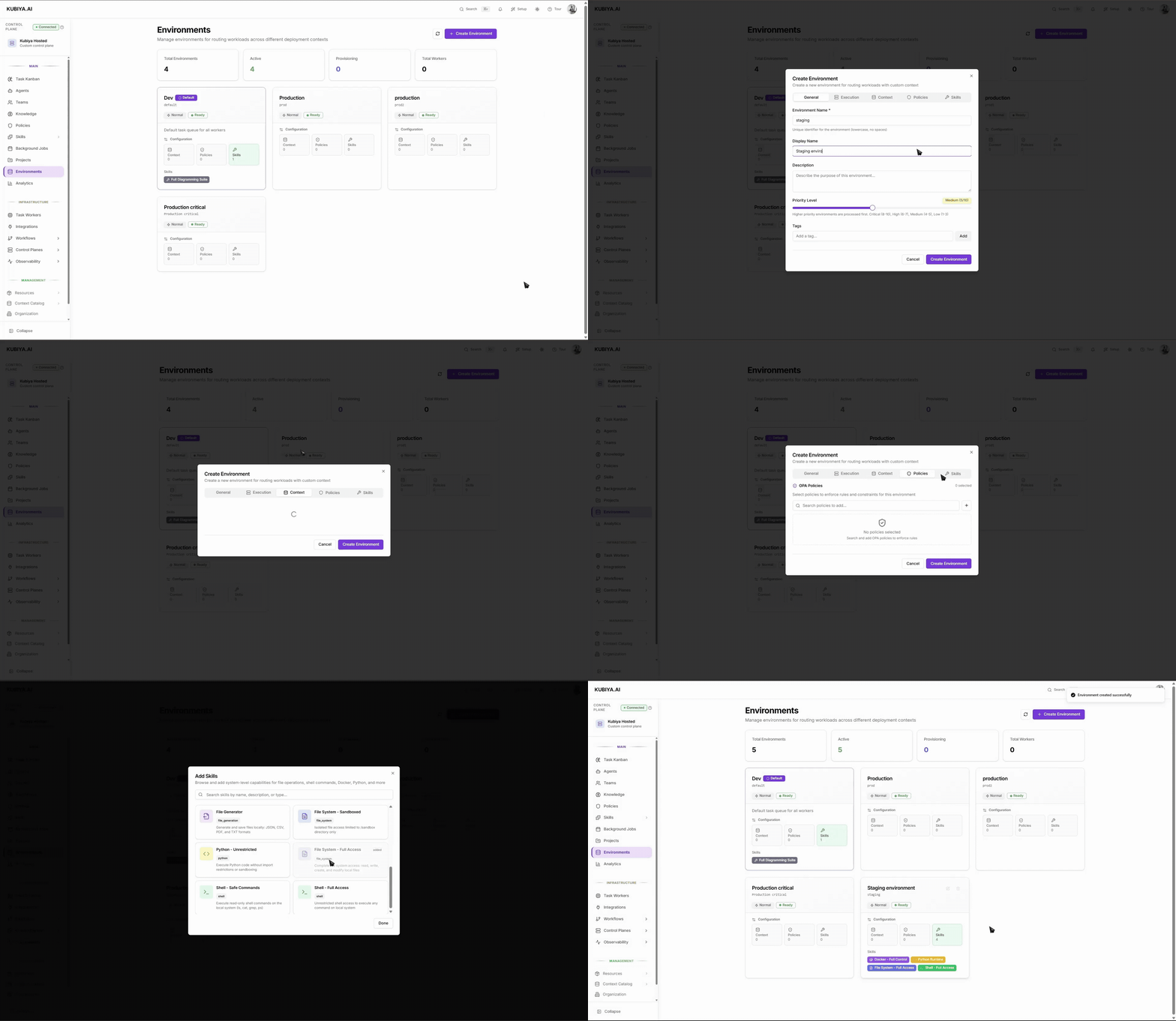 1. **Go to**: **Environments > Create Environment**.
2. **General**
* **Environment Name** (immutable key, lowercase, no spaces).
* **Display Name** and **Description**.
* **Priority Level** slider: higher values are processed first when routing (Low 1-3, Medium 4-5, High 6-7, Critical 8-10).
* Optional **Tags** for filtering.
3. **Execution**
* **Environment Variables**: key/value pairs (e.g., `API_URL`).
* **Secrets**: select stored secrets to expose at runtime.
* **Integration Credentials**: attach accounts/keys for external systems.
4. **Context**
* **Knowledge Base**: add documents/data sets agents may consult.
* **Resources**: add catalog entries (clusters, services, repos, etc.).
5. **Policies**
* Select one or more **OPA** policies to enforce in this environment.
6. **Skills**
* Add system capabilities (e.g., **Shell – Safe Commands**, **Docker – Containers**, **Python**).
7. **Create Environment**.
## **Edit or evolve an environment**
1. **Environments >** open the card > **Configuration**.
2. Adjust any tab (**General, Execution, Context, Policies, Skills**).
3. **Update Environment** to apply changes. Updates affect subsequent runs for teams/agents deployed here.
## **Common patterns**
* **Dev / Staging / Prod:** relaxed vs. strict policies; different credentials; prod marked **High/Critical** priority.
* **Regional isolation:** `prod-eu` vs `prod-us` with region-specific credentials and resources.
* **Data-sensitivity tiers:** `pii-restricted` with limited Skills and stricter OPA.
* **Air-gapped:** environment with only self-hosted workers and local Skills.
## **Tips**
* Start with the **Default** environment; create additional ones as soon as you need different policies or credentials.
* Keep **Execution** minimal in prod—prefer read-only Skills where possible and enforce OPA policies (MFA, business hours, RBAC).
* Use **Priority** to ensure urgent or prod work preempts lower-priority queues when capacity is shared.
## **Relationships**
* **Projects:** can provide shared goals/context; environments supply the runtime boundary.
* **Teams & Agents:** inherit execution settings, context, policies, and Skills from the environment(s) they're deployed to.
* **Workers:** provide the actual compute capacity. Make sure workers are connected to the task queues that service your environments.
For more info on how to use the cli to manage environments go to [Environments Cli](./../cli/resources#environments)
## **Troubleshooting signals**
* **Status not Ready:** missing secrets/integrations or misconfigured Skills, open the environment and review **Execution** and **Skills**.
* **Tasks don't start:** no worker capacity, check **Task Queues** and queue attachments.
* **Policy denials:** open **Policies** on the environment and inspect OPA rule messages in run logs.
* **Wrong credentials used:** confirm the task ran in the intended environment and that **Execution > Integration Credentials** are correct.
1. **Go to**: **Environments > Create Environment**.
2. **General**
* **Environment Name** (immutable key, lowercase, no spaces).
* **Display Name** and **Description**.
* **Priority Level** slider: higher values are processed first when routing (Low 1-3, Medium 4-5, High 6-7, Critical 8-10).
* Optional **Tags** for filtering.
3. **Execution**
* **Environment Variables**: key/value pairs (e.g., `API_URL`).
* **Secrets**: select stored secrets to expose at runtime.
* **Integration Credentials**: attach accounts/keys for external systems.
4. **Context**
* **Knowledge Base**: add documents/data sets agents may consult.
* **Resources**: add catalog entries (clusters, services, repos, etc.).
5. **Policies**
* Select one or more **OPA** policies to enforce in this environment.
6. **Skills**
* Add system capabilities (e.g., **Shell – Safe Commands**, **Docker – Containers**, **Python**).
7. **Create Environment**.
## **Edit or evolve an environment**
1. **Environments >** open the card > **Configuration**.
2. Adjust any tab (**General, Execution, Context, Policies, Skills**).
3. **Update Environment** to apply changes. Updates affect subsequent runs for teams/agents deployed here.
## **Common patterns**
* **Dev / Staging / Prod:** relaxed vs. strict policies; different credentials; prod marked **High/Critical** priority.
* **Regional isolation:** `prod-eu` vs `prod-us` with region-specific credentials and resources.
* **Data-sensitivity tiers:** `pii-restricted` with limited Skills and stricter OPA.
* **Air-gapped:** environment with only self-hosted workers and local Skills.
## **Tips**
* Start with the **Default** environment; create additional ones as soon as you need different policies or credentials.
* Keep **Execution** minimal in prod—prefer read-only Skills where possible and enforce OPA policies (MFA, business hours, RBAC).
* Use **Priority** to ensure urgent or prod work preempts lower-priority queues when capacity is shared.
## **Relationships**
* **Projects:** can provide shared goals/context; environments supply the runtime boundary.
* **Teams & Agents:** inherit execution settings, context, policies, and Skills from the environment(s) they're deployed to.
* **Workers:** provide the actual compute capacity. Make sure workers are connected to the task queues that service your environments.
For more info on how to use the cli to manage environments go to [Environments Cli](./../cli/resources#environments)
## **Troubleshooting signals**
* **Status not Ready:** missing secrets/integrations or misconfigured Skills, open the environment and review **Execution** and **Skills**.
* **Tasks don't start:** no worker capacity, check **Task Queues** and queue attachments.
* **Policy denials:** open **Policies** on the environment and inspect OPA rule messages in run logs.
* **Wrong credentials used:** confirm the task ran in the intended environment and that **Execution > Integration Credentials** are correct.