> ## Documentation Index
> Fetch the complete documentation index at: https://docs.kubiya.ai/llms.txt
> Use this file to discover all available pages before exploring further.
# Context Graph Use Cases
> Explore real-world use cases for the Context Graph, including Meta Agent tool calling for dynamic queries, relationship mapping, and infrastructure analysis.
The Context Graph becomes most powerful when combined with the Meta Agent's tool calling capabilities. This page demonstrates practical use cases where natural language queries are transformed into dynamic Cypher queries, providing deep insights into your infrastructure.
The Meta Agent has built-in tools for interacting with the Context Graph API. These tools allow it to fetch schema, scan nodes, execute Cypher queries, store relationships, and create new nodes—all through natural language conversation.
## Meta Agent Context Graph Tools
The Meta Agent has access to the following Context Graph tools:
| Tool | Description |
| ------------------------ | ------------------------------------------------------------------------- |
| **Fetch Graph Schema** | Retrieves the current graph schema including node types and relationships |
| **Scan Graph Nodes** | Searches for nodes matching specific criteria |
| **Execute Cypher Query** | Runs dynamic Cypher queries against the graph |
| **Store Relationship** | Creates new relationships between existing nodes |
| **Create Node** | Adds new nodes to the graph with specified labels and properties |
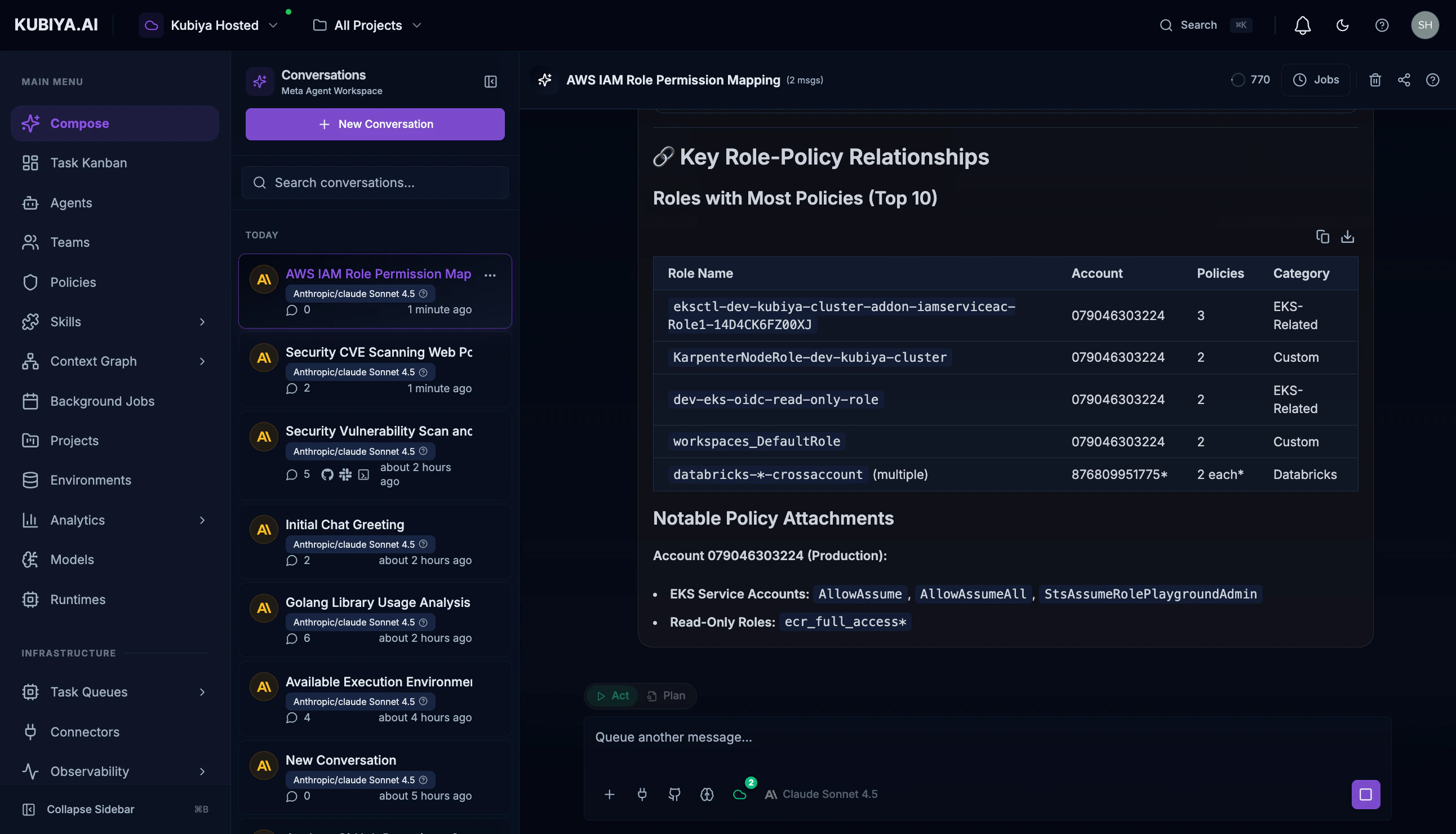
## Use Case 1: AWS IAM Permission Analysis
Understand your AWS IAM permission structure across multiple accounts by querying roles, policies, and their relationships.
### Example Prompt
```
Show me all AWS IAM roles and their relationships with policies
in the context graph. I want to understand the permission
structure across our AWS accounts.
```
### What Happens
The Meta Agent executes a series of tool calls:
1. **Fetches Graph Schema** - Understands available node types and relationships
2. **Scans for IAM Nodes** - Identifies AWS-related entities
3. **Executes Dynamic Cypher Queries** - Retrieves roles, policies, and their connections
 ### Sample Generated Queries
The Meta Agent dynamically generates queries like:
```cypher theme={null}
MATCH (role:AWSRole)-[rel:POLICY]->(policy)
WHERE policy:AWSManagedPolicy OR policy:AWSInlinePolicy
RETURN role.name AS role_name,
role.arn AS role_arn,
type(rel) AS relationship,
policy.name AS policy_name,
labels(policy) AS policy_type
ORDER BY role.name, policy.name
LIMIT 100
```
### Results
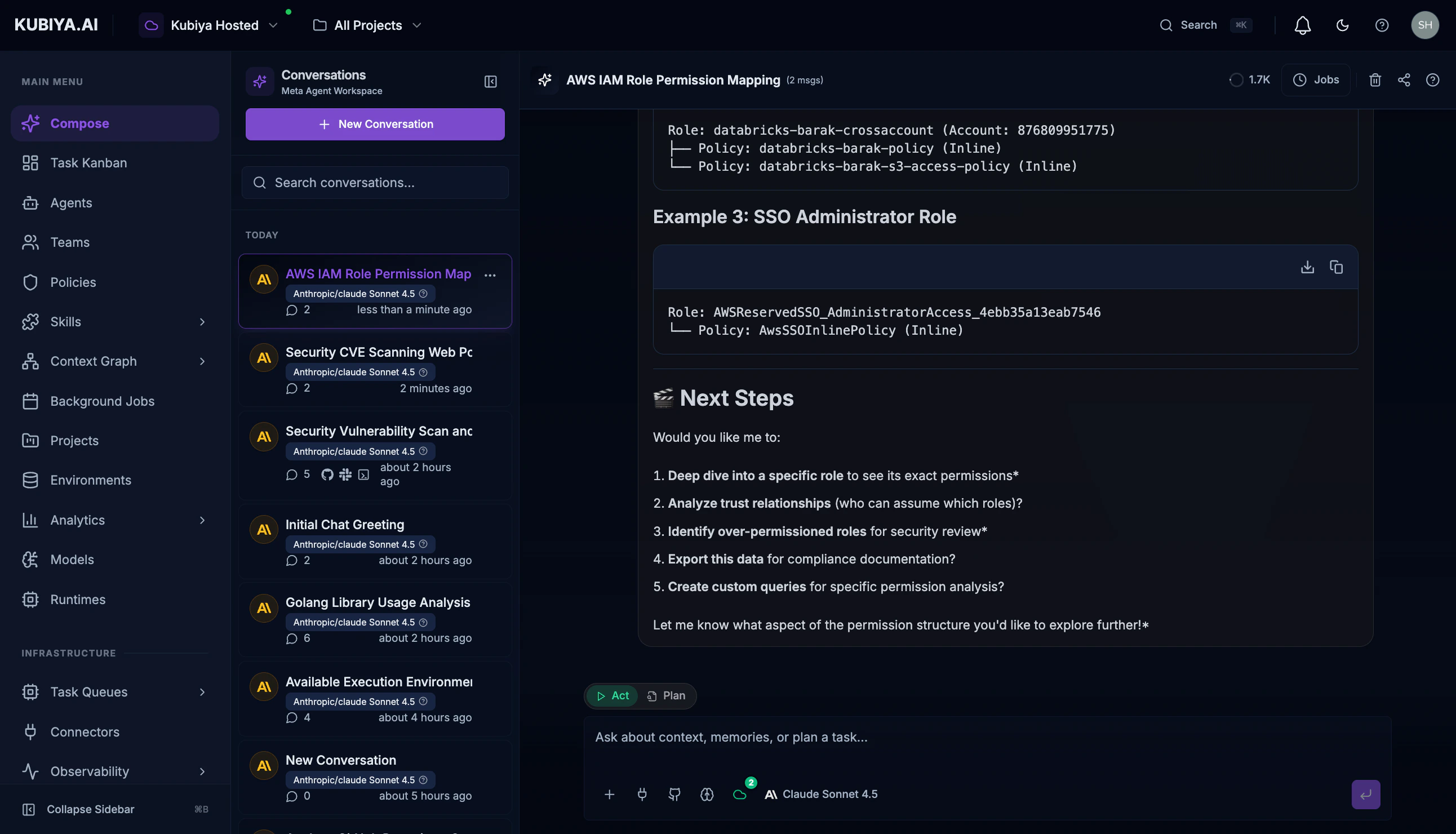
The Meta Agent provides:
* **Summary statistics** - Total roles, policies, and accounts
* **Account breakdown** - Resources organized by AWS account
* **Role categorization** - SSO roles, service-linked roles, custom roles
* **Visual diagrams** - Mermaid charts showing permission structures
### Sample Generated Queries
The Meta Agent dynamically generates queries like:
```cypher theme={null}
MATCH (role:AWSRole)-[rel:POLICY]->(policy)
WHERE policy:AWSManagedPolicy OR policy:AWSInlinePolicy
RETURN role.name AS role_name,
role.arn AS role_arn,
type(rel) AS relationship,
policy.name AS policy_name,
labels(policy) AS policy_type
ORDER BY role.name, policy.name
LIMIT 100
```
### Results
The Meta Agent provides:
* **Summary statistics** - Total roles, policies, and accounts
* **Account breakdown** - Resources organized by AWS account
* **Role categorization** - SSO roles, service-linked roles, custom roles
* **Visual diagrams** - Mermaid charts showing permission structures
 ## Use Case 2: Dependency Impact Analysis
Before making infrastructure changes, understand what resources depend on a specific component.
### Example Prompt
```
What services and resources depend on the user-auth database?
Show me the full dependency chain.
```
### What Happens
1. **Identifies the target resource** - Finds the user-auth database node
2. **Traces relationships** - Follows DEPENDS\_ON, CONNECTS\_TO, and USES relationships
3. **Builds dependency tree** - Creates a comprehensive impact map
### Sample Generated Query
```cypher theme={null}
MATCH path = (dependent)-[*1..3]->(db:Database {name: 'user-auth'})
RETURN DISTINCT labels(dependent) AS resource_type,
dependent.name AS resource_name,
length(path) AS dependency_depth,
[rel in relationships(path) | type(rel)] AS relationship_chain
ORDER BY dependency_depth, resource_type
```
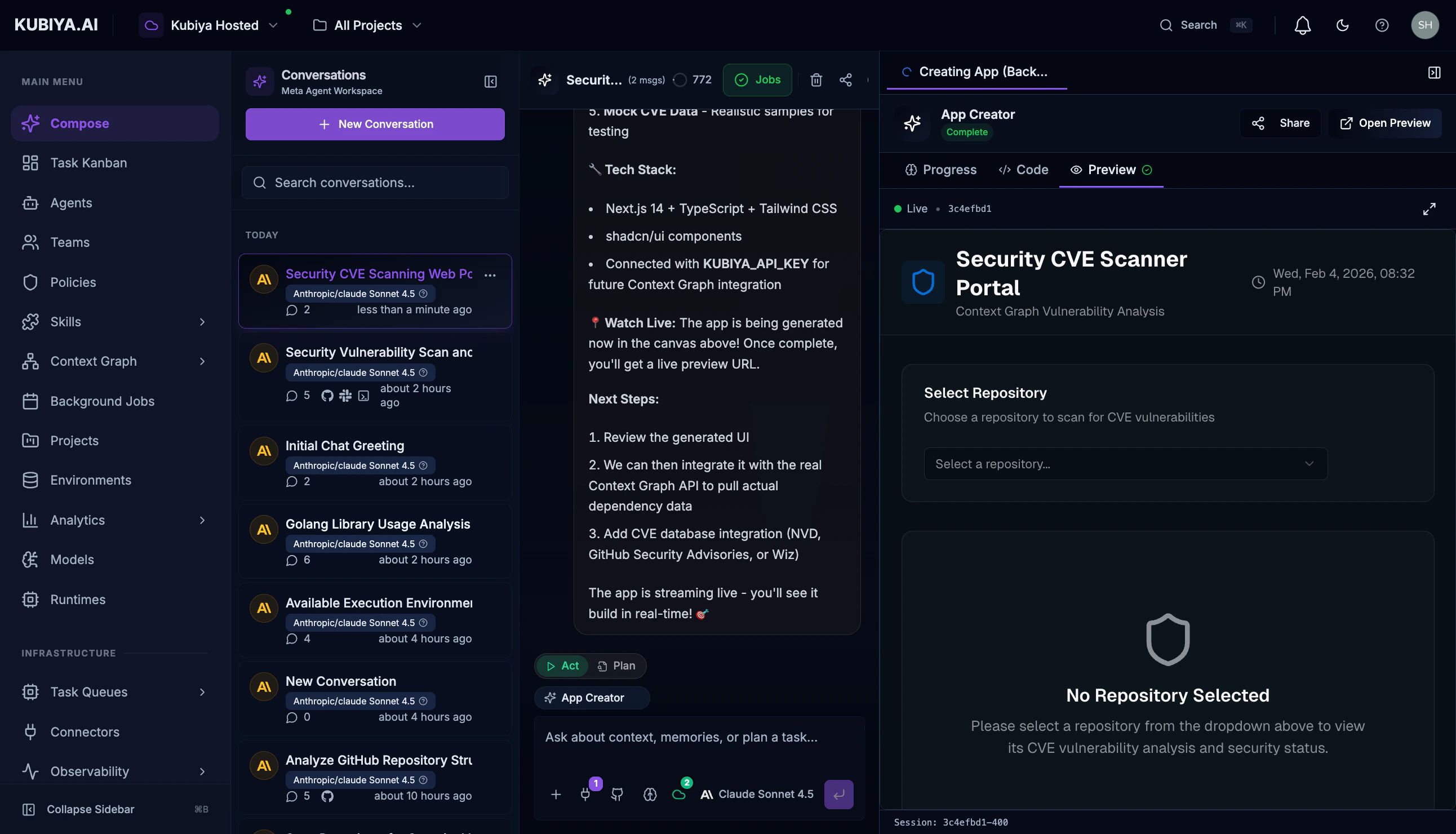
## Use Case 3: Security Vulnerability Correlation
Correlate CVE data with your actual infrastructure to understand real exposure.
### Example Prompt
```
Search the context graph for repositories with known CVEs
and show me which dependencies are affected.
```
### What Happens
1. **Scans for CVE-related nodes** - Finds vulnerability records
2. **Correlates with repositories** - Links CVEs to affected code
3. **Traces to dependencies** - Shows which packages introduce vulnerabilities
## Use Case 2: Dependency Impact Analysis
Before making infrastructure changes, understand what resources depend on a specific component.
### Example Prompt
```
What services and resources depend on the user-auth database?
Show me the full dependency chain.
```
### What Happens
1. **Identifies the target resource** - Finds the user-auth database node
2. **Traces relationships** - Follows DEPENDS\_ON, CONNECTS\_TO, and USES relationships
3. **Builds dependency tree** - Creates a comprehensive impact map
### Sample Generated Query
```cypher theme={null}
MATCH path = (dependent)-[*1..3]->(db:Database {name: 'user-auth'})
RETURN DISTINCT labels(dependent) AS resource_type,
dependent.name AS resource_name,
length(path) AS dependency_depth,
[rel in relationships(path) | type(rel)] AS relationship_chain
ORDER BY dependency_depth, resource_type
```
## Use Case 3: Security Vulnerability Correlation
Correlate CVE data with your actual infrastructure to understand real exposure.
### Example Prompt
```
Search the context graph for repositories with known CVEs
and show me which dependencies are affected.
```
### What Happens
1. **Scans for CVE-related nodes** - Finds vulnerability records
2. **Correlates with repositories** - Links CVEs to affected code
3. **Traces to dependencies** - Shows which packages introduce vulnerabilities
 ### Sample Generated Query
```cypher theme={null}
MATCH (repo:GitHubRepository)-[:REQUIRES]->(dep:Dependency)
WHERE dep.name IN ['jinja2', 'pyyaml', 'requests']
RETURN repo.name AS repository,
dep.name AS dependency,
dep.version AS version
ORDER BY repo.name
```
## Use Case 4: Cross-Account Resource Discovery
Find all resources across multiple cloud accounts and understand their relationships.
### Example Prompt
```
List all EC2 instances across our AWS accounts and show which
IAM roles they're using.
```
### Sample Generated Query
```cypher theme={null}
MATCH (instance:EC2Instance)-[:USES_ROLE]->(role:AWSRole)
OPTIONAL MATCH (role)-[:POLICY]->(policy)
RETURN instance.id AS instance_id,
instance.name AS instance_name,
role.name AS role_name,
COLLECT(policy.name) AS attached_policies,
CASE
WHEN instance.id CONTAINS 'i-' THEN 'Running'
ELSE 'Unknown'
END AS status
ORDER BY role_name
```
## Use Case 5: Creating Custom Relationships
The Meta Agent can also create new relationships to enrich your graph.
### Example Prompt
```
Create a relationship showing that the payments-service
depends on the user-auth database for authentication.
```
### What Happens
1. **Validates nodes exist** - Confirms both resources are in the graph
2. **Creates relationship** - Adds DEPENDS\_ON relationship with metadata
3. **Confirms creation** - Returns the new relationship details
## Use Case 6: GitHub Repository Analysis
Analyze code repositories, their dependencies, and relationships.
### Example Prompt
```
Show me all GitHub repositories and their dependency counts.
Which repos have the most external dependencies?
```
### Sample Generated Query
```cypher theme={null}
MATCH (repo:GitHubRepository)
OPTIONAL MATCH (repo)-[:REQUIRES]->(dep:Dependency)
WITH repo, COUNT(dep) AS dep_count
RETURN repo.name AS repository,
dep_count AS dependency_count
ORDER BY dep_count DESC
LIMIT 20
```
## Best Practices
### Writing Effective Prompts
| Do | Don't |
| ----------------------------------------- | ----------------------------------------- |
| Be specific about what you're looking for | Use vague terms like "show me everything" |
| Mention the resource types you care about | Assume the agent knows your context |
| Ask for relationships explicitly | Only ask for node properties |
| Request summaries for large datasets | Ask for unlimited results |
### Example Good Prompts
* "Show me all Lambda functions and their IAM execution roles in account 123456789"
* "What S3 buckets are accessible from the public internet?"
* "Trace the data flow from our API Gateway to the backend databases"
* "Which Kubernetes deployments use secrets from AWS Secrets Manager?"
## What's Next
* **[Meta Agent](/core-concepts/meta-agent)** - Learn more about the Meta Agent's full capabilities
* **[Graph Visualization](/core-concepts/graph-explorer)** - See your infrastructure visually
* **[Queries](/core-concepts/queries)** - Write Cypher queries directly
* **[Data Sources](/core-concepts/data-sources)** - Add more data to your graph
### Sample Generated Query
```cypher theme={null}
MATCH (repo:GitHubRepository)-[:REQUIRES]->(dep:Dependency)
WHERE dep.name IN ['jinja2', 'pyyaml', 'requests']
RETURN repo.name AS repository,
dep.name AS dependency,
dep.version AS version
ORDER BY repo.name
```
## Use Case 4: Cross-Account Resource Discovery
Find all resources across multiple cloud accounts and understand their relationships.
### Example Prompt
```
List all EC2 instances across our AWS accounts and show which
IAM roles they're using.
```
### Sample Generated Query
```cypher theme={null}
MATCH (instance:EC2Instance)-[:USES_ROLE]->(role:AWSRole)
OPTIONAL MATCH (role)-[:POLICY]->(policy)
RETURN instance.id AS instance_id,
instance.name AS instance_name,
role.name AS role_name,
COLLECT(policy.name) AS attached_policies,
CASE
WHEN instance.id CONTAINS 'i-' THEN 'Running'
ELSE 'Unknown'
END AS status
ORDER BY role_name
```
## Use Case 5: Creating Custom Relationships
The Meta Agent can also create new relationships to enrich your graph.
### Example Prompt
```
Create a relationship showing that the payments-service
depends on the user-auth database for authentication.
```
### What Happens
1. **Validates nodes exist** - Confirms both resources are in the graph
2. **Creates relationship** - Adds DEPENDS\_ON relationship with metadata
3. **Confirms creation** - Returns the new relationship details
## Use Case 6: GitHub Repository Analysis
Analyze code repositories, their dependencies, and relationships.
### Example Prompt
```
Show me all GitHub repositories and their dependency counts.
Which repos have the most external dependencies?
```
### Sample Generated Query
```cypher theme={null}
MATCH (repo:GitHubRepository)
OPTIONAL MATCH (repo)-[:REQUIRES]->(dep:Dependency)
WITH repo, COUNT(dep) AS dep_count
RETURN repo.name AS repository,
dep_count AS dependency_count
ORDER BY dep_count DESC
LIMIT 20
```
## Best Practices
### Writing Effective Prompts
| Do | Don't |
| ----------------------------------------- | ----------------------------------------- |
| Be specific about what you're looking for | Use vague terms like "show me everything" |
| Mention the resource types you care about | Assume the agent knows your context |
| Ask for relationships explicitly | Only ask for node properties |
| Request summaries for large datasets | Ask for unlimited results |
### Example Good Prompts
* "Show me all Lambda functions and their IAM execution roles in account 123456789"
* "What S3 buckets are accessible from the public internet?"
* "Trace the data flow from our API Gateway to the backend databases"
* "Which Kubernetes deployments use secrets from AWS Secrets Manager?"
## What's Next
* **[Meta Agent](/core-concepts/meta-agent)** - Learn more about the Meta Agent's full capabilities
* **[Graph Visualization](/core-concepts/graph-explorer)** - See your infrastructure visually
* **[Queries](/core-concepts/queries)** - Write Cypher queries directly
* **[Data Sources](/core-concepts/data-sources)** - Add more data to your graph