> ## Documentation Index
> Fetch the complete documentation index at: https://docs.kubiya.ai/llms.txt
> Use this file to discover all available pages before exploring further.
# Cognitive Memory Overview
> Persistent, semantic knowledge storage that enables AI agents to learn, remember, and recall context across sessions
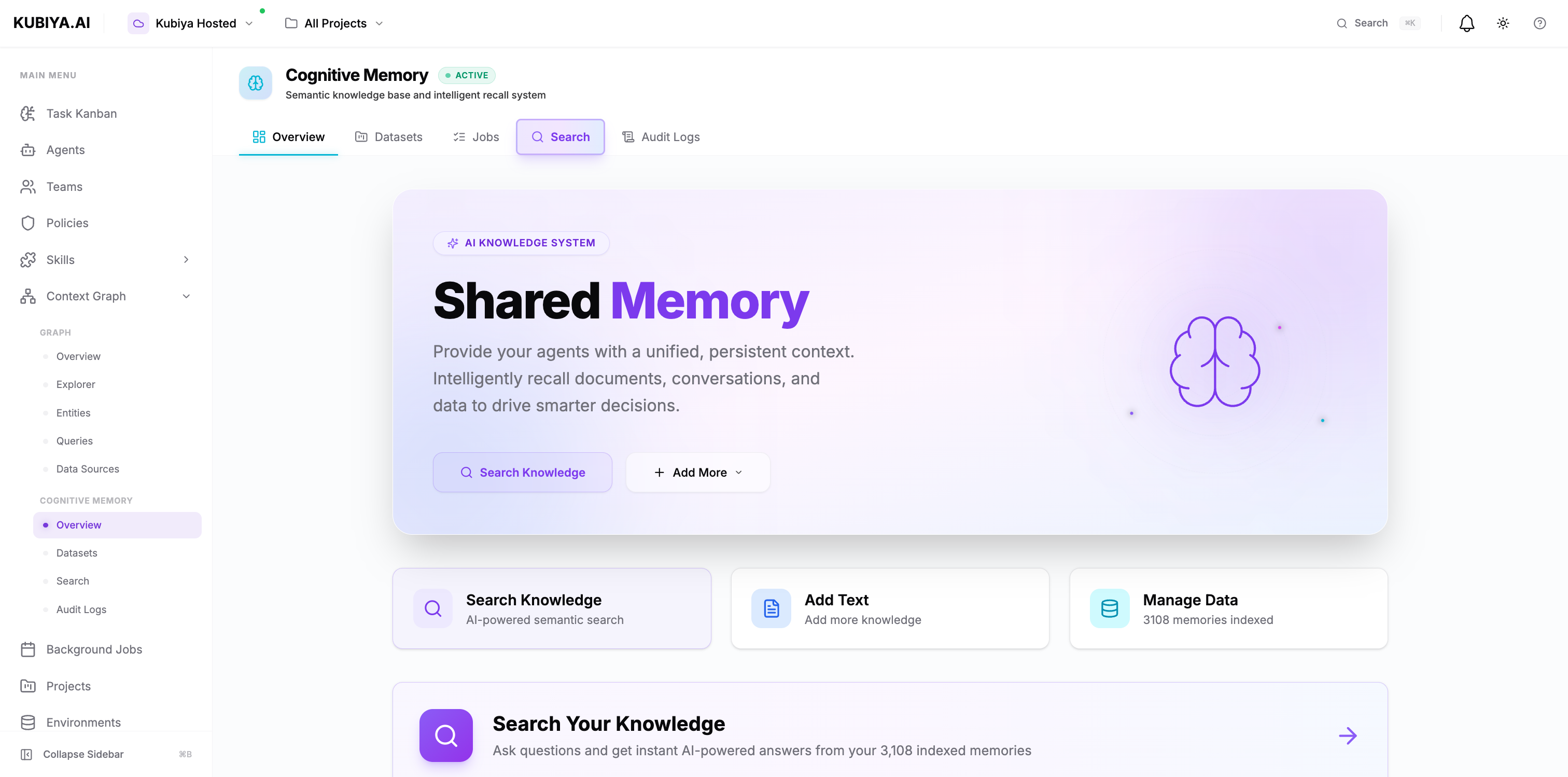
Cognitive Memory is Kubiya's built-in knowledge management system that provides AI agents with persistent, searchable memory. It enables agents to store context, recall relevant information, and share knowledge across your organization—automatically and without configuration.
 ## **What is Cognitive Memory?**
Cognitive Memory is a semantic knowledge base that stores and retrieves information using AI-powered embeddings. Unlike traditional databases that rely on exact keyword matches, Cognitive Memory understands the meaning and context of your data, enabling natural language search and intelligent recall.
**Key Capabilities:**
* **Semantic Search** - Find information using natural language queries, not just keywords
* **Temporal Memory** - Track and recall information across time and sessions
* **Knowledge Extraction** - Automatically identify entities and relationships from unstructured data
* **Cognitive Insights** - Generate patterns, connections, and insights from stored knowledge
## **Why Cognitive Memory Matters**
Traditional AI agents are stateless—they forget everything after each conversation. Cognitive Memory transforms your agents into learning systems that:
* **Remember across sessions** - Agents recall past interactions, decisions, and solutions
* **Share team knowledge** - What one agent learns, all agents in the same environment can access
* **Make context-aware decisions** - Agents use historical context to provide more accurate, relevant responses
* **Reduce redundant work** - Agents don't re-solve problems they've already handled
* **Build organizational knowledge** - Every agent interaction adds to your team's collective intelligence
## **How It Works**
Cognitive Memory uses a multi-layered architecture to store and retrieve knowledge. The diagram below illustrates the complete workflow from data ingestion through the knowledge graph to AI-powered retrieval:
## **What is Cognitive Memory?**
Cognitive Memory is a semantic knowledge base that stores and retrieves information using AI-powered embeddings. Unlike traditional databases that rely on exact keyword matches, Cognitive Memory understands the meaning and context of your data, enabling natural language search and intelligent recall.
**Key Capabilities:**
* **Semantic Search** - Find information using natural language queries, not just keywords
* **Temporal Memory** - Track and recall information across time and sessions
* **Knowledge Extraction** - Automatically identify entities and relationships from unstructured data
* **Cognitive Insights** - Generate patterns, connections, and insights from stored knowledge
## **Why Cognitive Memory Matters**
Traditional AI agents are stateless—they forget everything after each conversation. Cognitive Memory transforms your agents into learning systems that:
* **Remember across sessions** - Agents recall past interactions, decisions, and solutions
* **Share team knowledge** - What one agent learns, all agents in the same environment can access
* **Make context-aware decisions** - Agents use historical context to provide more accurate, relevant responses
* **Reduce redundant work** - Agents don't re-solve problems they've already handled
* **Build organizational knowledge** - Every agent interaction adds to your team's collective intelligence
## **How It Works**
Cognitive Memory uses a multi-layered architecture to store and retrieve knowledge. The diagram below illustrates the complete workflow from data ingestion through the knowledge graph to AI-powered retrieval:
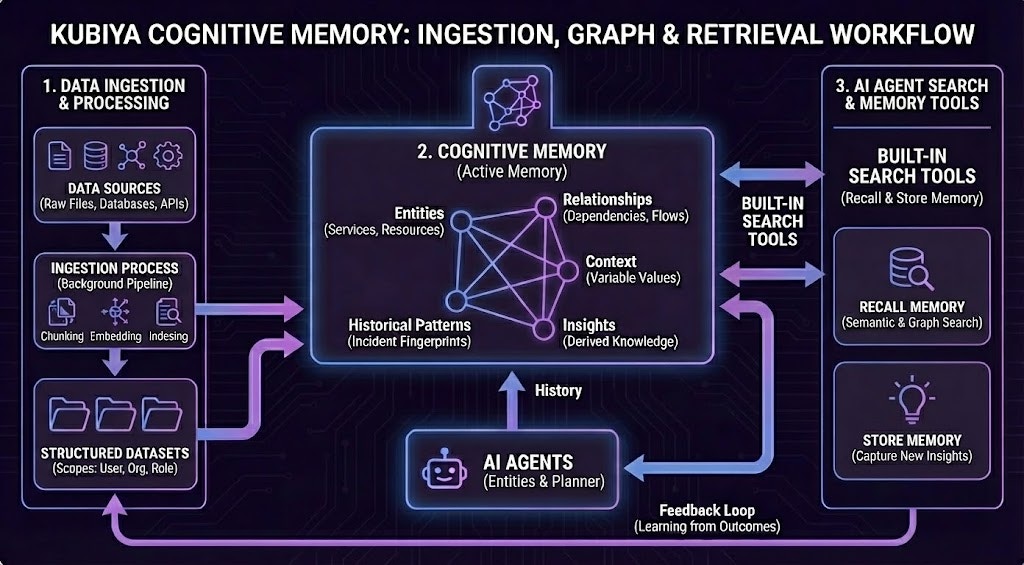 **Architecture Components:**
1. **Data Ingestion & Processing**: Raw data from files, databases, and APIs is processed through chunking, embedding, and indexing pipelines, then organized into structured datasets.
2. **Cognitive Memory (Knowledge Graph)**: The active memory system stores:
* **Entities** (Services, Resources)
* **Relationships** (Dependencies, Flows)
* **Context** (Variable Values)
* **Historical Patterns** (Incident Fingerprints)
* **Insights** (Derived Knowledge)
3. **AI Agent Search & Memory Tools**: Agents use built-in search tools for recall and semantic search, along with a store memory function to capture new insights, creating a continuous feedback loop for learning.
**Technical Stack:**
1. **Storage Layer**: PostgreSQL + pgvector for embeddings, Neo4j for knowledge graph
2. **Embedding Engine**: LiteLLM converts text into semantic vectors
3. **Knowledge Graph**: Background processing engine extracts entities and relationships
4. **Search Layer**: Vector similarity search + graph traversal for intelligent recall
**The Flow:**
```mermaid theme={null}
flowchart LR
Store["📝 Store
**Architecture Components:**
1. **Data Ingestion & Processing**: Raw data from files, databases, and APIs is processed through chunking, embedding, and indexing pipelines, then organized into structured datasets.
2. **Cognitive Memory (Knowledge Graph)**: The active memory system stores:
* **Entities** (Services, Resources)
* **Relationships** (Dependencies, Flows)
* **Context** (Variable Values)
* **Historical Patterns** (Incident Fingerprints)
* **Insights** (Derived Knowledge)
3. **AI Agent Search & Memory Tools**: Agents use built-in search tools for recall and semantic search, along with a store memory function to capture new insights, creating a continuous feedback loop for learning.
**Technical Stack:**
1. **Storage Layer**: PostgreSQL + pgvector for embeddings, Neo4j for knowledge graph
2. **Embedding Engine**: LiteLLM converts text into semantic vectors
3. **Knowledge Graph**: Background processing engine extracts entities and relationships
4. **Search Layer**: Vector similarity search + graph traversal for intelligent recall
**The Flow:**
```mermaid theme={null}
flowchart LR
Store["📝 Store
Agent adds context,
text, code, docs"]
Process["⚙️ Process
Convert to embeddings
Extract entities"]
Index["💾 Index
pgvector: embeddings
Neo4j: relationships"]
Recall["🔍 Recall
Natural language
semantic search"]
Return["✅ Return
Relevant context
+ similarity scores"]
Store --> Process
Process --> Index
Index --> Recall
Recall --> Return
style Store fill:#e8f5e9,stroke:#4caf50,stroke-width:2px
style Process fill:#fff3e0,stroke:#f57c00,stroke-width:2px
style Index fill:#e3f2fd,stroke:#1976d2,stroke-width:2px
style Recall fill:#f3e5f5,stroke:#9c27b0,stroke-width:2px
style Return fill:#c8e6c9,stroke:#66bb6a,stroke-width:2px
```
## **Built-in Agent Capabilities**
**Every AI entity (agents, teams) automatically inherits cognitive memory capabilities.** No configuration required.
### Available Operations
All agents can:
* `store_memory(content, metadata)` - Store context with custom metadata
* `recall_memory(query, limit)` - Semantic search across stored memories
* `list_memories()` - List all stored memories for the current context
* `get_dataset_info()` - Get information about the current dataset
### Environment-Based Datasets
By default, agents automatically use a dataset named after their execution environment:
```
Environment: "production" → Dataset: "production"
Environment: "staging" → Dataset: "staging"
Environment: "dev" → Dataset: "dev"
```
**Benefits:**
* **Automatic isolation** - Production agents can't access staging memories
* **Shared team context** - All agents in the same environment share knowledge
* **Zero configuration** - Works out of the box, no setup needed
* **Environment-specific learning** - Each environment builds its own knowledge base
### Agent Integration
Agents automatically inherit cognitive memory capabilities, enabling them to store context, recall information, and coordinate with other agents. The memory operations happen at three key stages:
1. **Pre-Execution** - Agents recall relevant context before executing tasks
2. **During Execution** - Agents coordinate in real-time by checking shared memory
3. **Post-Execution** - Agents store learnings for future use
All agents in the same environment automatically share a dataset, enabling seamless knowledge sharing and coordination.
Learn more about how agents use cognitive memory in the [Agent Integration](/core-concepts/cognitive-memory/agent-integration) guide.
## **Dataset Organization**
Cognitive Memory organizes knowledge into datasets—collections of related memories with shared access controls.
### Dataset Scopes
Datasets support three levels of access control:
| Scope | Description | Use Case |
| -------- | --------------------------------- | ---------------------------------------------- |
| **USER** | Private to individual user/agent | Personal notes, agent-specific learning |
| **ORG** | Shared across entire organization | Team knowledge, shared procedures, runbooks |
| **ROLE** | Shared with specific roles | Role-specific guidelines, department knowledge |
**Default for agents**: Organization-level scope, enabling team-wide knowledge sharing.
Learn more about dataset organization and management in [Datasets](/core-concepts/cognitive-memory/datasets).
## **Multi-Tenant Security**
Cognitive Memory is built with enterprise-grade multi-tenancy:
* **Organization isolation** - Each organization's data is completely separate
* **User-level filtering** - Individual user memories can be kept private
* **RBAC support** - Role-based access control for dataset permissions
* **Audit trails** - Complete logging of all memory operations with agent attribution
* **Data encryption** - At rest and in transit
All operations are automatically scoped to your organization, ensuring data never leaks between tenants.
## **Integration with Context Graph**
Cognitive Memory is tightly integrated with Kubiya's Context Graph:
* **Unified knowledge layer** - Memories appear as nodes in the graph
* **Relationship tracking** - Connections between memories, entities, and resources
* **Cross-system queries** - Query across cognitive memories and integration data
* **Visual exploration** - See memory relationships in the Context Graph explorer
## **Getting Started**
### For End Users
Access cognitive memory through the Compose UI:
1. **Search** - Use natural language to find information across all memories
2. **Add Knowledge** - Store important context, decisions, and procedures
3. **Manage Datasets** - Organize knowledge into logical collections
4. **View Audit Logs** - Track who stored what and when
### For Developers
Use the CLI to manage cognitive memory:
```bash theme={null}
# Store a memory
kubiya cognitive memory store \
--dataset production \
--content "SRE runbook: Scale database during peak hours"
# Search memories
kubiya cognitive memory search "database performance issues"
```
How agents use cognitive memory to learn and coordinate
Learn about dataset organization and scoping
Understand how semantic search works
Complete CLI command reference
## **Production-Ready**
Cognitive Memory is battle-tested and production-ready:
* **93% test coverage** - Comprehensive automated testing
* **High availability** - Distributed architecture with failover
* **Performance at scale** - Handles millions of memories with low latency
* **Monitoring & observability** - Built-in metrics and health checks
* **Backup & recovery** - Automated backups and point-in-time recovery
## **Next Steps**
Now that you understand what Cognitive Memory is, explore how to use it:
1. **[Agent Integration](/core-concepts/cognitive-memory/agent-integration)** - How agents use cognitive memory to learn and coordinate
2. **[Datasets](/core-concepts/cognitive-memory/datasets)** - Organize and manage your knowledge
3. **[Semantic Search](/core-concepts/cognitive-memory/semantic-search)** - Find information using natural language
4. **[CLI Commands](/cli/cognitive-memory)** - Command-line integration