> ## Documentation Index
> Fetch the complete documentation index at: https://docs.kubiya.ai/llms.txt
> Use this file to discover all available pages before exploring further.
# Datasets
> Organize and manage collections of semantic memories with granular access control and team collaboration features
Datasets are containers for organizing related memories and knowledge within Cognitive Memory. Each dataset defines a scope of access (private, organizational, or role-based) and provides isolation between different collections of knowledge.
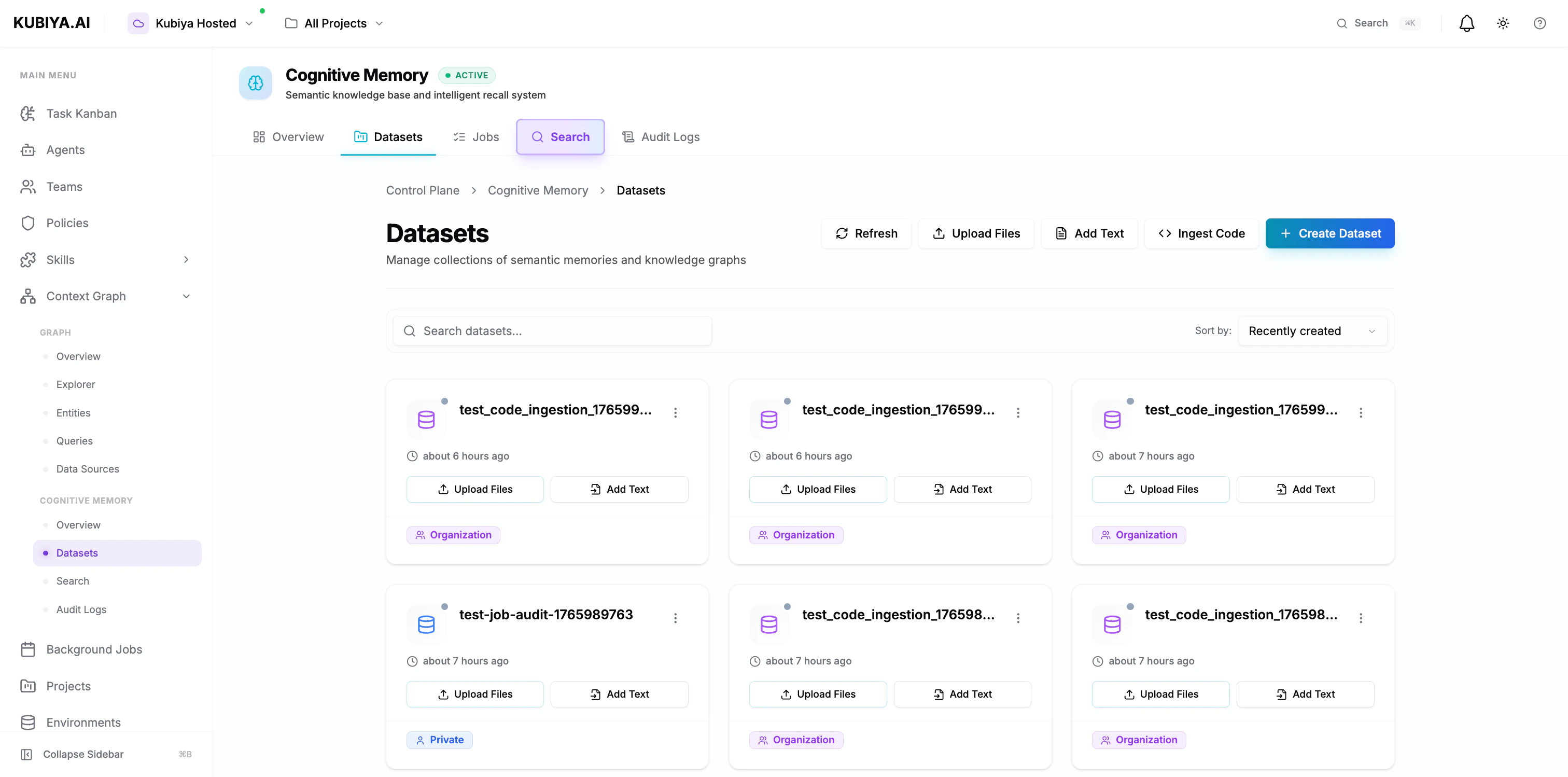 ## **What is a Dataset?**
A dataset is a logical collection of memories that share:
* **Common access controls** - Who can read, write, and manage the memories
* **Unified scope** - Private (USER), shared (ORG), or role-based (ROLE)
* **Semantic relationships** - Connected knowledge graphs within the collection
* **Audit trails** - Complete history of operations and agent interactions
Think of datasets as knowledge repositories that can be scoped to individuals, teams, or entire organizations.
## **Dataset Scopes**
Every dataset must have a visibility scope that determines who can access its memories.
### **USER Scope (Private)**
Private datasets accessible only to the user or agent that created them.
**Use cases:**
* Personal notes and reminders
* Agent-specific learning and context
* Private troubleshooting logs
* Individual experimentation
### **ORG Scope (Organization)**
Shared datasets accessible to all members of the organization. **This is the default scope for agents.**
**Use cases:**
* Team runbooks and procedures
* Shared incident history
* Organizational knowledge base
* Cross-team collaboration
* Agent memory sharing
**Why agents use ORG scope by default:**
* Enables knowledge sharing between agents
* Creates collective team intelligence
* Reduces redundant problem-solving
* Builds organizational memory over time
### **ROLE Scope (Role-Based)**
Datasets accessible only to users with specific roles.
**Use cases:**
* Security-sensitive procedures
* Department-specific knowledge
* Compliance documentation
* Role-specific workflows
## **Creating Datasets**
### **Via Composer UI**
## **What is a Dataset?**
A dataset is a logical collection of memories that share:
* **Common access controls** - Who can read, write, and manage the memories
* **Unified scope** - Private (USER), shared (ORG), or role-based (ROLE)
* **Semantic relationships** - Connected knowledge graphs within the collection
* **Audit trails** - Complete history of operations and agent interactions
Think of datasets as knowledge repositories that can be scoped to individuals, teams, or entire organizations.
## **Dataset Scopes**
Every dataset must have a visibility scope that determines who can access its memories.
### **USER Scope (Private)**
Private datasets accessible only to the user or agent that created them.
**Use cases:**
* Personal notes and reminders
* Agent-specific learning and context
* Private troubleshooting logs
* Individual experimentation
### **ORG Scope (Organization)**
Shared datasets accessible to all members of the organization. **This is the default scope for agents.**
**Use cases:**
* Team runbooks and procedures
* Shared incident history
* Organizational knowledge base
* Cross-team collaboration
* Agent memory sharing
**Why agents use ORG scope by default:**
* Enables knowledge sharing between agents
* Creates collective team intelligence
* Reduces redundant problem-solving
* Builds organizational memory over time
### **ROLE Scope (Role-Based)**
Datasets accessible only to users with specific roles.
**Use cases:**
* Security-sensitive procedures
* Department-specific knowledge
* Compliance documentation
* Role-specific workflows
## **Creating Datasets**
### **Via Composer UI**
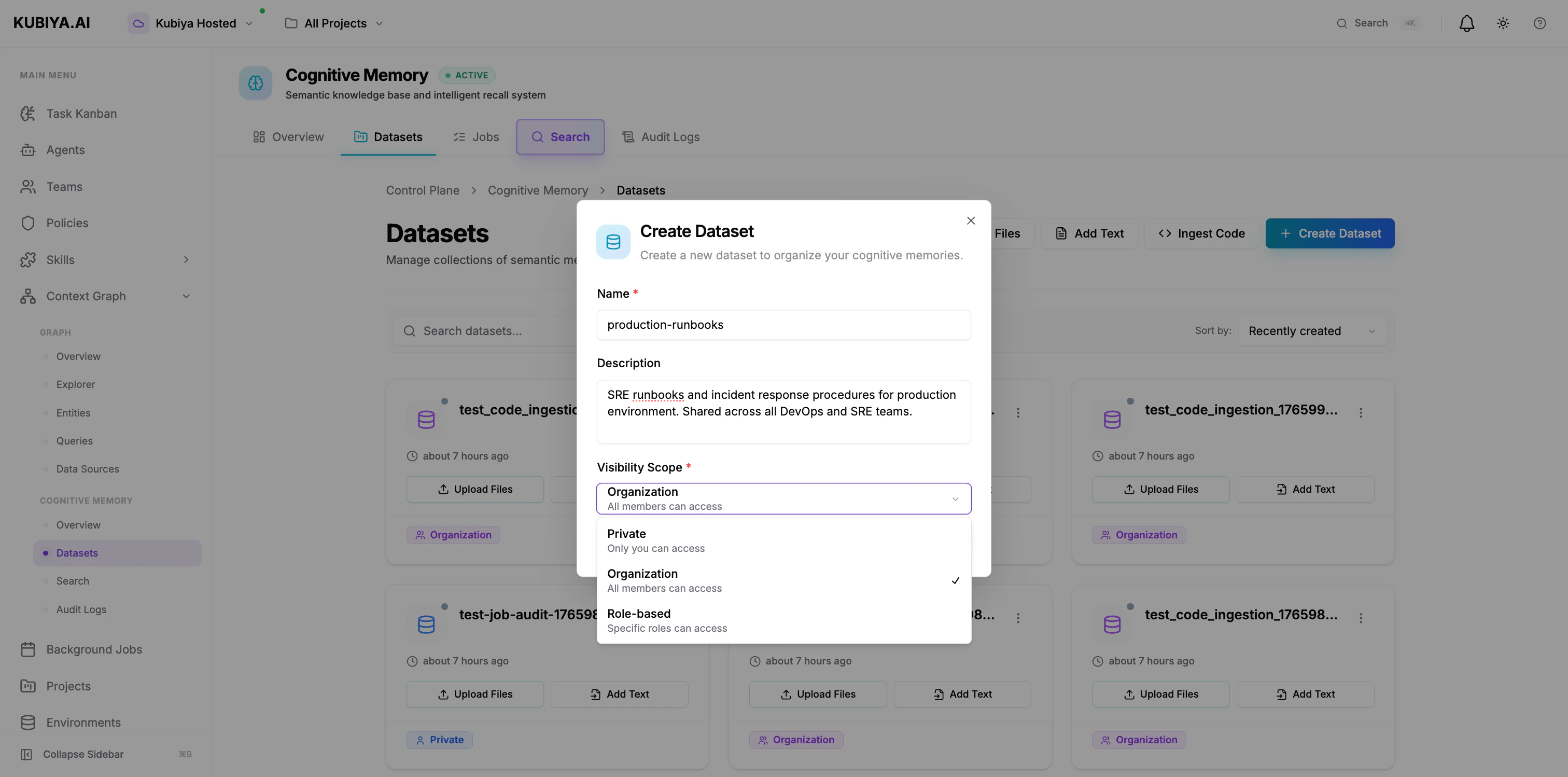 1. Navigate to **Cognitive Memory** → **Datasets**
2. Click **Create Dataset**
3. Configure:
* **Name**: Clear, descriptive identifier (e.g., "production-runbooks")
* **Description**: Purpose and contents
* **Visibility Scope**: Private, Organization, or Role-based
4. Click **Create Dataset**
The dataset is immediately available for storing memories.
### **Via CLI**
```bash theme={null}
# Create organization-scoped dataset
kubiya cognitive dataset create production-runbooks \
--scope org \
--description "Production environment runbooks and procedures"
# Create private dataset
kubiya cognitive dataset create my-notes \
--scope user \
--description "Personal troubleshooting notes"
# Create role-based dataset
kubiya cognitive dataset create security-docs \
--scope role \
--roles security-admin,sre-lead \
--description "Security procedures and incident response"
```
## **Environment-Based Datasets**
**By default, agents automatically use a dataset named after their execution environment.**
### **How It Works**
When an agent executes in an environment:
1. Agent checks for environment variable: `KUBIYA_ENVIRONMENT`
2. Uses environment name/slug as dataset name (e.g., "production", "staging")
3. If dataset doesn't exist, creates it automatically with ORG scope
4. All memory operations use this environment-based dataset
### **Example Environment Mapping**
| Environment | Default Dataset | Scope | Shared With |
| ------------ | --------------- | ----- | ------------------------ |
| `production` | `production` | ORG | All agents in production |
| `staging` | `staging` | ORG | All agents in staging |
| `dev` | `dev` | ORG | All agents in dev |
### **Benefits of Environment-Based Datasets**
**Automatic isolation:**
* Production memories stay in production
* Staging experiments don't pollute production knowledge
* Development testing is isolated
**Shared team context:**
* All agents in the same environment share knowledge
* Agent A stores finding → Agent B recalls it later
* Collective learning within each environment
**Zero configuration:**
* No setup required
* Works out of the box
* Automatic dataset creation
**Example agent workflow:**
```mermaid theme={null}
sequenceDiagram
participant AgentA as Agent A
participant ProdDS as production Dataset
participant AgentB as Agent B
participant AgentC as Agent C
participant StageDS as staging Dataset
AgentA->>ProdDS: store_memory()
Note right of ProdDS: Stores solution
AgentB->>ProdDS: recall_memory()
ProdDS-->>AgentB: Returns solution
AgentC->>StageDS: recall_memory()
StageDS-->>AgentC: No results found
```
## **Adding Data to Datasets**
### **Upload Files**
1. Navigate to **Cognitive Memory** → **Datasets**
2. Click **Create Dataset**
3. Configure:
* **Name**: Clear, descriptive identifier (e.g., "production-runbooks")
* **Description**: Purpose and contents
* **Visibility Scope**: Private, Organization, or Role-based
4. Click **Create Dataset**
The dataset is immediately available for storing memories.
### **Via CLI**
```bash theme={null}
# Create organization-scoped dataset
kubiya cognitive dataset create production-runbooks \
--scope org \
--description "Production environment runbooks and procedures"
# Create private dataset
kubiya cognitive dataset create my-notes \
--scope user \
--description "Personal troubleshooting notes"
# Create role-based dataset
kubiya cognitive dataset create security-docs \
--scope role \
--roles security-admin,sre-lead \
--description "Security procedures and incident response"
```
## **Environment-Based Datasets**
**By default, agents automatically use a dataset named after their execution environment.**
### **How It Works**
When an agent executes in an environment:
1. Agent checks for environment variable: `KUBIYA_ENVIRONMENT`
2. Uses environment name/slug as dataset name (e.g., "production", "staging")
3. If dataset doesn't exist, creates it automatically with ORG scope
4. All memory operations use this environment-based dataset
### **Example Environment Mapping**
| Environment | Default Dataset | Scope | Shared With |
| ------------ | --------------- | ----- | ------------------------ |
| `production` | `production` | ORG | All agents in production |
| `staging` | `staging` | ORG | All agents in staging |
| `dev` | `dev` | ORG | All agents in dev |
### **Benefits of Environment-Based Datasets**
**Automatic isolation:**
* Production memories stay in production
* Staging experiments don't pollute production knowledge
* Development testing is isolated
**Shared team context:**
* All agents in the same environment share knowledge
* Agent A stores finding → Agent B recalls it later
* Collective learning within each environment
**Zero configuration:**
* No setup required
* Works out of the box
* Automatic dataset creation
**Example agent workflow:**
```mermaid theme={null}
sequenceDiagram
participant AgentA as Agent A
participant ProdDS as production Dataset
participant AgentB as Agent B
participant AgentC as Agent C
participant StageDS as staging Dataset
AgentA->>ProdDS: store_memory()
Note right of ProdDS: Stores solution
AgentB->>ProdDS: recall_memory()
ProdDS-->>AgentB: Returns solution
AgentC->>StageDS: recall_memory()
StageDS-->>AgentC: No results found
```
## **Adding Data to Datasets**
### **Upload Files**
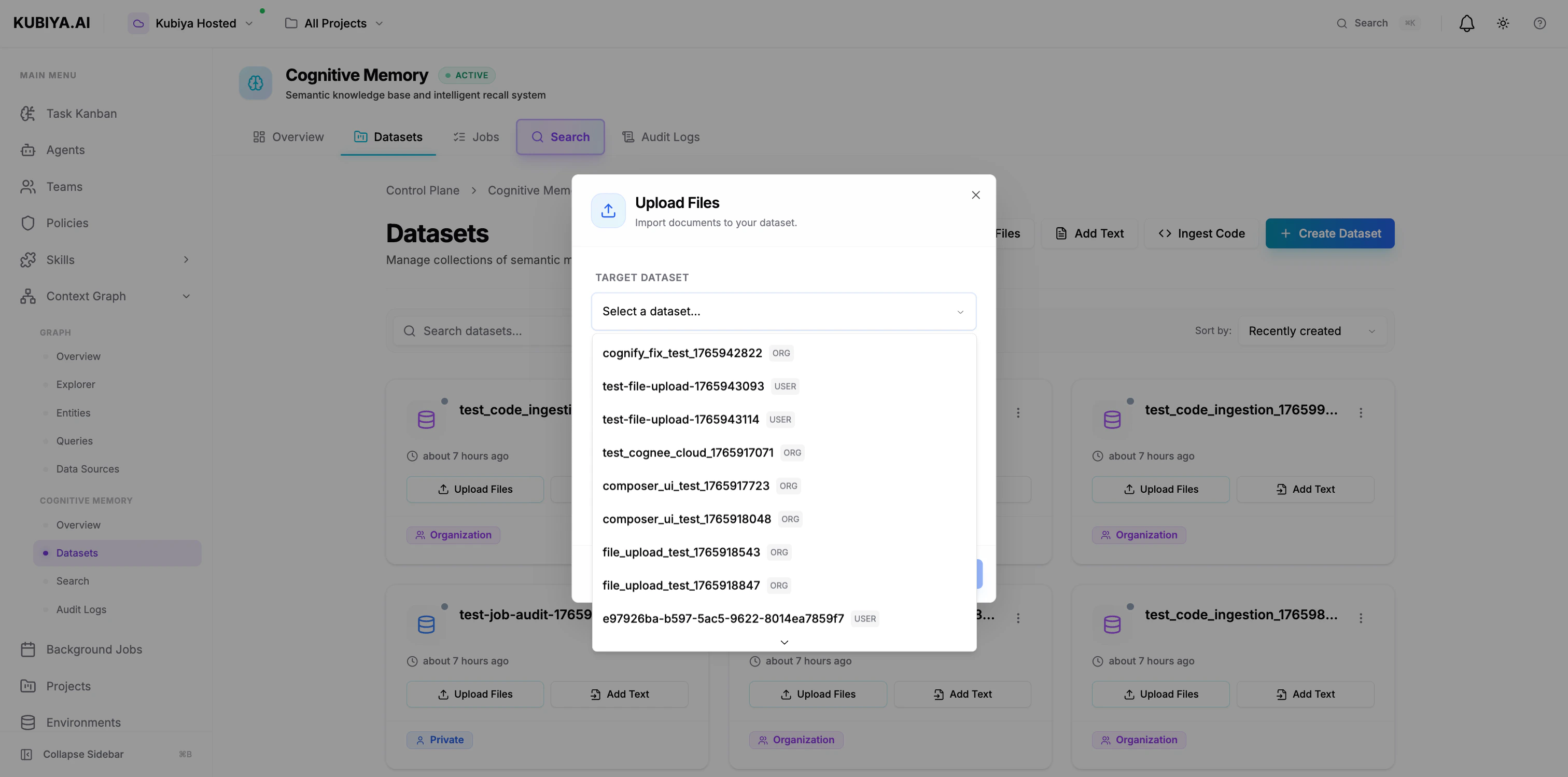 Upload documents, markdown files, JSON, or code:
**Via UI:**
1. Click **Upload Files**
2. Select target dataset
3. Drag files or click to browse
4. Supports: Text, Markdown, JSON, Code (up to 10MB)
### **Add Text**
Upload documents, markdown files, JSON, or code:
**Via UI:**
1. Click **Upload Files**
2. Select target dataset
3. Drag files or click to browse
4. Supports: Text, Markdown, JSON, Code (up to 10MB)
### **Add Text**
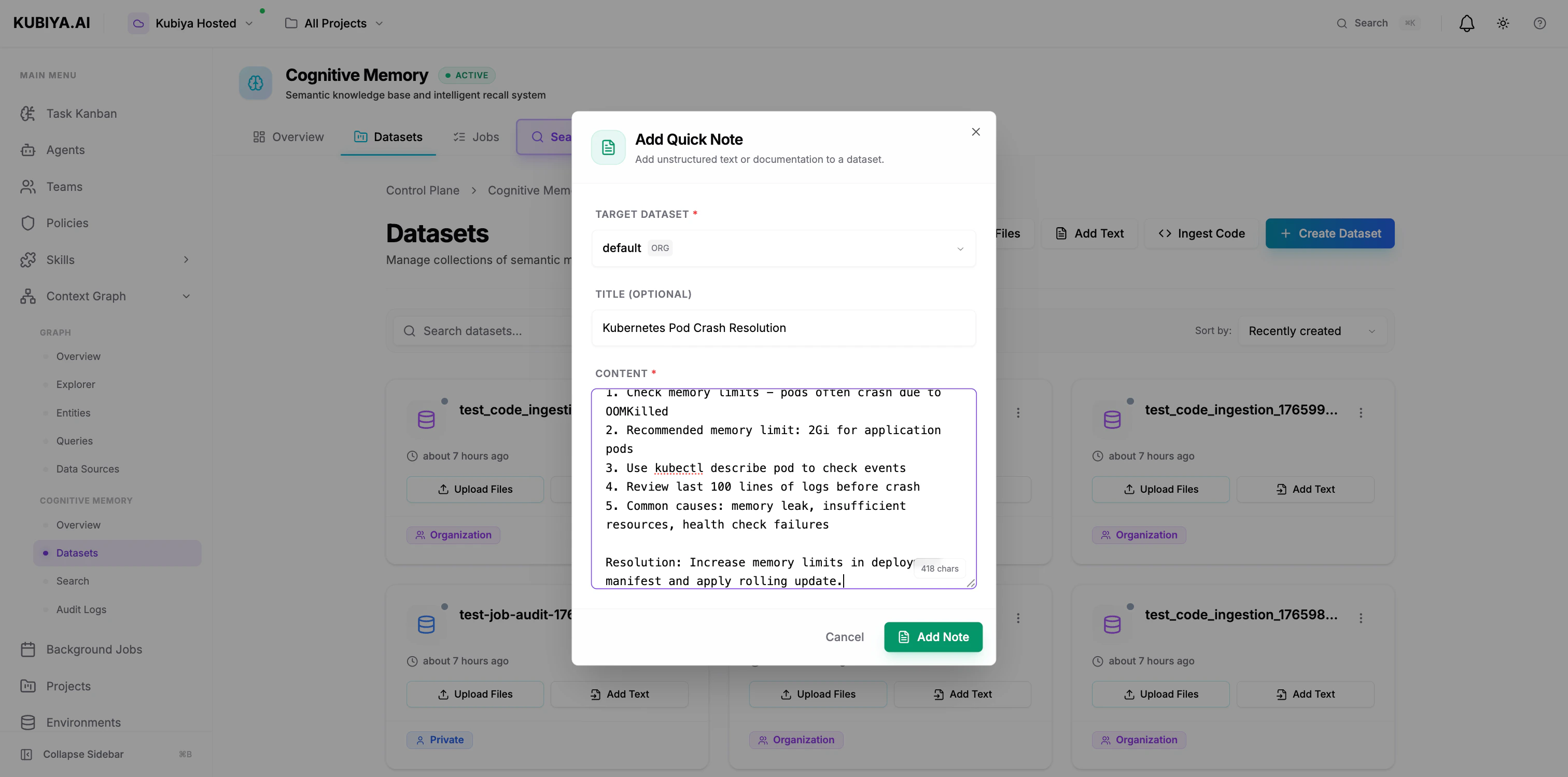 Store unstructured text, notes, or documentation:
**Via UI:**
1. Click **Add Text**
2. Select target dataset
3. Add title (optional) and content
4. Click **Add Note**
### **Ingest Code**
Store unstructured text, notes, or documentation:
**Via UI:**
1. Click **Add Text**
2. Select target dataset
3. Add title (optional) and content
4. Click **Add Note**
### **Ingest Code**
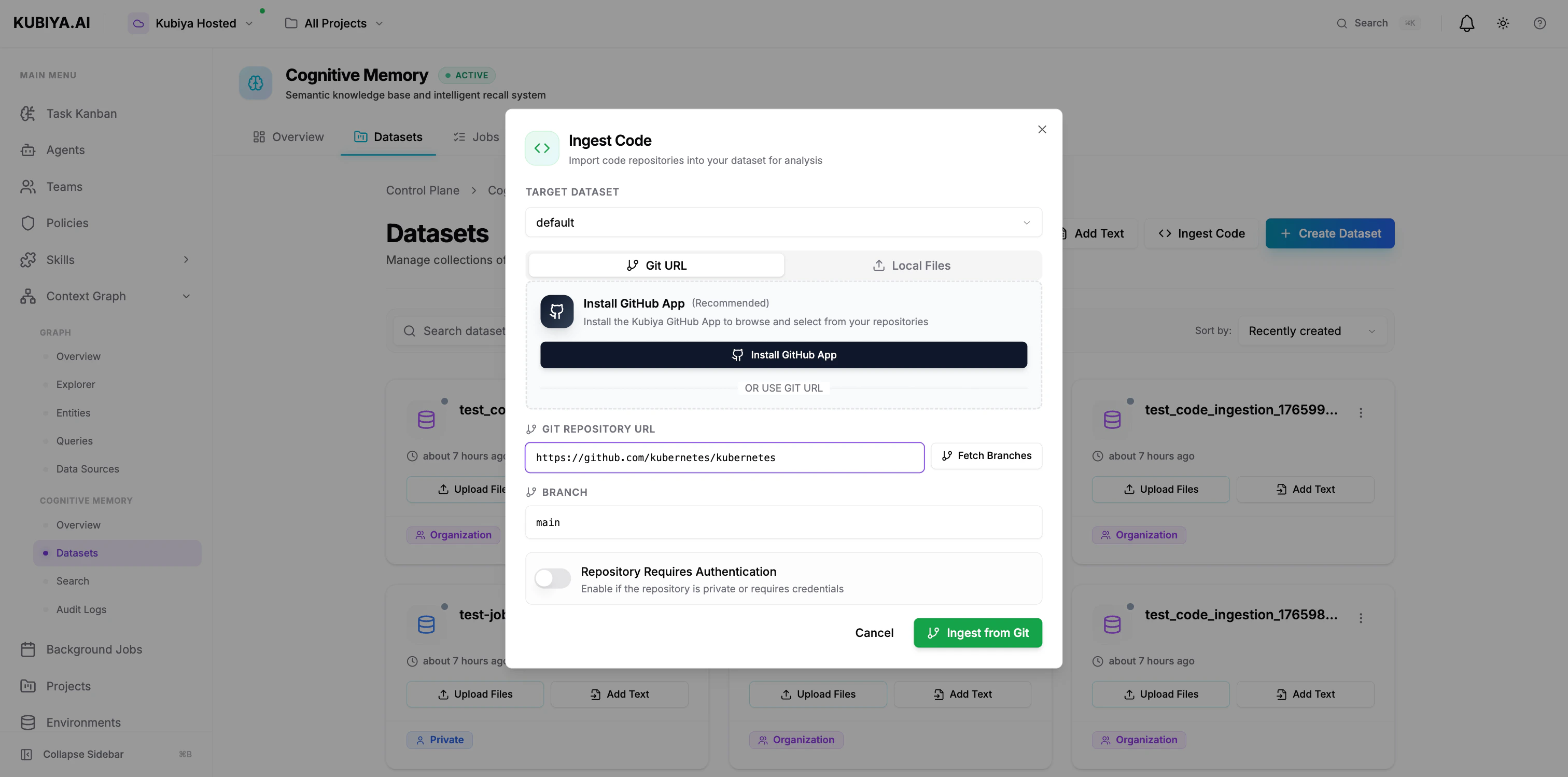 Import code repositories for analysis and knowledge extraction:
**Via UI (Git URL):**
1. Click **Ingest Code**
2. Select target dataset
3. Enter Git repository URL
4. Specify branch (default: main)
5. Enable authentication if private repo
6. Click **Ingest from Git**
**Via UI (Local Files):**
Import code repositories for analysis and knowledge extraction:
**Via UI (Git URL):**
1. Click **Ingest Code**
2. Select target dataset
3. Enter Git repository URL
4. Specify branch (default: main)
5. Enable authentication if private repo
6. Click **Ingest from Git**
**Via UI (Local Files):**
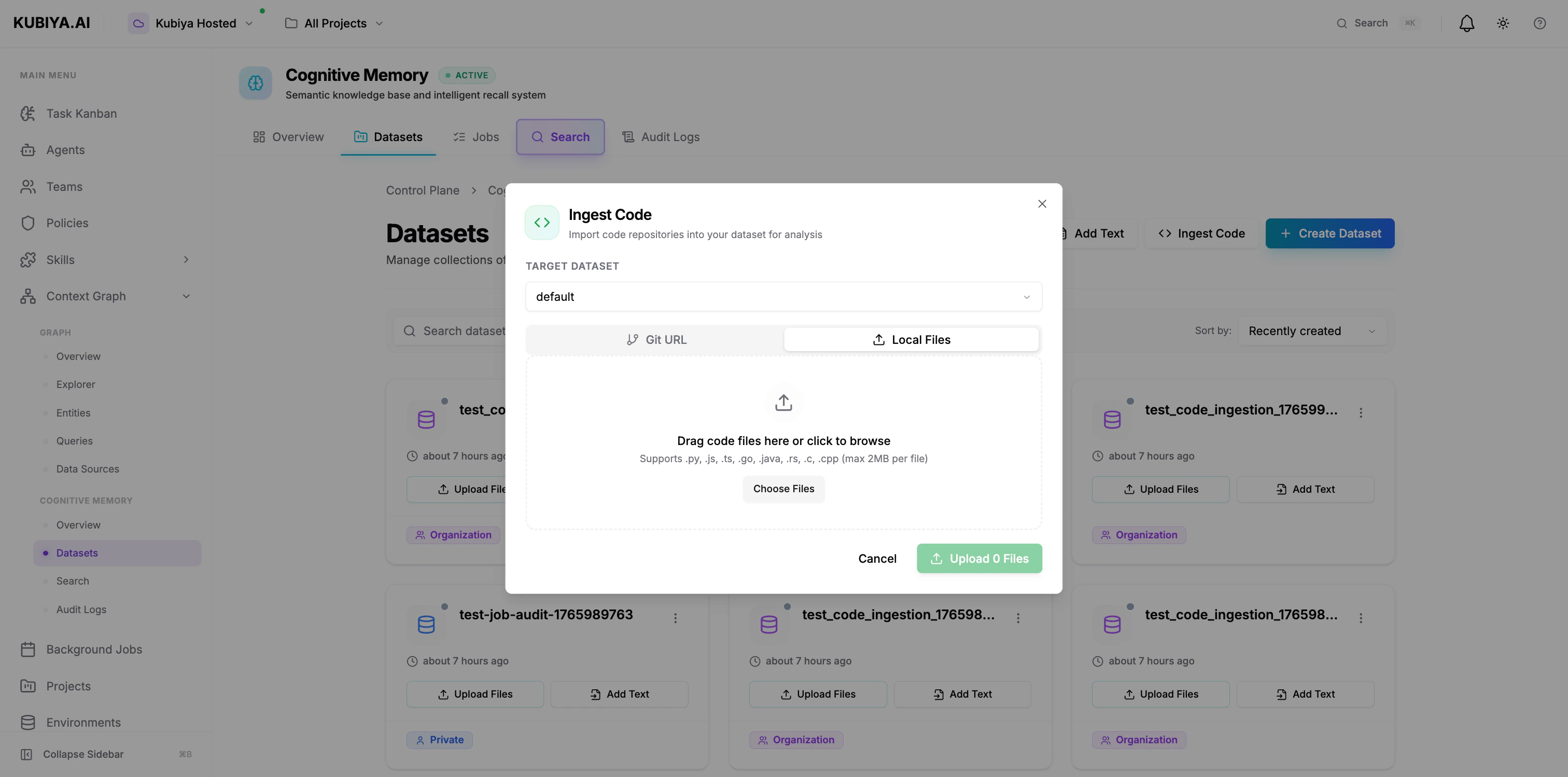 1. Click **Ingest Code** → **Local Files** tab
2. Select target dataset
3. Drag code files or click to browse
4. Supports: .py, .js, .ts, .go, .java, .rs, .c, .cpp (max 2MB per file)
## **Knowledge Processing Pipeline**
When data is added to a dataset, it goes through the cognitive processing pipeline:
1. **Ingestion** - Raw data is stored
2. **Embedding** - Text converted to semantic vectors via LLM
3. **Entity Extraction** - Key concepts, relationships identified
4. **Graph Construction** - Knowledge graph created in Neo4j
5. **Indexing** - Vectors indexed in pgvector for search
6. **Cognification** - Background job processes data into structured knowledge
**Processing Status:**
* **Pending**: Data uploaded, waiting for processing
* **Processing**: Cognitive engine analyzing content
* **Completed**: Ready for semantic search and recall
* **Failed**: Processing error (check audit logs)
Monitor processing in the **Background Jobs** section.
## **Dataset Operations**
### **List Datasets**
```bash theme={null}
# List all accessible datasets
kubiya cognitive dataset list
# Filter by scope
kubiya cognitive dataset list --scope org
```
### **View Dataset Details**
```bash theme={null}
# Get dataset information
kubiya cognitive dataset get production-runbooks
# View memories in dataset
kubiya cognitive memory list --dataset production-runbooks
```
### **Delete Dataset**
```bash theme={null}
# Delete dataset and all memories
kubiya cognitive dataset delete production-runbooks --confirm
```
Deleting a dataset is **permanent** and removes all associated memories, embeddings, and knowledge graph data. This action cannot be undone.
## **Best Practices**
### **Naming Conventions**
* Use kebab-case: `production-runbooks`, `security-procedures`
* Include environment or scope: `prod-incidents`, `staging-docs`
* Be descriptive: `sre-kubernetes-runbooks` vs `docs`
### **Scope Selection**
* **Default to ORG scope** for team collaboration
* Use USER scope only for truly private data
* Reserve ROLE scope for sensitive, compliance-driven content
### **Dataset Organization**
* Group by **purpose**: runbooks, incidents, procedures, notes
* Separate by **environment**: production, staging, development
* Divide by **team**: sre-knowledge, devops-procedures, security-docs
### **Data Hygiene**
* Regular cleanup of outdated memories
* Audit access logs periodically
* Document dataset purpose in description
* Use metadata consistently for filtering
## **Agent Memory Sharing Example**
Here's how agents share knowledge through organization-scoped datasets:
```mermaid theme={null}
sequenceDiagram
participant DevOps as DevOps Agent
participant Dataset as production Dataset
participant SRE as SRE Agent
DevOps->>Dataset: store_memory()
Note right of Dataset: Stores scaling solution
SRE->>Dataset: recall_memory()
Dataset-->>SRE: Returns solution from DevOps
Note over SRE: Applies same fix
```
**Key benefits:**
* Agent B doesn't re-solve what Agent A already fixed
* Organizational knowledge compounds over time
* Audit trail shows which agent solved what
* Team learns collectively
## **Multi-Tenant Security**
Datasets enforce strict multi-tenancy:
* **Organization isolation** - Org A cannot access Org B's datasets
* **User-level filtering** - USER-scoped datasets are private
* **RBAC enforcement** - ROLE-scoped datasets check user roles
* **Audit logging** - Complete history of all operations
* **Data encryption** - At rest and in transit
All operations automatically include organization context from the authenticated user or agent.
## **Next Steps**
Learn how to query and recall memories
Explore the broader Context Graph
Complete CLI command reference
Python SDK integration guide
1. Click **Ingest Code** → **Local Files** tab
2. Select target dataset
3. Drag code files or click to browse
4. Supports: .py, .js, .ts, .go, .java, .rs, .c, .cpp (max 2MB per file)
## **Knowledge Processing Pipeline**
When data is added to a dataset, it goes through the cognitive processing pipeline:
1. **Ingestion** - Raw data is stored
2. **Embedding** - Text converted to semantic vectors via LLM
3. **Entity Extraction** - Key concepts, relationships identified
4. **Graph Construction** - Knowledge graph created in Neo4j
5. **Indexing** - Vectors indexed in pgvector for search
6. **Cognification** - Background job processes data into structured knowledge
**Processing Status:**
* **Pending**: Data uploaded, waiting for processing
* **Processing**: Cognitive engine analyzing content
* **Completed**: Ready for semantic search and recall
* **Failed**: Processing error (check audit logs)
Monitor processing in the **Background Jobs** section.
## **Dataset Operations**
### **List Datasets**
```bash theme={null}
# List all accessible datasets
kubiya cognitive dataset list
# Filter by scope
kubiya cognitive dataset list --scope org
```
### **View Dataset Details**
```bash theme={null}
# Get dataset information
kubiya cognitive dataset get production-runbooks
# View memories in dataset
kubiya cognitive memory list --dataset production-runbooks
```
### **Delete Dataset**
```bash theme={null}
# Delete dataset and all memories
kubiya cognitive dataset delete production-runbooks --confirm
```
Deleting a dataset is **permanent** and removes all associated memories, embeddings, and knowledge graph data. This action cannot be undone.
## **Best Practices**
### **Naming Conventions**
* Use kebab-case: `production-runbooks`, `security-procedures`
* Include environment or scope: `prod-incidents`, `staging-docs`
* Be descriptive: `sre-kubernetes-runbooks` vs `docs`
### **Scope Selection**
* **Default to ORG scope** for team collaboration
* Use USER scope only for truly private data
* Reserve ROLE scope for sensitive, compliance-driven content
### **Dataset Organization**
* Group by **purpose**: runbooks, incidents, procedures, notes
* Separate by **environment**: production, staging, development
* Divide by **team**: sre-knowledge, devops-procedures, security-docs
### **Data Hygiene**
* Regular cleanup of outdated memories
* Audit access logs periodically
* Document dataset purpose in description
* Use metadata consistently for filtering
## **Agent Memory Sharing Example**
Here's how agents share knowledge through organization-scoped datasets:
```mermaid theme={null}
sequenceDiagram
participant DevOps as DevOps Agent
participant Dataset as production Dataset
participant SRE as SRE Agent
DevOps->>Dataset: store_memory()
Note right of Dataset: Stores scaling solution
SRE->>Dataset: recall_memory()
Dataset-->>SRE: Returns solution from DevOps
Note over SRE: Applies same fix
```
**Key benefits:**
* Agent B doesn't re-solve what Agent A already fixed
* Organizational knowledge compounds over time
* Audit trail shows which agent solved what
* Team learns collectively
## **Multi-Tenant Security**
Datasets enforce strict multi-tenancy:
* **Organization isolation** - Org A cannot access Org B's datasets
* **User-level filtering** - USER-scoped datasets are private
* **RBAC enforcement** - ROLE-scoped datasets check user roles
* **Audit logging** - Complete history of all operations
* **Data encryption** - At rest and in transit
All operations automatically include organization context from the authenticated user or agent.
## **Next Steps**
Learn how to query and recall memories
Explore the broader Context Graph
Complete CLI command reference
Python SDK integration guide