> ## Documentation Index
> Fetch the complete documentation index at: https://docs.kubiya.ai/llms.txt
> Use this file to discover all available pages before exploring further.
# Agents
> Configuration entities that define AI-powered automation capabilities, executed by workers across diverse compute environments through durable task queues.
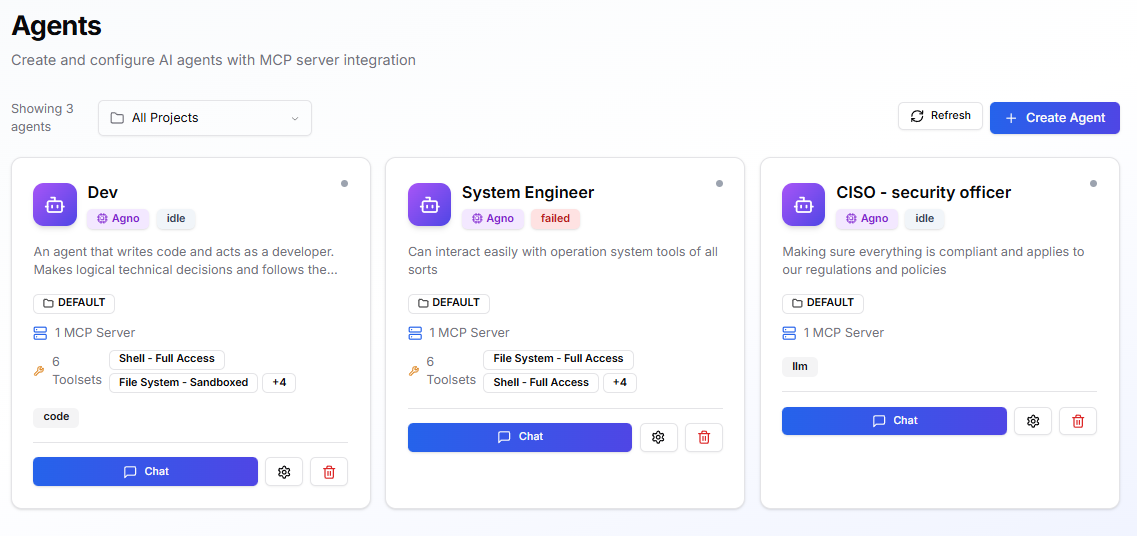
Agents are **configuration entities** that define reusable AI-powered automation capabilities. Rather than running as standalone services, agents are executed by **[workers](/core-concepts/execution-infrastructure/workers)** connected to **[task queues](/core-concepts/execution-infrastructure/task-queues)**, enabling durable execution across diverse compute environments.
Each agent configuration specifies:
* **Runtime** - The execution engine (e.g., [Claude Code](/core-concepts/runtimes/claude-code-runtime) for coding tasks, [Agno](/core-concepts/runtimes/agno-runtime) for multi-model flexibility)
* **Model** - The LLM powering the agent's reasoning
* **Skills** - Capabilities for system operations (shell, file ops, Docker, Python)
* **Environment** - Runtime configuration, secrets, and policies inherited from attached environments
**Primary way to consume agents**: Use the [Meta Agent](/core-concepts/meta-agent) to execute agents via natural language. The Meta Agent's [task management tools](/core-concepts/meta-agent/tools/task-management) create **durable tasks** that are routed to appropriate workers, tracked through completion, and can span multiple compute environments.
 ## How Agent Execution Works
```mermaid theme={null}
sequenceDiagram
participant User
participant MetaAgent as Meta Agent
participant TaskQueue as Task Queue
participant Worker
participant Agent as Agent (Claude Code)
User->>MetaAgent: "Execute DevOps agent to check K8s"
MetaAgent->>TaskQueue: Create durable task
Note over TaskQueue: Task persisted & tracked
TaskQueue->>Worker: Route to available worker
Worker->>Agent: Execute with Claude Code runtime
Agent->>Agent: Run tools (Bash, kubectl, etc.)
Agent-->>Worker: Results & artifacts
Worker-->>TaskQueue: Task completed
TaskQueue-->>MetaAgent: Stream results
MetaAgent-->>User: Display output
```
**Key characteristics:**
* **Durable execution** - Tasks persist through worker restarts and network interruptions
* **Environment-agnostic** - Same agent config can run on different workers (dev, staging, prod)
* **Real-time streaming** - See agent reasoning and tool calls as they happen
* **Trackable** - Every execution gets an ID for monitoring and audit
**When to create custom agents**: Most users interact with Kubiya through the [Meta Agent](/core-concepts/meta-agent), which handles general orchestration. Create custom agents only when you need specialized, reusable automation for a specific domain (DevOps, Security, FinOps, etc.).
### Example Use Cases
| Agent | Runtime | Description |
| --------------------- | ----------- | -------------------------------------------------------------------- |
| **DevOps Engineer** | Claude Code | Checks system health, manages deployments, writes automation scripts |
| **Security Engineer** | Claude Code | Performs CVE scans, security audits, compliance checks |
| **SRE Helper** | Claude Code | Diagnoses incidents using logs, metrics, and runbooks |
| **Cost Auditor** | Agno | Reviews cloud spending and raises cost alerts |
Agents are reusable, can be shared across teams and workflows, and automatically inherit configuration from the Environments they run in.
## **When to Use an Agent**
Create an agent when you need:
* **Specialized domain expertise** beyond general Meta Agent capabilities
* **Reusable operational capability** that runs repeatedly (deployments, audits, compliance checks)
* **Custom automation** invoked by other systems, Teams, or workflows
* **Specific model or capability configuration** different from defaults
For general exploration and task execution, use the [Meta Agent](/core-concepts/meta-agent) instead. It provides access to all platform capabilities without custom configuration.
## **Prerequisites**
Before creating an agent, ensure:
* At least one **Environment** is in **Ready** state
* A **Task Queue** with at least one connected worker is attached to that Environment
* Any required **secrets** or **integration credentials** exist (prefer storing them at the Environment level)
## **Built-in Cognitive Capabilities**
**Every agent automatically inherits cognitive memory capabilities.** No configuration required.
All agents can store context, recall relevant information, and share knowledge across your organization through Kubiya's Cognitive Memory system.
### **Automatic Skills**
Agents inherit these cognitive memory operations by default:
* **`store_memory(content, metadata)`** - Store context, findings, solutions
* **`recall_memory(query, limit)`** - Semantic search across stored memories
* **`list_memories()`** - List all stored memories for current context
* **`get_dataset_info()`** - Get information about current dataset
These skills are always available—agents can use them without any setup.
### **Environment-Based Datasets**
**By default, agents automatically use a dataset named after their execution environment.**
| Agent Environment | Default Dataset | Scope | Shared With |
| ----------------- | --------------- | ----- | ------------------------ |
| `production` | `production` | ORG | All agents in production |
| `staging` | `staging` | ORG | All agents in staging |
| `dev` | `dev` | ORG | All agents in dev |
**Benefits:**
* **Automatic isolation** - Production agents can't access staging memories
* **Shared team context** - All agents in the same environment share knowledge
* **Zero configuration** - Works out of the box, no setup needed
* **Environment-specific learning** - Each environment builds its own knowledge base
### **Cross-Agent Memory Sharing**
Agents in the same environment share an organization-scoped dataset, enabling collective learning:
```mermaid theme={null}
sequenceDiagram
participant AgentA as Agent A
participant Dataset as production Dataset
participant AgentB as Agent B
AgentA->>Dataset: store_memory()
Note right of Dataset: Stores pod crash fix
AgentB->>Dataset: recall_memory()
Dataset-->>AgentB: Returns solution from Agent A
Note over AgentB: Applies solution successfully
```
**Key benefits:**
* Agents don't re-solve problems already handled
* Organizational knowledge compounds over time
* Audit trail shows which agent solved what
* Teams learn collectively
### **Environment Context**
Agents automatically know their execution environment through:
* **Environment variable**: `KUBIYA_ENVIRONMENT`
* **Automatic dataset selection**: Uses environment name as dataset name
* **Isolation**: Production memories ≠ staging memories
**Environment-based dataset isolation:**
```mermaid theme={null}
graph TB
subgraph Production[Production Environment]
A1[Agent A - DevOps]
A2[Agent B - SRE]
A3[Agent C - Monitoring]
ProdDataset[production Dataset - ORG Scope]
A1 --> ProdDataset
A2 --> ProdDataset
A3 --> ProdDataset
end
subgraph Staging[Staging Environment]
B1[Agent D - Test]
StagingDataset[staging Dataset - ORG Scope]
B1 --> StagingDataset
end
style ProdDataset fill:#e3f2fd,stroke:#1976d2,stroke-width:3px
style StagingDataset fill:#fff3e0,stroke:#f57c00,stroke-width:3px
style Production fill:#f5f5f5,stroke:#424242,stroke-width:2px
style Staging fill:#f5f5f5,stroke:#424242,stroke-width:2px
```
Learn more about cognitive memory capabilities in [Cognitive Memory Overview](/core-concepts/cognitive-memory/overview).
## **Key concepts & defaults**
* **Model**
The LLM the agent uses (Sonnet, Opus, GPT-4o). Higher tiers are more capable but costlier.
* **Skills**
Capabilities for local/system operations (shell, file operations, Docker, Python). Agents inherit Skills from their Environments.
* **MCP Servers**
External services and platform APIs the agent can call.
* **Environments**
Provide runtime configuration, env vars, secrets, credentials, and policies.
* **Policies (OPA)**
Attach after creation to restrict actions or access.
* **System Prompt**
Defines AI instructions. The default covers tool usage, planning, and safety. Edit only when needed.
## **Create an agent**
## How Agent Execution Works
```mermaid theme={null}
sequenceDiagram
participant User
participant MetaAgent as Meta Agent
participant TaskQueue as Task Queue
participant Worker
participant Agent as Agent (Claude Code)
User->>MetaAgent: "Execute DevOps agent to check K8s"
MetaAgent->>TaskQueue: Create durable task
Note over TaskQueue: Task persisted & tracked
TaskQueue->>Worker: Route to available worker
Worker->>Agent: Execute with Claude Code runtime
Agent->>Agent: Run tools (Bash, kubectl, etc.)
Agent-->>Worker: Results & artifacts
Worker-->>TaskQueue: Task completed
TaskQueue-->>MetaAgent: Stream results
MetaAgent-->>User: Display output
```
**Key characteristics:**
* **Durable execution** - Tasks persist through worker restarts and network interruptions
* **Environment-agnostic** - Same agent config can run on different workers (dev, staging, prod)
* **Real-time streaming** - See agent reasoning and tool calls as they happen
* **Trackable** - Every execution gets an ID for monitoring and audit
**When to create custom agents**: Most users interact with Kubiya through the [Meta Agent](/core-concepts/meta-agent), which handles general orchestration. Create custom agents only when you need specialized, reusable automation for a specific domain (DevOps, Security, FinOps, etc.).
### Example Use Cases
| Agent | Runtime | Description |
| --------------------- | ----------- | -------------------------------------------------------------------- |
| **DevOps Engineer** | Claude Code | Checks system health, manages deployments, writes automation scripts |
| **Security Engineer** | Claude Code | Performs CVE scans, security audits, compliance checks |
| **SRE Helper** | Claude Code | Diagnoses incidents using logs, metrics, and runbooks |
| **Cost Auditor** | Agno | Reviews cloud spending and raises cost alerts |
Agents are reusable, can be shared across teams and workflows, and automatically inherit configuration from the Environments they run in.
## **When to Use an Agent**
Create an agent when you need:
* **Specialized domain expertise** beyond general Meta Agent capabilities
* **Reusable operational capability** that runs repeatedly (deployments, audits, compliance checks)
* **Custom automation** invoked by other systems, Teams, or workflows
* **Specific model or capability configuration** different from defaults
For general exploration and task execution, use the [Meta Agent](/core-concepts/meta-agent) instead. It provides access to all platform capabilities without custom configuration.
## **Prerequisites**
Before creating an agent, ensure:
* At least one **Environment** is in **Ready** state
* A **Task Queue** with at least one connected worker is attached to that Environment
* Any required **secrets** or **integration credentials** exist (prefer storing them at the Environment level)
## **Built-in Cognitive Capabilities**
**Every agent automatically inherits cognitive memory capabilities.** No configuration required.
All agents can store context, recall relevant information, and share knowledge across your organization through Kubiya's Cognitive Memory system.
### **Automatic Skills**
Agents inherit these cognitive memory operations by default:
* **`store_memory(content, metadata)`** - Store context, findings, solutions
* **`recall_memory(query, limit)`** - Semantic search across stored memories
* **`list_memories()`** - List all stored memories for current context
* **`get_dataset_info()`** - Get information about current dataset
These skills are always available—agents can use them without any setup.
### **Environment-Based Datasets**
**By default, agents automatically use a dataset named after their execution environment.**
| Agent Environment | Default Dataset | Scope | Shared With |
| ----------------- | --------------- | ----- | ------------------------ |
| `production` | `production` | ORG | All agents in production |
| `staging` | `staging` | ORG | All agents in staging |
| `dev` | `dev` | ORG | All agents in dev |
**Benefits:**
* **Automatic isolation** - Production agents can't access staging memories
* **Shared team context** - All agents in the same environment share knowledge
* **Zero configuration** - Works out of the box, no setup needed
* **Environment-specific learning** - Each environment builds its own knowledge base
### **Cross-Agent Memory Sharing**
Agents in the same environment share an organization-scoped dataset, enabling collective learning:
```mermaid theme={null}
sequenceDiagram
participant AgentA as Agent A
participant Dataset as production Dataset
participant AgentB as Agent B
AgentA->>Dataset: store_memory()
Note right of Dataset: Stores pod crash fix
AgentB->>Dataset: recall_memory()
Dataset-->>AgentB: Returns solution from Agent A
Note over AgentB: Applies solution successfully
```
**Key benefits:**
* Agents don't re-solve problems already handled
* Organizational knowledge compounds over time
* Audit trail shows which agent solved what
* Teams learn collectively
### **Environment Context**
Agents automatically know their execution environment through:
* **Environment variable**: `KUBIYA_ENVIRONMENT`
* **Automatic dataset selection**: Uses environment name as dataset name
* **Isolation**: Production memories ≠ staging memories
**Environment-based dataset isolation:**
```mermaid theme={null}
graph TB
subgraph Production[Production Environment]
A1[Agent A - DevOps]
A2[Agent B - SRE]
A3[Agent C - Monitoring]
ProdDataset[production Dataset - ORG Scope]
A1 --> ProdDataset
A2 --> ProdDataset
A3 --> ProdDataset
end
subgraph Staging[Staging Environment]
B1[Agent D - Test]
StagingDataset[staging Dataset - ORG Scope]
B1 --> StagingDataset
end
style ProdDataset fill:#e3f2fd,stroke:#1976d2,stroke-width:3px
style StagingDataset fill:#fff3e0,stroke:#f57c00,stroke-width:3px
style Production fill:#f5f5f5,stroke:#424242,stroke-width:2px
style Staging fill:#f5f5f5,stroke:#424242,stroke-width:2px
```
Learn more about cognitive memory capabilities in [Cognitive Memory Overview](/core-concepts/cognitive-memory/overview).
## **Key concepts & defaults**
* **Model**
The LLM the agent uses (Sonnet, Opus, GPT-4o). Higher tiers are more capable but costlier.
* **Skills**
Capabilities for local/system operations (shell, file operations, Docker, Python). Agents inherit Skills from their Environments.
* **MCP Servers**
External services and platform APIs the agent can call.
* **Environments**
Provide runtime configuration, env vars, secrets, credentials, and policies.
* **Policies (OPA)**
Attach after creation to restrict actions or access.
* **System Prompt**
Defines AI instructions. The default covers tool usage, planning, and safety. Edit only when needed.
## **Create an agent**
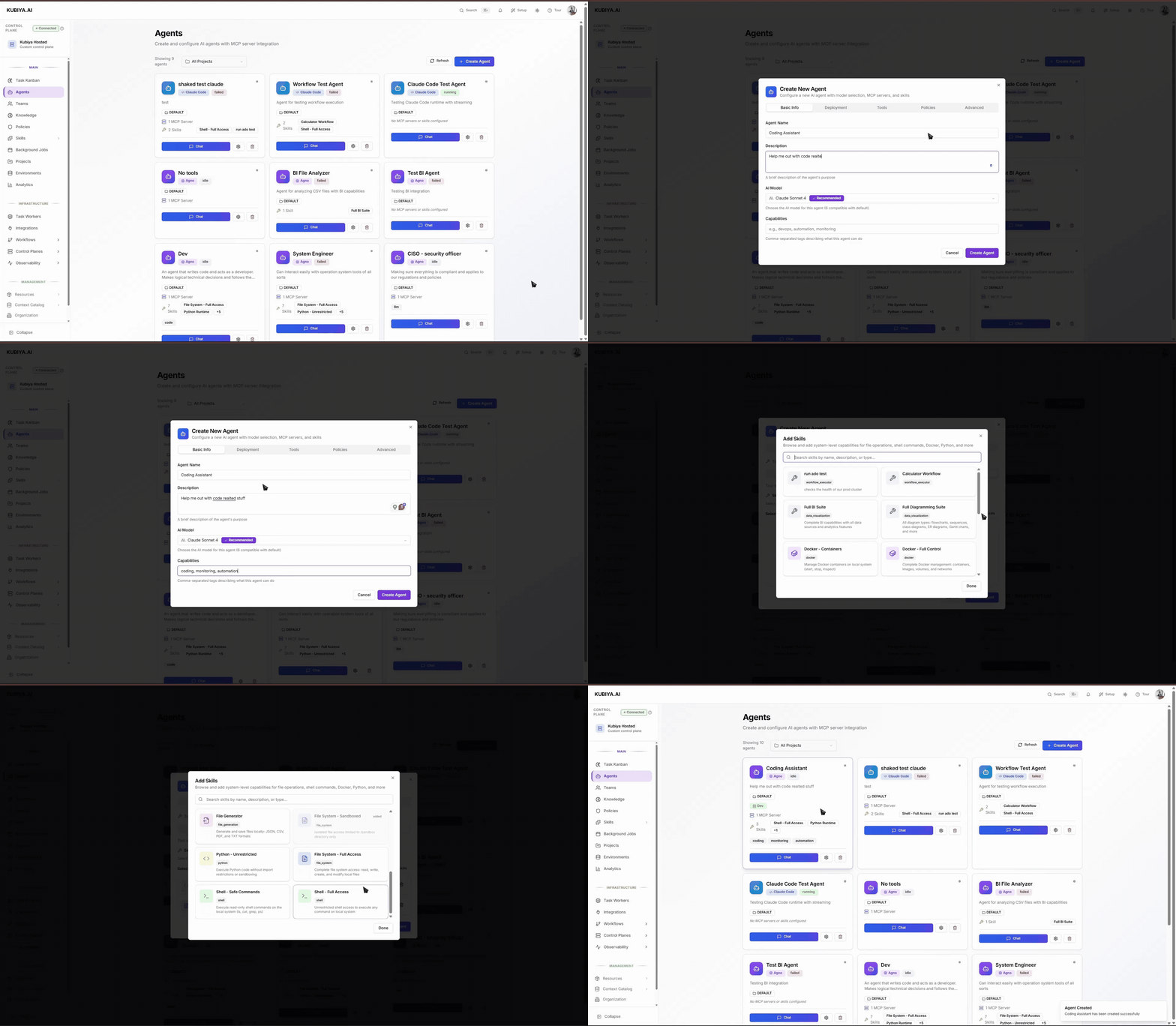 ### **1. Basic Info**
* **Agent Name**
Clear and specific: “DevOps Assistant”, “SRE Helper”, “Cost Auditor”.
* **Description**
Helps users understand the use case.
* **AI Model**
Select capability tier appropriate for the tasks.
* **Capabilities (tags)**
Optional filters such as: `devops`, `monitoring`, `cost`, `security`.
### **2. Deployment**
* **Runtime**
Choose the execution engine for your agent. [Agno](/core-concepts/runtimes/agno-runtime) for multi-model flexibility, [Claude Code](/core-concepts/runtimes/claude-code-runtime) for code-focused tasks. [Compare runtimes](/core-concepts/runtimes/comparison) to decide.
* **Environments**
Add one or more Environments (e.g., `staging`, `prod`).
The agent inherits configuration and can run where capacity exists.
Tip: If the agent should operate in multiple environments, attach both and keep environment-specific secrets and URLs at the Environment level, not the agent.
### **3. Execution Environment**
* **Environment Variables**
Non-secret configuration values.
* **Secrets**
Add only when agent-specific. Prefer keeping shared secrets on the Environment.
* **Integration Credentials**
Add credentials for external systems the agent needs to access.
### **4. Tools (Skills & MCP)**
#### **MCP Servers**
* Leave **Enable Kubiya Platform APIs** ON unless restricted by policy.
* Add custom MCP servers as needed (name, command, arguments).
#### **Skills**
* Add only the minimum Skills required.
* Remember: Skills from Environments also apply.
### **5. Policies**
After saving the agent, return to associate OPA policies that limit scope (e.g., allowed paths, allowed commands, allowed resources).
### **6. Advanced**
* **System Prompt**
A sensible default is provided. Adjust only to add specific constraints or operational guidance.
Keep it short, testable, and easy to maintain.
### **Verify & troubleshoot**
After creation, open the agent’s Chat and run a safe read-only test such as:
```bash theme={null}
List running services.
```
If a task remains **Pending**:
* Ensure the target Environment is **Ready**
* Check the Environment's Task Queue has at least one connected worker
* Verify required Skills or credentials are attached
* Review OPA policies for restrictions blocking execution
For more info on how to use the cli to manage agents go to [Agents Cli](./../cli/resources#agents)
## **Best Practices**
* Start with **least privilege**, add Skills gradually
* Store common secrets/config at the **Environment** level
* Use one agent across multiple Environments instead of cloning
* Test with simple read-only commands first
* Apply OPA policies after verifying correct behavior
## **Next Steps**
* Attach more Skills or MCP integrations
* Ensure Task Queues have active workers
* Build tasks or workflows that use this agent
* Configure policies for safe multi-environment operation
### **1. Basic Info**
* **Agent Name**
Clear and specific: “DevOps Assistant”, “SRE Helper”, “Cost Auditor”.
* **Description**
Helps users understand the use case.
* **AI Model**
Select capability tier appropriate for the tasks.
* **Capabilities (tags)**
Optional filters such as: `devops`, `monitoring`, `cost`, `security`.
### **2. Deployment**
* **Runtime**
Choose the execution engine for your agent. [Agno](/core-concepts/runtimes/agno-runtime) for multi-model flexibility, [Claude Code](/core-concepts/runtimes/claude-code-runtime) for code-focused tasks. [Compare runtimes](/core-concepts/runtimes/comparison) to decide.
* **Environments**
Add one or more Environments (e.g., `staging`, `prod`).
The agent inherits configuration and can run where capacity exists.
Tip: If the agent should operate in multiple environments, attach both and keep environment-specific secrets and URLs at the Environment level, not the agent.
### **3. Execution Environment**
* **Environment Variables**
Non-secret configuration values.
* **Secrets**
Add only when agent-specific. Prefer keeping shared secrets on the Environment.
* **Integration Credentials**
Add credentials for external systems the agent needs to access.
### **4. Tools (Skills & MCP)**
#### **MCP Servers**
* Leave **Enable Kubiya Platform APIs** ON unless restricted by policy.
* Add custom MCP servers as needed (name, command, arguments).
#### **Skills**
* Add only the minimum Skills required.
* Remember: Skills from Environments also apply.
### **5. Policies**
After saving the agent, return to associate OPA policies that limit scope (e.g., allowed paths, allowed commands, allowed resources).
### **6. Advanced**
* **System Prompt**
A sensible default is provided. Adjust only to add specific constraints or operational guidance.
Keep it short, testable, and easy to maintain.
### **Verify & troubleshoot**
After creation, open the agent’s Chat and run a safe read-only test such as:
```bash theme={null}
List running services.
```
If a task remains **Pending**:
* Ensure the target Environment is **Ready**
* Check the Environment's Task Queue has at least one connected worker
* Verify required Skills or credentials are attached
* Review OPA policies for restrictions blocking execution
For more info on how to use the cli to manage agents go to [Agents Cli](./../cli/resources#agents)
## **Best Practices**
* Start with **least privilege**, add Skills gradually
* Store common secrets/config at the **Environment** level
* Use one agent across multiple Environments instead of cloning
* Test with simple read-only commands first
* Apply OPA policies after verifying correct behavior
## **Next Steps**
* Attach more Skills or MCP integrations
* Ensure Task Queues have active workers
* Build tasks or workflows that use this agent
* Configure policies for safe multi-environment operation